一家位于宾夕法尼亚州的虚构保险公司,积压着理赔案件,使用老旧的理赔数据库,每晚接收文件,并对个人数据有严格的规定;你在 AWS 上搭建它的系统并阅读任务简报。
免费课程 本课程附带代码压缩包
阅读约需 79 分钟,动手实验约需 55 分钟。
你的进度7 项检查中已答对 0 项
只有当预测与实测结果相符时才会填充。阅读页面不会使其变化。它保存在此浏览器中。
成为前沿部署工程师:为真实客户交付 AI。第 1 部分,工作与客户。
下载本课程的代码: lesson-1.3.zip。其中包含
START-HERE.md
每个步骤及其预期输出、实验文件夹(Terraform 模块、Makefile、辅助脚本以及服务器自身的程序,包括数据生成器)、图表,以及本课程的 PDF 版本。
每位前沿部署工程师都记得与一位新客户共度的第一个早晨。你读过一份两页的简报,你有一个可以联系的联系人,并且你获得了对其他人花了三十年建成的系统的只读访问权限。本课程就是为你将在整个课程中合作的客户——Bramfield Mutual 保险公司——重现那个早晨。首先你阅读它的简报:这家公司是谁,它想要什么,它在什么规则下运作,以及谁是负责人。然后你用一条命令在你自己的 AWS 账户中亲手搭建它的系统。接着,你像在真实的第一天那样,以只读权限四处查看,并记录下你的发现。本课程以对理赔数据库的一次真实查询、所有正在运行内容的每小时成本,以及一个证明什么都没留下的资源清理作为结尾。
Bramfield Mutual 是虚构的。 它并不存在,与任何真实公司的相似之处纯属巧合。其系统中的每条记录、每个理赔、每条备注、每个名字和每个数字,都是合成的,由课程自带的生成器生成,
gen.py
,你可以在本课程末尾阅读它的内容。
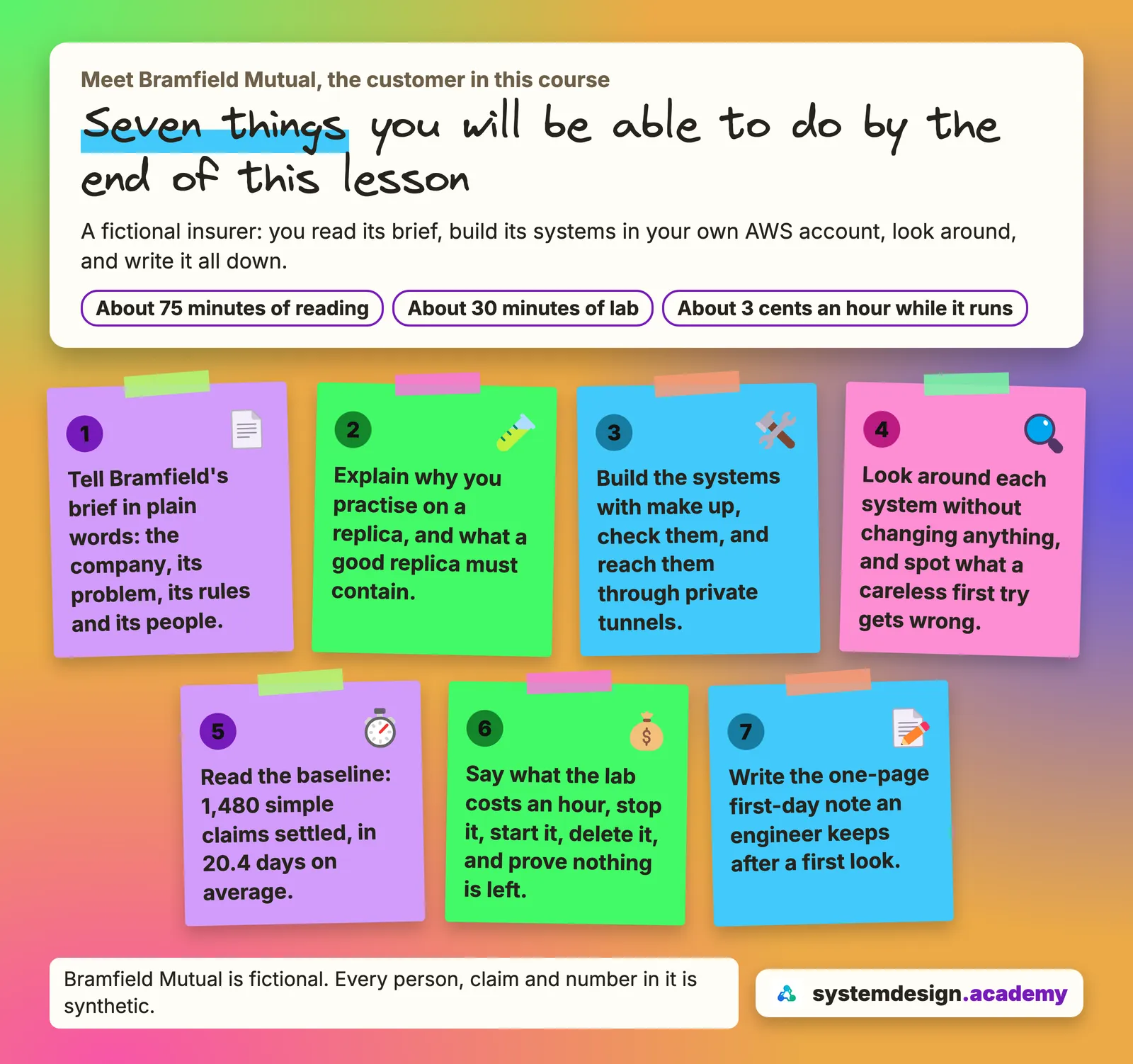
完成本课程后,你将能够:
- 用平实的语言讲述 Bramfield 的简报:这家公司、它带来的问题、它遵循的规则,以及你将要打交道的人;
- 解释为什么前沿部署工程师要在客户系统的副本上进行练习,以及一个好的副本必须包含什么;
- 用 make up 在你自己的 AWS 账户中搭建 Bramfield 的系统,用 make check 检查它们,并用 make tunnel 通过私有隧道访问它们;
- 以只读权限查看每个系统,并说出一次草率的首个查询、一个草率的加载器或一个草率的解析器会在每个系统中出错的地方;
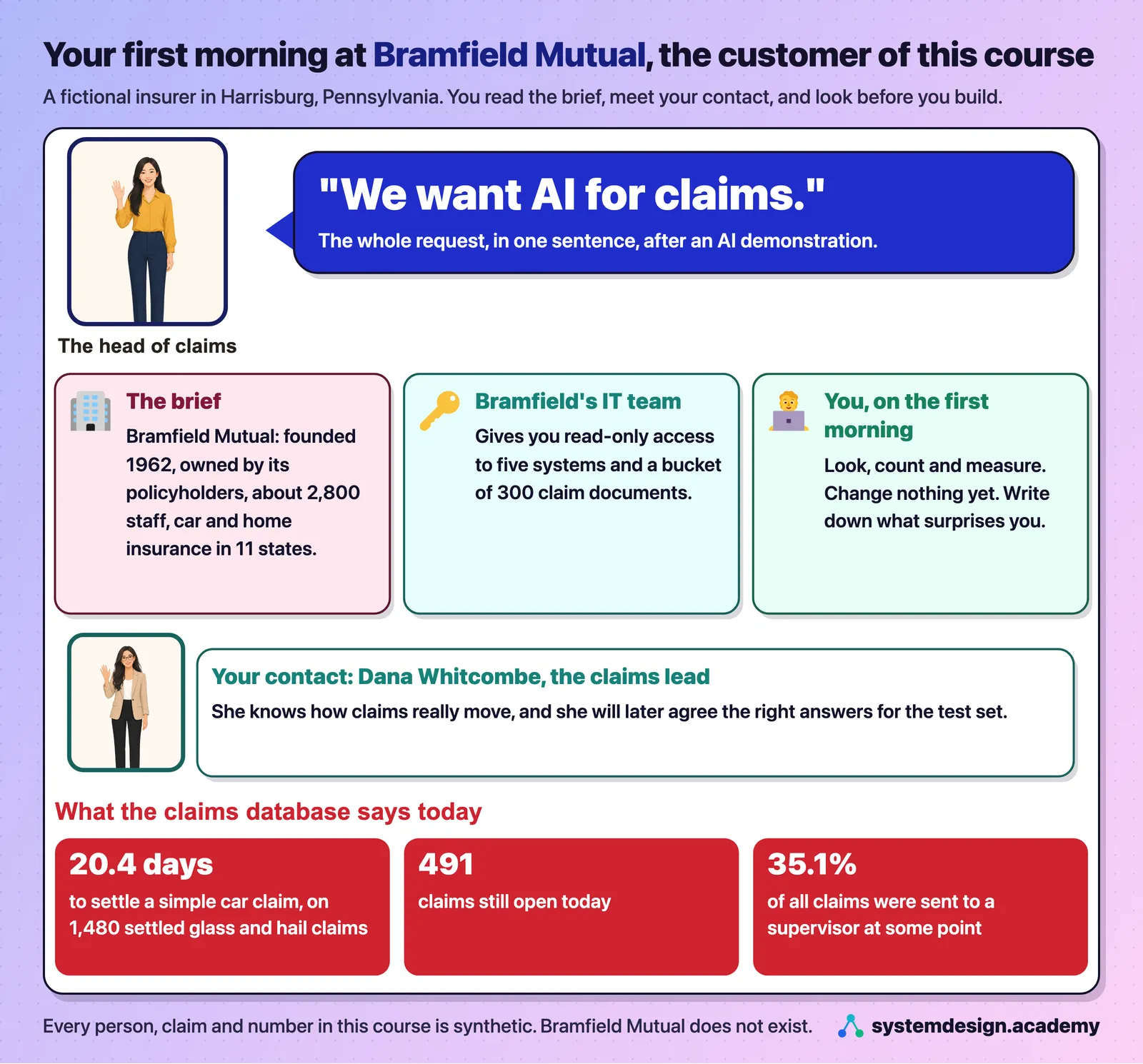
- 阅读试点将要对照的基准:1,480 个简单理赔已结案,平均用时 20.4 天;
- 说明这个实验每小时花费多少,停止并启动它,删除全部内容,并证明什么都没有留下;
- 写一篇前沿部署工程师在初次查看后保留的简短首日笔记。
时间: 阅读约 75 分钟,加上实验本身约 30 分钟,其中约 4 分钟是等待构建完成。
费用: 实验运行期间每小时约 $0.0302,即每小时约 3 美分,价格由实验自身的
make cost
命令根据 AWS 价格表计算,精确对应我们这次运行所创建的资源。这是一个价格,而不是账单:AWS Cost Explorer(显示你实际被扣费金额的账单页面)在我们撰写本课时时尚未显示本次会话的数据。停止期间,其磁盘每天约 5 美分。删除之后,则为零。我们整个记录在案的会话,从
make up
到
make destroy
,服务器运行了大约八分钟,按该价格计算远不足一美分。
日期和时间: 本课中的所有时间均为 UTC(世界标准时钟),日期为 2026 年 11 月 13 日。当天早上 07:44 UTC 开始的首次测试构建发现了本课末尾“深入探讨”中描述的四个问题。我们修复了这些问题,删除了那次构建,并从头重新构建了修正后的实验。本课展示的正是第二次构建。我们在约 07:57:30 输入了
make up
,Terraform 在 07:58:50 前创建了所有资源,服务器在 08:01:40 前构建好了 Bramfield 的数据。我们在 08:02 到 08:03 之间进行了查看,约 08:03:30 停止了服务器,08:10:56 再次启动(EC2 报告的启动时间),约 08:12:40 发现它已重新就绪,
make destroy
并在 08:14:15 前删除了所有内容。
问题所在:你无法在一家真实的保险公司身上学习这份工作
前沿部署工程师深入某一位客户的世界中工作,直到软件真正完成客户需要的工作。课程“前沿部署工程师做什么”展示了招聘该职位的公司是如何描述它的。这份工作的难点很少在于模型本身,而在于客户的旧系统、规则和人员,而这些都无法通过使用干净数据的教程学到。
因此,对于任何想学习这份工作的人来说,都存在一个现实的困难。没有保险公司会让学生只读访问其理赔数据库,其中充满了真实人物的姓名、电话号码、伤情和付款信息。即使有一家愿意,你也无法在上面练习。你无法对其保单服务运行一个粗心的加载器来观察会发生什么,无法在某个晚上结束时删除所有内容,也无法在第二天早上把它原样重建。
本课的术语
这几个词在本课中反复出现。每一个都有一个日常的类比可以帮助理解。本课末尾的表格解释了 AWS 和数据库相关的术语。
| 术语 | 通俗含义 | 日常类比 |
|---|---|---|
| 副本 | 客户系统的复制品,由代码构建并填充虚构的记录 | 一台飞行模拟器:它的行为和真飞机一样,坠毁也毫无损失 |
| 种子 | 生成器所有随机选择背后的固定起始数字 | 每次都以同样的方式洗一副牌,所以出来的牌总是相同 |
| 基线 | 在你做任何改动之前测得的当前数字 | 减肥前先称体重,这样之后才能展示变化 |
| 只读访问 | 你可以查看数据,但你发送的任何内容都不能改变它 | 参观博物馆:你可以看每一幅画,但不能碰任何一幅 |
| 隧道 | 从你计算机上的一个端口到服务器上一个端口的私有连接 | 一条从停车场直通某个房间的员工通道,没有正门 |
| 速率限制 | 服务在一秒内最多接受的请求数 | 一个每秒只放行十人的旋转门,无论队伍多长 |
| 首日笔记 | 一页纸,记录你看到了什么、该问谁、什么让你意外 | 护士在换班结束时写的交接笔记 |
为什么你要亲手构建客户的系统
核心思想: 你是在客户系统的一个副本上学习这份工作的,你可以随意破坏、重建它,并与已知答案进行核对。
想想飞行员是如何学习的。没有人会在第一天就把一架满载乘客的飞机交给新飞行员。他们在飞行模拟器中学习,在那里犯错毫无代价,同一场风暴可以反复重演,而且教练确切知道应该发生什么。前沿部署工程师也需要同样的东西。
本课程给出的答案是副本:客户系统的一个副本,它的行为和真实系统一样,用代码在你自己的 AWS 账户中构建,并填充虚构的记录。一个好的副本能给你三样真实访问权限永远给不了的东西:
- 你可以安全地犯每一个错误。 你可以写出会失败的查询,一次发送四十个请求并看着服务拒绝其中十个,还可以把同一个文件加载两次来查看重复项。没有任何人的理赔被延误,也没有任何人的数据泄露。
- 你可以从同一个起点重新开始。 make destroy 会删除所有内容,而 make up 会用同一个种子——生成器所有随机选择所用的固定起始数字——重新构建相同的系统,因此你会得到同样的 6,000 条理赔以及其中同样的混乱。正是这一点让本课程的每一课都能展示真实的输出,供你与自己的结果进行比较。
- 答案是已知的。 生成器故意埋入问题,并在一份数据库永远看不到的答案密钥中记录下它把问题放在了哪里。后面的课程会用这份密钥来检查你的 AI Agent 是否找到了保障范围之外的理赔、欺诈信号和隐藏指令。真实数据永远不会附带答案密钥。
副本只有在逼真的情况下才有用。一家老保险公司的系统并不干净,所以这个副本也不干净。它的数据库仍然保留着大型机的习惯——保险公司运行了几十年的大型中央计算机,Bramfield 直到 2012 年还在使用。它的保单服务使用 SOAP,这是一种程序之间相互调用的方式,起源于 2000 年代初,每条消息都用 XML 编写——XML 是一种文本格式,把每个值包裹在命名标签中。该服务会拒绝调用过快的调用方。它的业务合作伙伴每晚向服务器投放文件,格式各不相同。这种混乱正是重点所在,因为发现并处理这些混乱占了大部分工作。
注意: 一个整洁的练习副本会教给你错误的教训。如果你的测试数据只有一种日期格式、没有重复数据、也没有缓慢的服务,那么你的代码会通过所有测试,然后在客户的第一份真实文件上失败。一个有用的副本应该在真实系统混乱的相同方式上保持混乱。
你在周五运行
make destroy
,然后在周一运行
make up
。为什么你得到的是同样的 6,000 条理赔,其中包含同样的混乱内容?
显示答案
答案:B。
make up
使用相同的种子重新构建相同的系统——种子是生成器用于所有随机选择的固定起始数字——因此你得到相同的理赔和相同的植入问题。这正是让每一课都能向你展示可与自己的结果进行比较的真实输出的原因。A 和 C 是错误的,因为
make destroy
会删除磁盘和存储桶,什么都不会保留。D 是错误的,因为每条记录都是虚构的。
简介:用平实的语言介绍 Bramfield Mutual
理念: 在接触任何系统之前,先阅读简介:这家公司是谁、它要求什么、哪些规则约束着你,以及由谁做决定。
一位好医生在检查开始之前会先阅读病人的病历。病历上写着病人是谁、他们的主诉是什么,以及哪些事情不能做。客户的简介就是那份病历。这是你在第一次会议之前应该阅读的内容。所有内容都是为本课程虚构的。
公司。 Bramfield Mutual Insurance Company 成立于 1962 年,是一家互助保险公司,这意味着它由保单持有人而非股东所有。公司总部位于宾夕法尼亚州哈里斯堡,拥有约 2,800 名员工,在 11 个州销售汽车和房屋保险,其中包括加利福尼亚州。其大部分保单通过独立代理人销售——这些小型代理机构销售多家保险公司的保单。公司每年收取约 11 亿美元的保费,即客户为其保单支付的费用。它盈利,但它很慢。
它带来的问题。车险理赔的结案时间太长。理赔(claim)是客户就损失提出的赔付请求,例如挡风玻璃开裂或冰雹过后车顶凹陷;而结案(settle)一项理赔是指对它作出决定并将其关闭。Bramfield 的理赔员——负责处理理赔的工作人员——需要手工阅读冗长的理赔档案,将其与三十多年来编写的保单条款进行核对,遇到不确定的情况就把许多案件转给主管。每场冬季风暴和每个冰雹季节过后,积压案件都会增加。理赔负责人已经看过一场 AI 演示,需求只用一句话就送达了:“我们想要用于理赔的 AI。”
人物。本课程中的人物也是虚构的。实验室登录系统中的三个员工账号是合成的,其地址以
bramfield.example
结尾,这是一个专用于示例的域名:
| 人物 | 他们的职责,以及他们需要从你这里得到什么 |
|---|---|
| 理赔负责人 | 提出了“用于理赔的 AI”的需求。希望积压案件减少,并将以数字来评判工作成果。 |
| Dana Whitcombe,理赔主管 | 你的日常联系人。了解理赔的实际流转方式,之后将共同确定测试集的正确答案。登录系统中的角色:claims-lead。 |
| Marcus Oakes,理赔督导 | 接收理赔员不确定的案件。角色:claims-supervisor。 |
| Priya Haverford,理赔员 | 将使用你构建的系统的 40 名理赔员之一。角色:adjuster。 |
| IT 部门 | 负责老旧系统。向你提供只读访问权限,并决定你可以接触哪些内容。 |
| 安全与供应商风险团队 | 将你视为外部供应商。他们会发送安全问卷,而且他们有规章制度。 |
规则。Bramfield 的安全团队在第一天就给了你四条规则,课程的每一课都遵守它们:
- 客户数据保留在 AWS 的美国区域内。课程使用位于北弗吉尼亚的 us-east-1。
- 你从只读访问权限开始,更高的权限需要靠自己争取。
- 任何外部供应商都不得在生产系统上获得 shell。
- 理赔备注包含个人数据,例如姓名、电话号码和身份证件号码,因此在脱敏之前,其中任何内容都不得送达模型。
保险行业还受到关于数据安全、隐私和泄露通知的法律约束。哪些法律适用、适用于哪些数据,这本身就是前沿部署工程师的一项任务,而“安全与合规调研”会逐一阅读它们的官方文本。本课不对这些法律进行猜测。
注意:“我们想要用于理赔的 AI”是一个愿望,而不是问题。需求简报中的问题更狭窄且可衡量:简单车险理赔的结案时间太长。如果你围绕愿望开始构建,你只会做出一个演示。如果你从问题出发,你将构建出可以衡量的东西。
Bramfield 的安全团队在第一天就给了你四条规则。以下哪个请求会违反其中一条?
显示答案
答案:C。
理赔备注中包含姓名、电话号码和身份证号码,因此第四条规则规定,在完成脱敏之前,其中的任何内容都不得传给模型。A 遵循只读规则,B 遵循数据必须留在美国区域内的规则,而 D 则是只读规则所期望的你获得更多访问权限的方式。
这些系统:你将接手的内容
背景: 五套老旧系统运行在一台不接受任何外部连接的服务器上,你只能从 AWS 内部访问它。
想象一栋完全没有前门的建筑。没有人能从街上走进去。员工通过一条从停车场延伸出来的私人走廊进入各个房间,而这栋楼自己的管理员会为他们打开那条走廊。Bramfield 的服务器也是以同样的方式运作的。
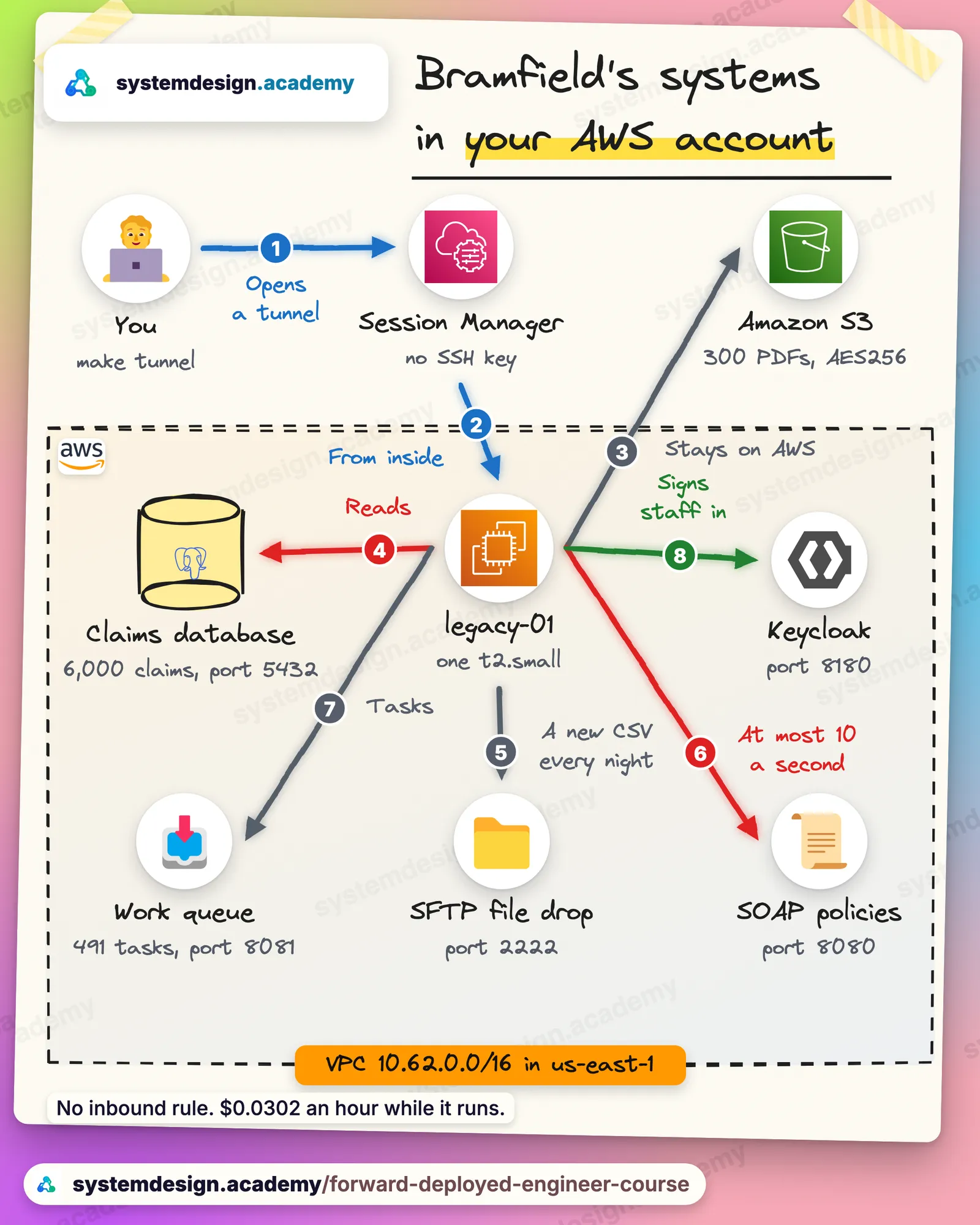
Bramfield 的 IT 团队将其老旧系统运行在一台名为
legacy-01
的服务器上。实验会在你自己的 AWS 账户中构建这台服务器及其周边的一切:
先介绍几个 AWS 术语,每个只解释一次:
- VPC,即虚拟私有云,是你在 AWS 内部的专属私有网络。Bramfield 的 VPC 使用 10.62.0.0 到 10.62.255.255 的地址段,这些地址只在其内部有效。
- 子网是该网络中较小的一部分。实验会创建一个公有子网 10.62.0.0/24,其中的机器可以访问互联网;以及两个私有子网 10.62.1.0/24 和 10.62.2.0/24,它们完全没有通往互联网的路由。目前私有子网中还没有任何东西;“无公共互联网:私有访问系统”一节会把东西移进去。
- EC2 实例是 AWS 为你运行的虚拟机,按运行时长以秒计费。legacy-01 是一台 t2.small:1 个虚拟 CPU、2 GB 内存,运行 Amazon Linux 2023,配备一块加密的 20 GB 磁盘。
- 安全组是围绕一台机器的防火墙。它列出了允许进入的连接。legacy-01 的列表是空的:无论是来自互联网还是来自其他任何地方,都不允许连接到它。
- Session Manager 是 AWS Systems Manager 的一部分,从内部访问机器。服务器上的一个小型代理与 AWS 保持一条常开的连接,AWS 通过这条连接传输你的命令并建立隧道。因此,这台服务器不需要开放任何端口,也不需要 SSH 密钥。
- S3 是 AWS 的文件存储服务。Bramfield 的理赔文档存放在那里的一个存储桶中。
- Terraform 是一种根据描述云资源的文本文件来构建云资源的工具,也可以再次删除它们。
在服务器上,Bramfield 的每套系统都运行在自己的容器中——容器是一个打包好的程序,包含它所需的一切,由运行容器的工具 Docker 启动。每套系统监听自己的端口——端口是一个数字,用来告诉服务器某个连接是发给哪个程序的,就像门牌号告诉邮递员该敲哪扇门一样:
| 系统 | 它是什么 | 服务器上的端口 |
|---|---|---|
| 理赔数据库 | PostgreSQL 16.6,即 claims 数据库,其表名和表结构沿用自 2012 年从大型机迁移时的设计 | 5432 |
| 保单服务 | 一个带 WSDL(描述其操作的文件)的老式 SOAP 服务。每页返回 100 份保单,允许每秒 10 次请求 | 8080 |
| 工作队列 | 一个小型 Web 服务,以 JSON(一种简单的数据文本格式)响应,理赔员从这里领取理赔案件 | 8081 |
| SFTP 文件投递点 | 独立代理机构的系统每天东部时间凌晨 2:00 在这里留下一个 CSV 文件(一种以逗号分隔值的纯文本表格),内容是新理赔案件 | 2222 |
| 身份提供方 | Keycloak 26.0.7,一个开源登录系统,用来代替 Bramfield 员工实际使用的系统 | 8180 |
| 生成器 | 只在首次启动时运行一次,用于生成所有合成记录 | 无 |
每个端口都只在服务器自身上监听,监听地址为
127.0.0.1
,除此之外无处监听。从你的计算机访问这些端口的唯一途径是 Session Manager 隧道,你将在第 3 步中打开它。
坦白说,为什么这台服务器有公网地址。 你可能会注意到
legacy-01
位于公有子网中,并拥有一个公网 IPv4 地址。它需要在首次启动时访问互联网,以下载 Docker 和容器镜像。为私有子网中的机器提供这种出站访问的常规方式是 NAT 网关,其费用为每小时 $0.045,比整个实验的成本还要多出一半。而公网地址的费用仅为每小时 $0.0050。由于安全组不接受任何入站连接,公网地址只允许服务器向外访问,而不允许任何东西进入。这是针对实验环境的有意节省,而“无公共互联网:私有方式访问系统”展示了真实保险公司的安全团队会要求的私有版本。
为什么选择
t2.small
.
我们构建这个实验的当天,账户在 us-east-1 区域对普通机器的限制是 1 个虚拟 CPU,
"Before you start"通过
make quota
显示了这一点。而
t2.small
恰好有 1 个虚拟 CPU。原计划中预留的是更大的
t3.large
,每小时 $0.0832,配备 2 个虚拟 CPU,但该限制不允许使用。对于六个小型容器和 6,000 条理赔案件来说,1 个虚拟 CPU 和 2 GB 内存已经足够,而且服务器的成本不到前者的三分之一。如果你的限额更高,你可以修改
instance_type
中的
terraform/variables.tf
,但本课程不需要更多资源。
注意: 公网地址并不意味着服务器对互联网开放。决定谁可以连接的是安全组,而这个安全组没有列出任何入站连接。一台机器可以有公网地址,却仍然不允许任何东西进入,就像一栋房子可以有门牌号却没有前门一样。
legacy-01
拥有一个公网 IPv4 地址。为什么互联网上没有人能连接到它的理赔数据库?
显示答案
答案:B。
有两个因素保证了数据库的私密性。安全组(即机器周围的防火墙)没有列出任何入站连接,而且每个系统都只监听服务器自身的地址,
127.0.0.1
。公网地址让服务器可以向外下载软件,但不允许任何东西进入。唯一的进入方式是 Session Manager 隧道,它从 AWS 内部发起。
动手实践,第 1 部分:构建 Bramfield 的系统
你需要什么
- "开始之前" 中的所有内容:已完成 aws configure 的 AWS CLI、Session Manager 插件、Terraform 1.6 或更新版本、Python 3.10 或更新版本、uv 和 Git,全部通过 python3 check_setup.py 检查。
- make quota 显示“足够:继续”,以及 make budget 设置的 10 美元预算警报,在任何构建开始之前完成。
- 本课顶部的 zip 文件,已解压。
准备好文件
解压
lesson-1.3.zip
,在 VS Code 中打开终端,并进入实验文件夹:
cd ~/Downloads/lesson-1.3/lab
整个课程使用同一个实验文件夹。 "开始之前" 的 zip 和本课的 zip 包含相同的
lab
文件夹。使用其中一个并一直用它,因为每个文件夹都保存着自己的 Terraform 状态:它所构建内容的记录。从一个文件夹构建,从另一个文件夹销毁,第二个文件夹中的 Terraform 对你的实验一无所知。该文件夹还附带一个
.gitignore
文件,将该状态排除在 Git 之外,因为状态以纯文本形式保存生成的密码。
| 路径 | 它是什么 |
|---|---|
| Makefile | 本课每个步骤对应的一条简短命令 |
| terraform/ | 网络、服务器、文档存储桶、服务器的角色和三个密码 |
| bin/ | Makefile 调用的辅助脚本:check.sh、tunnel.sh、leftovers.sh 和 budget.sh |
| app/ | 服务器上运行的内容:compose.yaml、数据库模式、生成器、两个小型服务和登录设置 |
| look_around.py | make look 运行的内容:它以只读访问方式读取每个系统,不写入任何内容 |
| cost.py | make cost 运行的内容:来自 AWS Price List 的今日价格 |
| check_setup.py、self-check/ | "开始之前" 中的检查 |
步骤 1:用一条命令构建一切
make up
make up
将
app/
文件夹打包为
build/app.tgz
,让 Terraform 准备就绪,并要求它构建一切。它为 Terraform 创建的每个资源打印了一行:
terraform is ready
random_id.suffix: Creation complete
random_password.pw["owner"]: Creation complete
random_password.pw["lab"]: Creation complete
random_password.pw["readonly"]: Creation complete
aws_iam_role.legacy: Creation complete
aws_ssm_parameter.pw["lab"]: Creation complete
aws_ssm_parameter.pw["readonly"]: Creation complete
aws_ssm_parameter.pw["owner"]: Creation complete
aws_iam_role_policy_attachment.ssm: Creation complete
aws_s3_bucket.docs: Creation complete
aws_iam_role_policy.legacy: Creation complete
aws_s3_bucket_public_access_block.docs: Creation complete
aws_s3_bucket_server_side_encryption_configuration.docs: Creation complete
aws_s3_object.app: Creation complete
aws_iam_instance_profile.legacy: Creation complete
aws_vpc.bramfield: Creation complete
aws_route_table.private: Creation complete
aws_internet_gateway.igw: Creation complete
aws_subnet.private[0]: Creation complete
aws_route_table.public: Creation complete
aws_security_group.legacy: Creation complete
aws_subnet.private[1]: Creation complete
aws_route_table_association.private[1]: Creation complete
aws_route_table_association.private[0]: Creation complete
aws_vpc_endpoint.s3: Creation complete
aws_subnet.public: Creation complete
aws_route_table_association.public: Creation complete
aws_instance.legacy: Creation complete
Apply complete! Resources: 28 added, 0 changed, 0 destroyed.
the server is starting. Bramfield's data takes about 8 more minutes to build: run make check
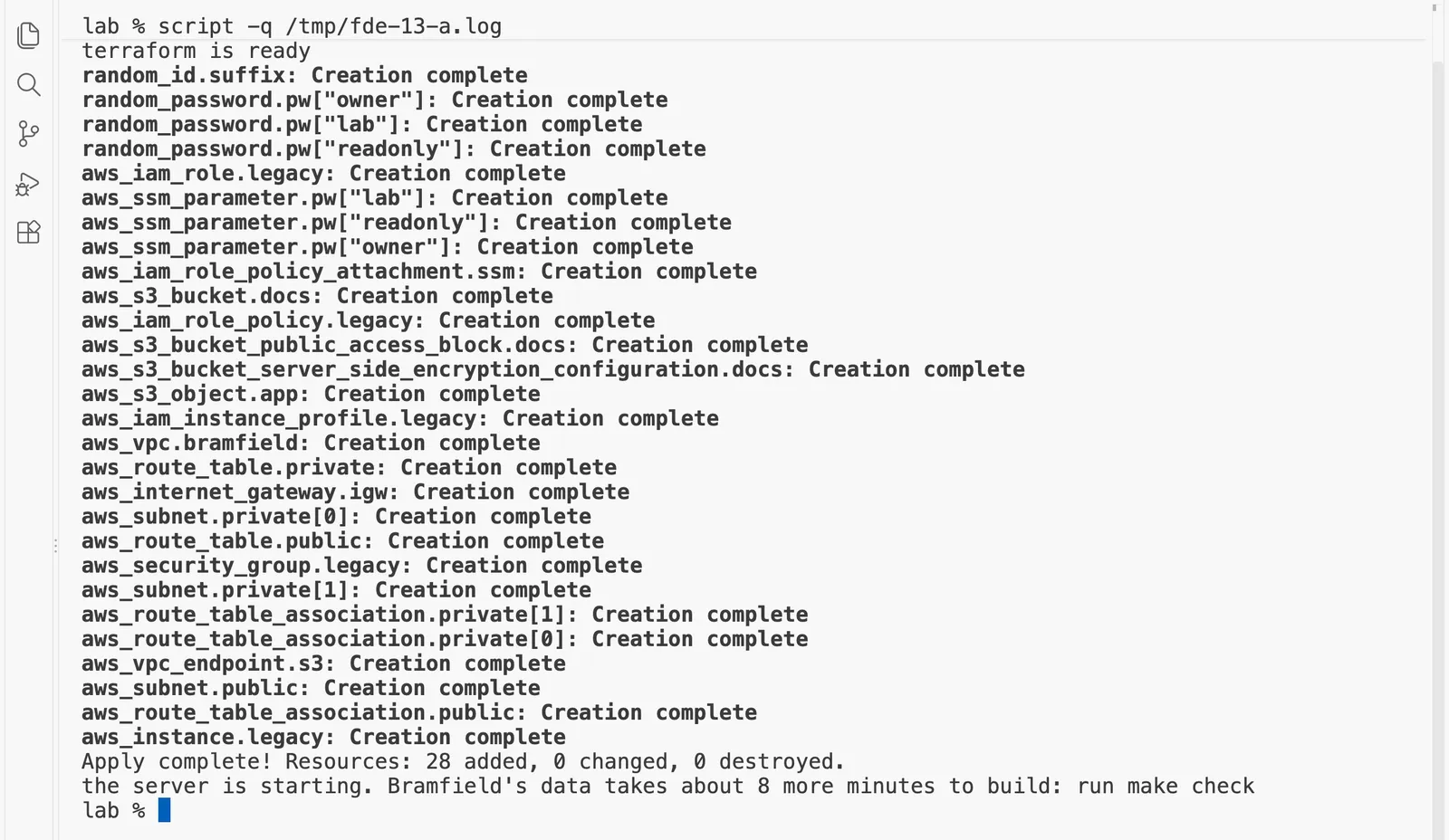
Terraform 在 07:58:50 之前打印了最后一条针对服务器的“Creation complete”行,服务器在 08:01:40 写入了它的就绪文件。
make up
的最后一行很谨慎:它说大约还需要 8 分钟,而我们的在不到 3 分钟内就准备好了。消息中的数字是为缓慢启动预留的余量,下一步中的
make check
只需等待所需的时间。
理念: Terraform 构建外部,然后服务器自己构建内部。
刚才发生了什么。 想象搬进一套新公寓。建筑工人砌好墙、装好门和锁。然后搬家卡车到达,搬运工在你不用盯着的情况下拆包并布置屋内的一切。这里 Terraform 是建筑工人,服务器自己的启动脚本就是搬运工。Terraform 创建了 28 个资源,然后服务器自己完成了其余的工作:
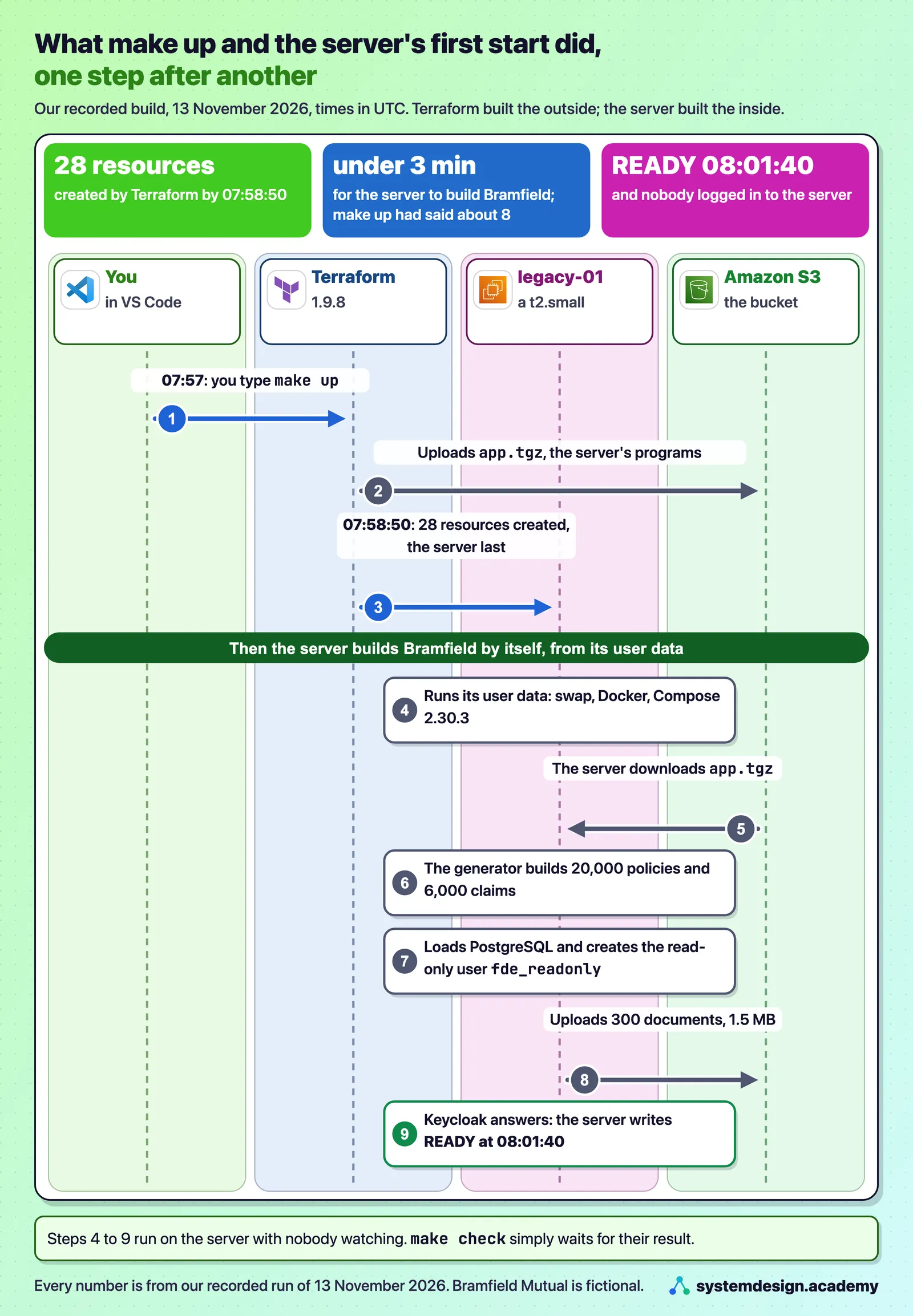
逐步执行
一步步了解构建的组成部分
按 2026 年 11 月 13 日实际发生的顺序逐步执行构建,从你输入的命令到服务器写入就绪文件。
第 1 步,共 6 步
你输入 make up,Terraform 开始构建外部环境。
make up 将 app 文件夹打包为 build/app.tgz,准备好 Terraform,并要求它构建所有内容。我们在大约 UTC 时间 07:57:30 输入了该命令。
- Terraform 将 app.tgz(服务器的程序)上传到 S3 存储桶。
第 2 步,共 6 步
Terraform 创建 28 个资源,服务器最后创建。
包括网络、空的安全组、服务器的角色、存储桶,以及保存在 SSM Parameter Store 中的三个随机密码。Terraform 在 07:58:50 之前打印了最后一条 Creation complete 行,对应的是服务器。
- 这些密码是随机的,长度为 24 个字符,你永远不需要输入或看到它们。
第 3 步,共 6 步
服务器自行运行其 user data。
当 EC2 实例首次启动时,它会运行一个称为 user data 的脚本。我们的脚本会添加 1 GB 的交换空间、安装 Docker、下载 app.tgz、将服务器命名为 legacy-01.bramfield.internal、设置两个定时器,并运行 app/bin/setup.sh。
第 4 步,共 6 步
setup.sh 运行生成器并加载数据库。
生成器一次性构建所有合成记录:20,000 份保单和 6,000 个理赔。setup.sh 启动 PostgreSQL、创建表、加载数据行,并创建只读用户 fde_readonly。
- 它还会将 300 份文档(共 1.5 MB)上传到 S3。
第 5 步,共 6 步
Keycloak 响应,服务器在 08:01:40 写入 READY。
setup.sh 启动每个服务,并等待 Keycloak 响应后才写入 /opt/bramfield/READY。make up 曾预计还需要大约 8 分钟;我们实际在不到 3 分钟内就绪,而 make check 只会一直等待,需要多久就等多久。
第 6 步,共 6 步
之后两个定时器会持续运行。
一个定时器每天晚上东部时间 2:00 向 SFTP 投递目录写入一个新文件。另一个定时器在每次启动 4 小时后停止服务器,因此你忘记的会话只会损失几小时,而不是一个月。
- Terraform 构建了外部环境。 包括网络、空的安全组、一个 IAM 角色(即服务器所携带的一组 AWS 权限,允许服务器使用 Session Manager,并只能读取自己的存储桶和自己的三个密码)、存储桶本身,以及作为加密值保存在 SSM Parameter Store(AWS 用于存储小型设置和机密的免费存储服务)中的三个密码。这些密码是随机的,长度为 24 个字符,你永远不需要输入或看到它们。
- 服务器构建了内部环境。 当 EC2 实例首次启动时,它会运行一个称为 user data 的脚本,这里是 terraform/user-data.sh.tftpl。我们的脚本会添加 1 GB 的交换空间(服务器可用作备用内存的磁盘空间)、安装 Docker、下载 app.tgz、将服务器命名为 legacy-01.bramfield.internal、设置两个定时器,然后运行 app/bin/setup.sh。
- setup.sh 构建了 Bramfield。 它运行一次生成器,启动 PostgreSQL,创建表,加载数据行,创建只读数据库用户 fde_readonly,将文档上传到 S3,启动所有服务,并等待 Keycloak 响应后才写入文件 /opt/bramfield/READY。
- 之后有两个定时器持续运行。 一个在每晚美国东部时间凌晨 2:00 向 SFTP 投递目录写入一个新文件,就像独立 Agent 的系统那样。另一个在每次启动服务器 4 小时后将其停止,这样你忘记的会话只会损失几小时,而不是一个月。预算警报只会提醒你;这个定时器会真正停止花费。
注意: 预算警报是烟雾报警器,不是喷淋系统。它在花费达到 10 美元的 50% 和 100% 时给你发邮件,但不会停止任何东西。能阻止被遗忘服务器的是 4 小时定时器,能阻止所有花费的是 make destroy。
第 2 步:等待每个系统响应
make check
waiting for Session Manager to reach i-0df366db812ac45f8 online
waiting for Bramfield's data to be built.......
Bramfield Mutual's systems on legacy-01, built 2026-11-13T08:01:40Z
  claims database (5432)       answers
  policy service, SOAP (8080)  answers
  work queue, HTTP (8081)      answers
  SFTP file drop (2222)        answers
  identity provider (8180)     answers
  nightly drops waiting:       3 files
  memory in use:               807 of 1964 MB
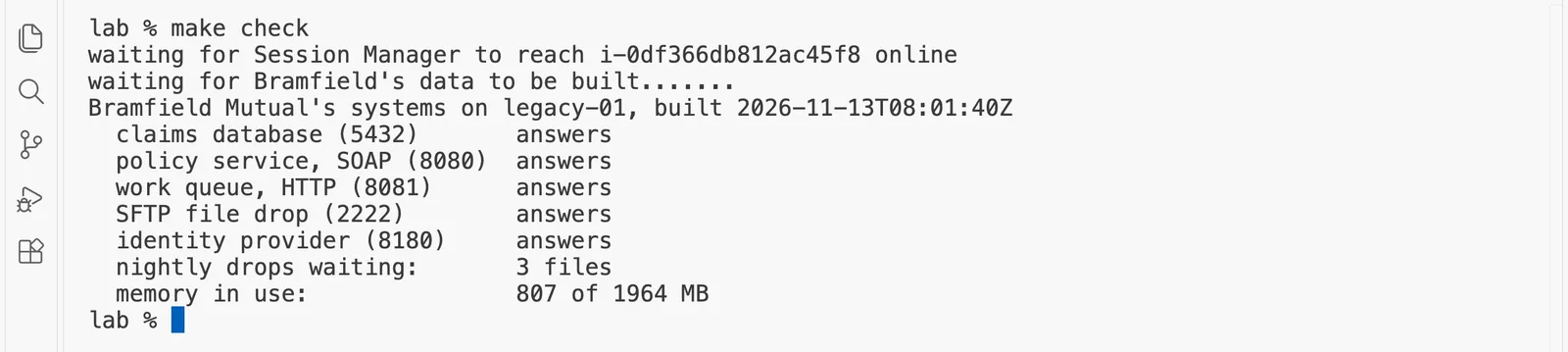
make check
先等待 Session Manager 能够连接到服务器,然后每 20 秒通过 Session Manager 请求服务器运行一次
app/bin/status.sh
。每个点代表数据仍在构建期间的一次询问。构建完成后,
status.sh
会从服务器内部检查每个系统并打印它发现的结果。每一行都必须显示
answers
。服务器在 1,964 MB 内存中只使用了 807 MB,所以六个容器还有充足的余量。
第 3 步:打开通往系统的私有隧道
make tunnel
  claims database      localhost:15432
  policy service       localhost:18080
  work queue           localhost:18081
  SFTP file drop       localhost:12222
  identity provider    localhost:18180
tunnels open. Close them with: make untunnel

这里的隧道是一条私有连接,由 Session Manager 从你自己计算机上的一个端口传送到服务器上的一个端口。
make tunnel
会在后台打开五条隧道,每个系统一条,每条都使用以 1 开头的本地端口,这样就不会与你已经在运行的数据库或 Web 服务器冲突。从现在起,
localhost:15432
在你的计算机上就是 Bramfield 的理赔数据库,而互联网上的任何东西都看不到它的任何内容。
在
make tunnel
之后,你计算机上的一个程序连接到
localhost:15432
。这个连接真正终止在哪里?
显示答案
答案:B。
隧道通过 Session Manager 把连接从你计算机的 15432 端口传送到服务器的 5432 端口,因此你无需下载任何东西就能与真正的理赔数据库对话。C 是人们最常犯的错误:隧道不会在公网地址上打开任何端口,因为它是从 AWS 内部连接到服务器的。
动手实践,第 2 部分:四处查看,就像你入职第一天那样
理念: 第一天你只读取、计数和记录,而系统本身必须拒绝其他任何操作。
新审计员在第一天上午不会动钱。他们打开账本、清点、在页边做笔记。在真正的第一天,你不改变任何东西。你观察、清点,并写下让你意外的地方。
make look PART=...
正是这样做的,一次一个系统,使用只读访问权限。它通过 Makefile 从 Parameter Store 读取密码,并且从不打印它们。请慢慢阅读每一条输出,就像阅读真实输出那样。
先预测,再测量
你用大多数人写 SQL 的方式执行了 select count(*) from CLMS_CLAIM 来统计理赔记录。你预期结果是什么?
测量结果会在你确认答案后显示。只有你的第一次作答会计入进度。
第 4 步:理赔数据库
make look PART=db
== the tables you can read, and how many rows each holds
  CLMS_ADJUSTER           44 rows
  CLMS_CLAIM           6,000 rows
  CLMS_NOTE           18,039 rows
  CLMS_STATUS_REF         11 rows

== a first query, written the way most people write SQL
  error: relation "clms_claim" does not exist
  with the name in double quotes: 6,000 claims

== the status codes: what the column holds, and which codes are retired
  CLSD  Closed                         in use   3,813
  PAID  Payment issued                 in use   1,393
  PEND  Waiting for documents          in use     134
  ASGN  Assigned to an adjuster        in use     117
  INVS  Under investigation            in use      98
  SUPV  Referred to a supervisor       in use      68
  NEW   Reported, not yet assigned     in use      35
  CL    Closed (retired 2009)          RETIRED    264
  XX    Void (retired 2014)            RETIRED     39
  OP    Open (retired 2009)            RETIRED     21
  RO    Reopened (retired 2014)        RETIRED     18

== the loss dates are text, written two ways
  YYYY-MM-DD (since 2012)   3,926   for example 2026-01-01
  MMDDYYYY (old system)     2,074   for example 01012026

== today's numbers, the baseline the pilot will be judged against
  simple claims (glass and hail) settled: 1,480, average 20.4 days from report to close
  claims still open: 491; claims ever sent to a supervisor: 35.1%

== is this account really read-only?
  error: cannot execute UPDATE in a read-only transaction
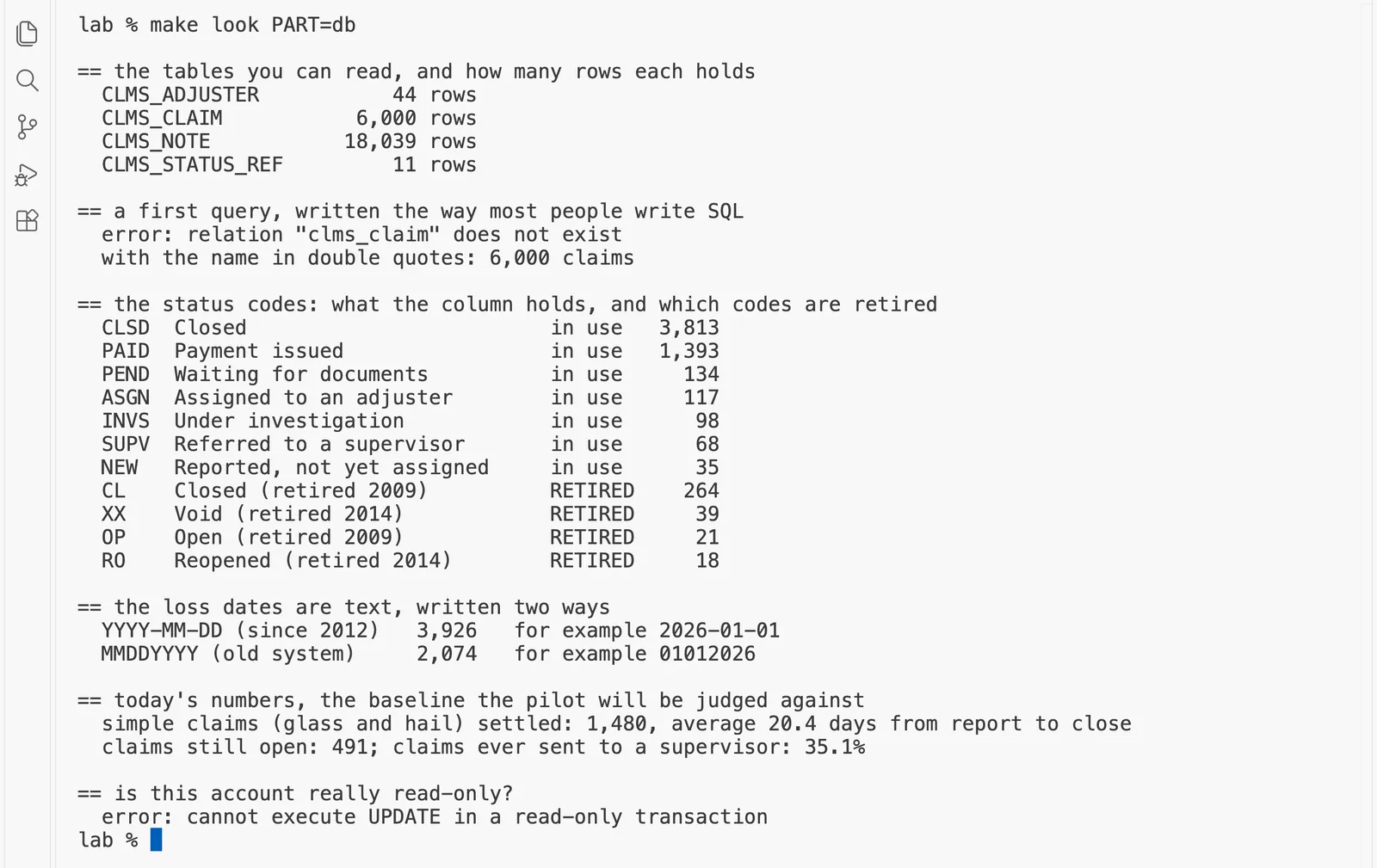
这短短六节里包含了很多内容。请逐节阅读。
失败的查询。 第一个查询是按大多数人写 SQL 的方式写的,
select count(*) from CLMS_CLAIM
,而 PostgreSQL 回答说
clms_claim
不存在。它其实存在。PostgreSQL 会把你写的任何不带双引号的名称转换为小写,所以它查找的是
clms_claim
。当 Bramfield 在 2012 年将理赔业务从大型机迁移出来时,团队保留了大写名称,并像
"CLMS_CLAIM"
这样用引号创建了表,而带引号的名称会完全保留其大小写。因此,对这个数据库的每个查询都必须把每个表名和列名放在双引号里:
select count(*) from "CLMS_CLAIM"
返回 6,000。这个习惯会让每一个你指向该数据库的工具都栽跟头,包括一个根据自然语言问题编写 SQL 的 AI Agent,直到你教会它为止。
注意: “relation does not exist”听起来像是缺少表。但这里表是存在的。这个错误意味着 PostgreSQL 查找的是小写名称,所以在你去找缺失的表之前,先检查引号。
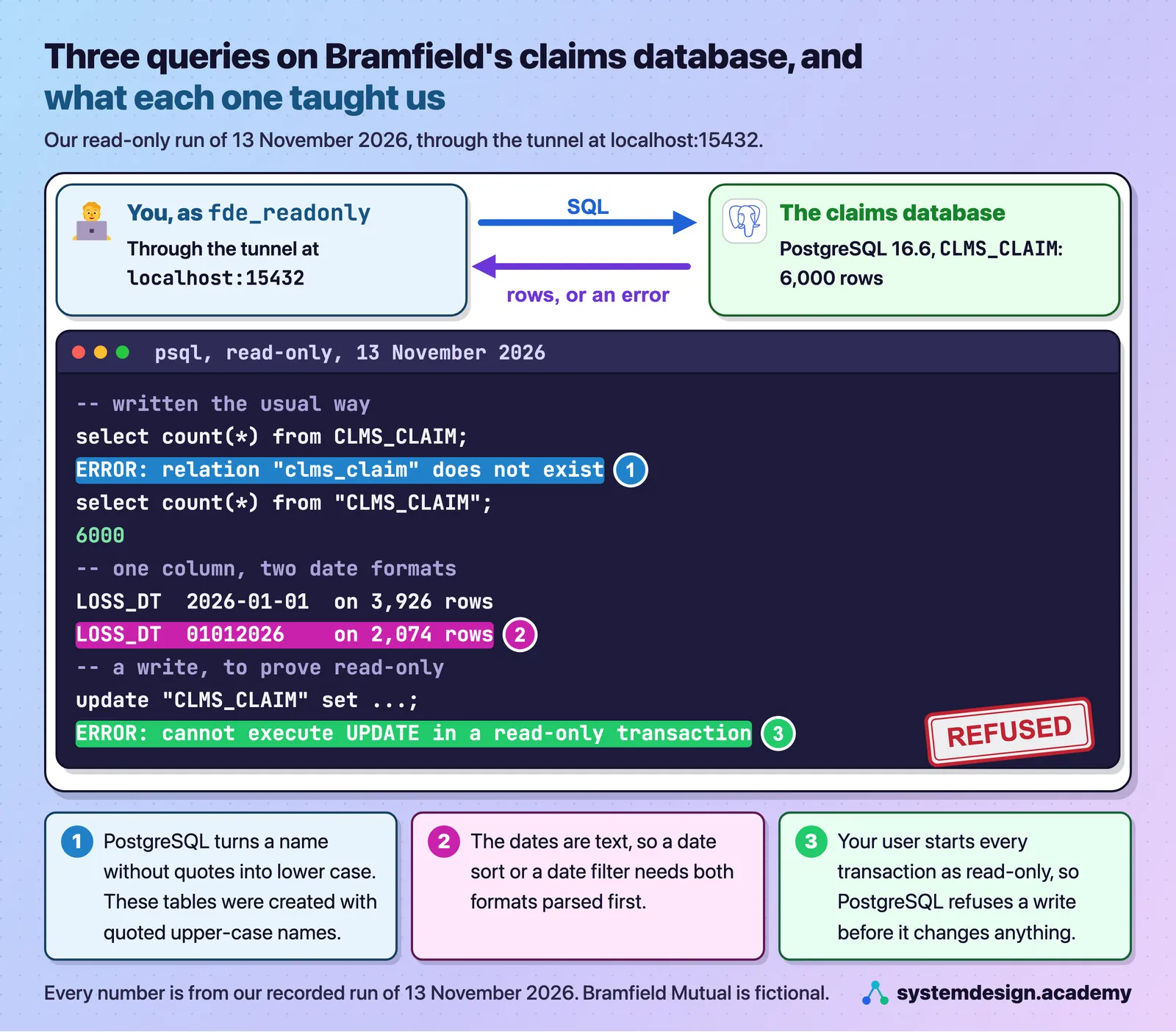
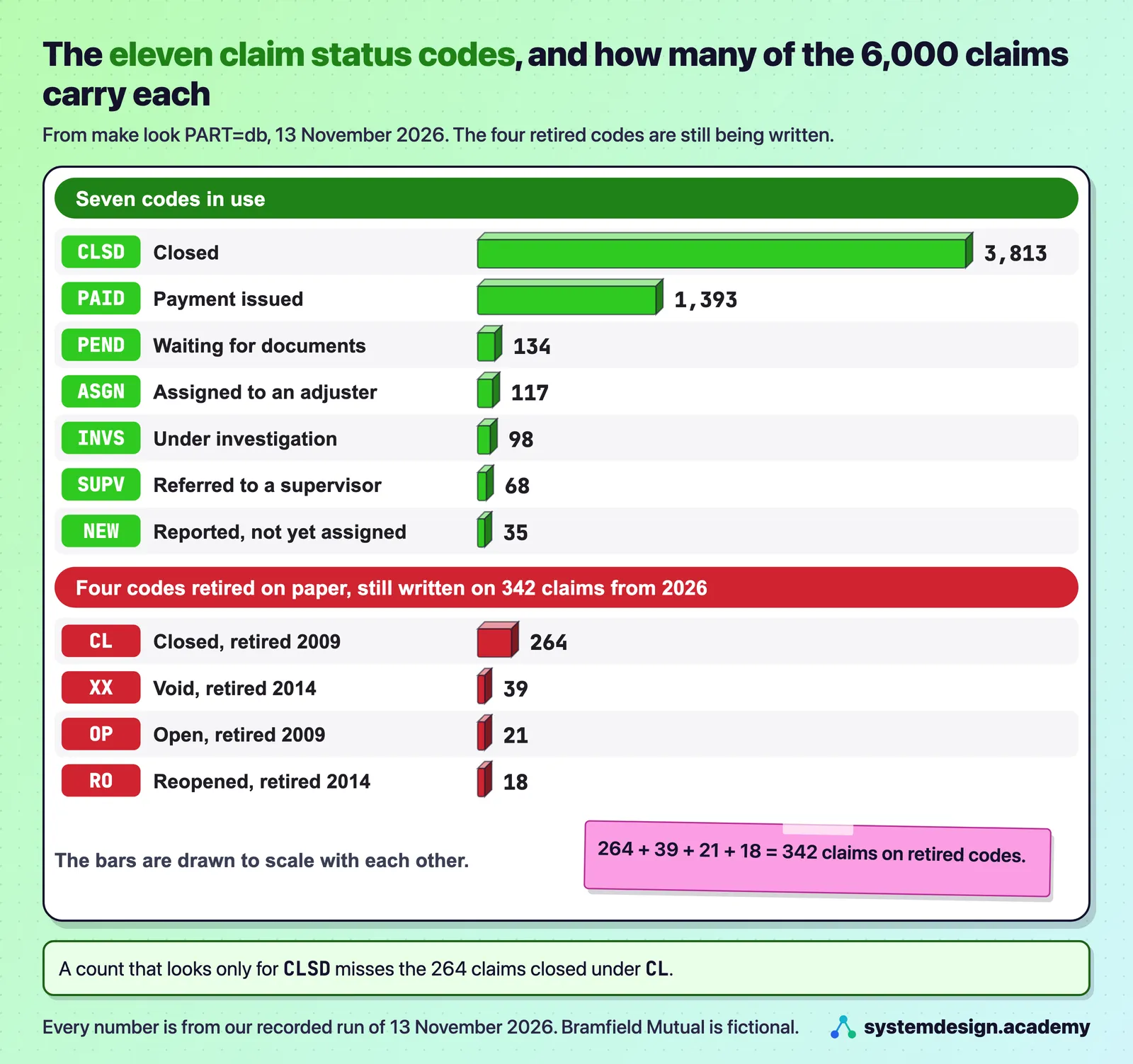
状态代码。 理赔状态列包含十一个代码。七个在使用中。四个已停用:
OP
和
CL
,即“Open”和“Closed”,于 2009 年停用;而
RO
和
XX
,即“Reopened”和“Void”,于 2014 年停用。然而它们出现在 342 行上,即 264 + 39 + 21 + 18,而且这些行是 2026 年的理赔,不是旧数据。所以这些代码在纸面上于 2009 年和 2014 年停用,但某个东西——很可能是旧的数据导入路径——至今仍在写入它们。这正是前沿部署工程师在第一天就会记下来并向理赔系统负责人询问的那类问题。在你弄清楚之前,每一次统计都存疑。如果你只查找
CLSD
来统计已关闭的理赔,你会漏掉以
CL
关闭的 264 条理赔。如果你把所有没有关闭日期的都算作未关闭理赔,那么 21 行
OP
和 18 行
RO
也会被计入,而且目前还没有人能告诉你是否有人在处理它们。
一个实例:粗心的统计偏差有多大。 以已关闭的理赔为例,一步步来看。
- 只查找代码 CLSD 的统计会得到 3,813 条理赔。
- 已停用的代码 CL 也表示“Closed”,它出现在 264 条理赔上。
- 如果 CL 今天仍然表示已关闭,那么已关闭的理赔为 3,813 + 264 = 4,077 条。
- 所以粗心的统计少了 264 条理赔,即 4,077 条中的 264 条,约占所有已关闭理赔的 6.5%。
这个差距大到足以改变一份提交给高管的报告,而查询中没有任何东西就此向你发出警告。
CL
是否真的仍然表示已关闭,正是你要记下来向理赔系统负责人提出的问题。
注意: 在没有先列出该列中实际存在的每一个代码之前,绝不要按单一状态码进行计数。一个只匹配 CLSD 的计数可以不报任何错误地运行,但结果仍然是错的。
日期问题。 事故或风暴发生的日期,即损失日期,是以文本而非日期格式存储的,共有两种格式。3,926 行使用
YYYY-MM-DD
,例如
2026-01-01
,另有 2,074 行使用大型机的
MMDDYYYY
,例如
01012026
。文本按字符排序,所以
01012026
会排在
2025-12-31
之前,而像“损失日期在 6 月 1 日之后”这样的筛选条件会悄悄给出错误的答案。再仔细看看示例:标签写着“旧系统”,但
01012026
是 2026 年 1 月 1 日,距离系统迁移已经过去了十四年。所以今天仍有东西在写入旧格式。你还不知道是什么,而这正是你应该记录下来并向 Dana 请教的那类问题。
有人请求获取所有损失日期在 2026 年 6 月 1 日之后的理赔,并直接把筛选条件应用在文本列上。为什么答案可能出错却没有任何报错?
显示答案
答案:C。
文本按字符逐个排序,所以
01012026
(即 2026 年 1 月 1 日)会排在
2025-12-31
之前。由于 3,926 行是一种格式、2,074 行是另一种格式,对文本列应用筛选条件会悄悄给出错误的答案且不报任何错误。必须先把两种格式都转换成真正的日期,这正是基线查询在做减法之前所做的事情。
基线。 基线是在你做任何改动之前测得的当前数值,以便之后展示发生了什么变化。本课程构建的试点将以简单理赔(玻璃和冰雹)为评判标准,数据库显示其中 1,480 件已结案,从报案到结案平均耗时 20.4 天。还有两个相关数字:491 件理赔仍未结案,35.1% 的理赔曾在某个时点被提交给主管。要诚实地说明这些计数的含义,因为定义还很宽松。491 件“未结案”是指没有结案日期的理赔,其中包括已停用代码上的 21 行
OP
和 18 行
RO
。1,480 件“已结案”是指有结案日期的玻璃和冰雹理赔,其中包括在已停用代码
CL
和
XX
下结案的行。在任何人向 Bramfield 的高管引用这些数字之前,课程的探索课程会与 Dana 一起收紧每一个定义。这些是生成器虚构的业务,但测量是真实的:在真实数据库上运行的真实 SQL,会在做减法之前先把两种日期格式都转换掉。
"Turning a wish into a number you can measure"会正确地构建这一测量,并追问这些数字分别让 Bramfield 花费了多少美元。
只读权限,已验证。 最后一个测试尝试修改某条理赔的状态,PostgreSQL 拒绝了:
cannot execute UPDATE in a read-only transaction
。用户
fde_readonly
只有读取权限。尽早验证这一点是个好习惯,因为当你第一次让 AI Agent 访问客户的数据库时,你希望由数据库本身、而不是你自己的谨慎,来保证不会写入任何数据。
你知道自己会小心,绝不会亲手输入 UPDATE。为什么仍然值得在第一天就证明数据库会拒绝一条 UPDATE?
显示答案
答案:A。
第一次让 Agent 访问客户数据库时,你希望由数据库本身、而不是你自己的谨慎,来保证不会写入任何内容。尽早证明这一点——用一次在改变任何东西之前就被拒绝的写入——把“我会小心”变成证据。本部分的后续课程还会更进一步,尝试另一种写入。
先预测,再测量
策略服务允许每秒 10 个请求。你在同一时刻发送 40 个。你预计它会拒绝多少个?
测量结果会在你确认答案后显示。只有你的第一次作答会计入进度。
第 5 步:策略服务
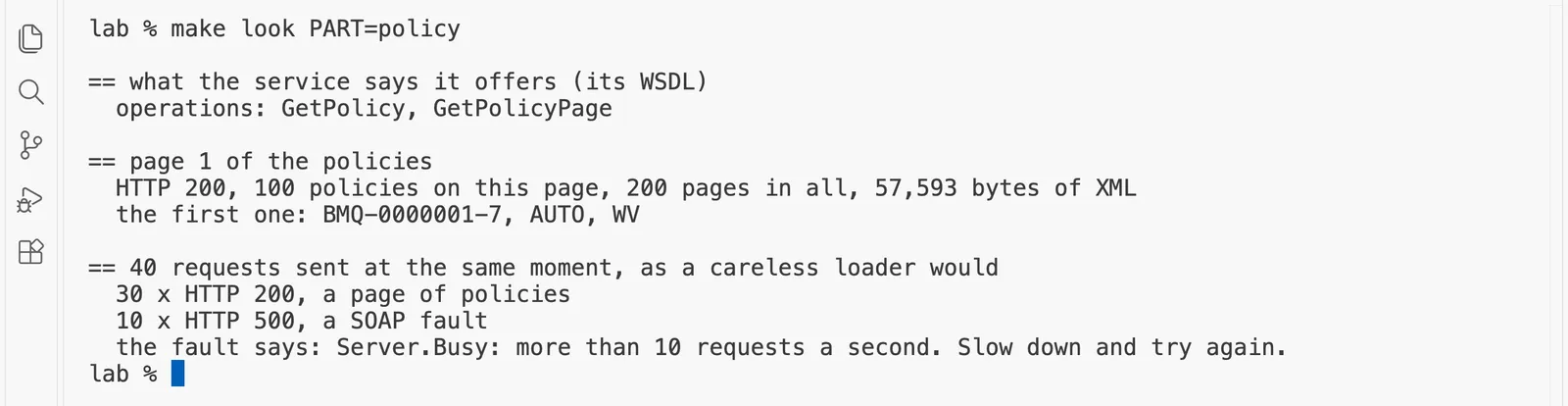
make look PART=policy
== what the service says it offers (its WSDL)
  operations: GetPolicy, GetPolicyPage

== page 1 of the policies
  HTTP 200, 100 policies on this page, 200 pages in all, 57,593 bytes of XML
  the first one: BMQ-0000001-7, AUTO, WV

== 40 requests sent at the same moment, as a careless loader would
  30 x HTTP 200, a page of policies
  10 x HTTP 500, a SOAP fault
  the fault says: Server.Busy: more than 10 requests a second. Slow down and try again.
思路: 策略服务用服务器错误表示“你访问太快了”,所以你的代码必须放慢速度并重试同一页,绝不能跳过。
它提供什么。 一个 SOAP 服务通过 WSDL(Web Services Description Language 文件)描述自己,文件位于
/PolicyService?wsdl
。Bramfield 的 WSDL 列出了两个操作:
GetPolicy
,按编号获取一个策略,以及
GetPolicyPage
,获取一页策略。每个请求和每个响应都是 XML。第一页包含 100 个策略,共 57,593 字节,共有 200 页,所以全部 20,000 个策略约为 11.5 MB 的 XML。没有办法询问“自昨天以来有什么变化”。要了解这些策略,你必须读取全部 200 页。
速率限制。 该服务对所有调用者合计允许每秒 10 个请求。
look_around.py
在同一时刻发送了 40 个请求,就像一个有 40 个线程的粗心加载器那样,其中 10 个返回了 HTTP 500 和 SOAP fault,
Server.Busy
.
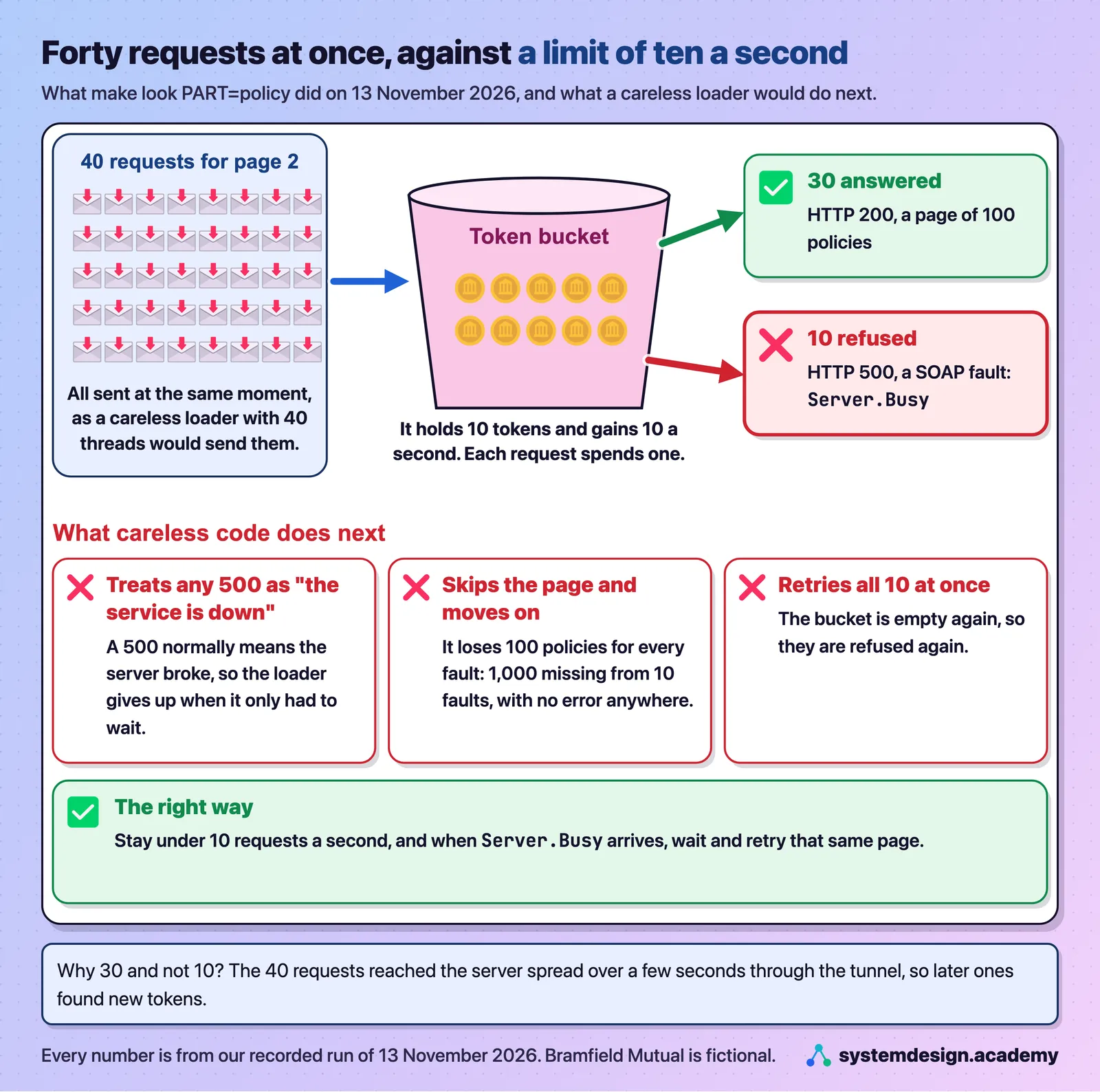
为什么是 30 而不是 10?想象停车场里一台最多容纳十张票、每秒打印十张新票的取票机。每辆车取一张票,发现机器空了的车就被拒之门外。服务保留的正是这样一个令牌桶:一个最多容纳 10 个令牌、每秒增加 10 个的计数器,每个请求消耗一个令牌,发现桶空了的请求会被拒绝。这 40 个请求同时从我们的计算机发出,但它们经过 Session Manager 隧道,在几秒钟内陆续到达服务器,所以后到的请求找到了新令牌。确切的分配每次运行都不同;在我们的测试构建中,同一个测试一次得到 12 个 fault,另一次得到 7 个。
一个具体例子:逐秒观察令牌桶。 我们没有测量每个请求的到达时间,所以这是对限制的算术推演,而不是实际记录。
- 开始时桶是满的,所以最先到达的 10 个请求各取一个令牌并得到响应。
- 在接下来的一秒内,桶增加 10 个新令牌,因此最多还能响应 10 个请求。
- 再过一秒,它又增加 10 个。
- 所以如果这 40 个请求在大约两秒内陆续到达服务器,桶最多只能支付其中 10 + 10 + 10 = 30 个,另外 10 个发现桶已经空了。
这与我们运行时打印的结果一致:30 个被应答,10 个被拒绝。如果这 40 个请求在同一瞬间全部到达,那么只有前 10 个会被应答。
注意: 该服务对“过快”的请求返回的是 HTTP 500,而不是 429。把每个 500 都当作“服务已宕机”的代码会直接放弃,而记录错误后继续前进的代码则会在每次被拒绝的页面中丢失 100 份保单,且结果中不会出现任何错误。
注意粗心的加载器会搞错的两点。第一,拒绝响应是 HTTP 500——这个代码通常表示“服务器故障”,而不是现代服务在“请求过多”时发送的 HTTP 429。为看到 429 时减速而编写的代码不会把这个响应识别为“你请求太快了”。把每个 500 都当作服务中断的代码会直接放弃,或者报告服务已损坏,而实际上它只需要稍等片刻。第二,如果加载器记录错误后继续处理下一页,它会在每次故障时悄悄丢失 100 份保单。40 个请求中出现 10 次故障,意味着你的副本中会缺失 1,000 份保单,而结果中不会出现任何错误。"调用旧版 SOAP API:分页与速率限制" 以礼貌的方式读取全部 20,000 条数据,带有节奏控制、重试机制和可以恢复的游标。
加载器读取 200 页保单,记录每一次
Server.Busy
故障,然后继续处理下一页。它最终出现 10 次故障,没有崩溃。它的副本有什么问题?
显示答案
答案:C。
每页包含 100 份保单,所以每跳过一页就丢失 100 份保单,跳过 10 页就是副本中缺失 1,000 份保单。结果中没有任何提示,因为加载器在没有报错的情况下完成了运行。D 是陷阱:一次故障会拒绝整页,而不是一份保单。正确的做法是等待并重试同一页。
第 6 步:每夜文件投递
理念: 在你清点过文件中的每一种格式之前,来自他人系统的文件对其格式的判断只能算是猜测。
想象一下汇总来自四十家不同商店的收据。一家打印
$12.50
,一家打印
12.50 USD
,还有一家对更大的账单打印
1,250.00
。一个只接受纯数字的计算器会在大多数收据上出错。每夜投递的文件就是这样一堆收据。
最新的投递文件有 106 行,其金额以三种格式书写:
1,234.56
,
$1,234.56
和
1234.5 USD
。如果加载器把每个金额都传给 Python 的
float()
,106 行中会有多少行失败?
显示我们的测量结果
我们的测量结果:D。
Python 的
float()
在 106 行中有 101 行失败,因为逗号、美元符号和货币代码都会使它出错。只有以纯数字格式书写的、低于 1,000 的金额才能通过。下面的运行统计了每种格式的数量:48 行纯数字,30 行带美元符号,28 行带
USD
.
make look PART=drops
== the SFTP drop folder, as the agents' systems leave it
  agent_claims_export_20261110.csv  12,008 bytes
  agent_claims_export_20261111.csv   8,289 bytes
  agent_claims_export_20261112.csv  10,211 bytes

== the newest file, agent_claims_export_20261112.csv: its header and first three rows
  agent_code,policy_number,loss_date,reported_at,amount_claimed,description
  AG0267,BMQ-0010956-0,2026-11-09,2026-11-12T00:02:00-05:00,2020.28 USD,Scraped a pole in a parking garage
  AG0107,BMQ-0016442-5,2026-11-09,2026-11-12T00:27:00-05:00,5401.93 USD,Rear-ended at a stop light
  AG0438,BMQ-0003477-3,2026-11-06,2026-11-12T00:26:00-05:00,"$2,100.73",Cracked windshield
  106 rows, 4 of them exact duplicates; amounts written as: 1,234.56 (48), $1,234.56 (30), 1234.5 USD (28)
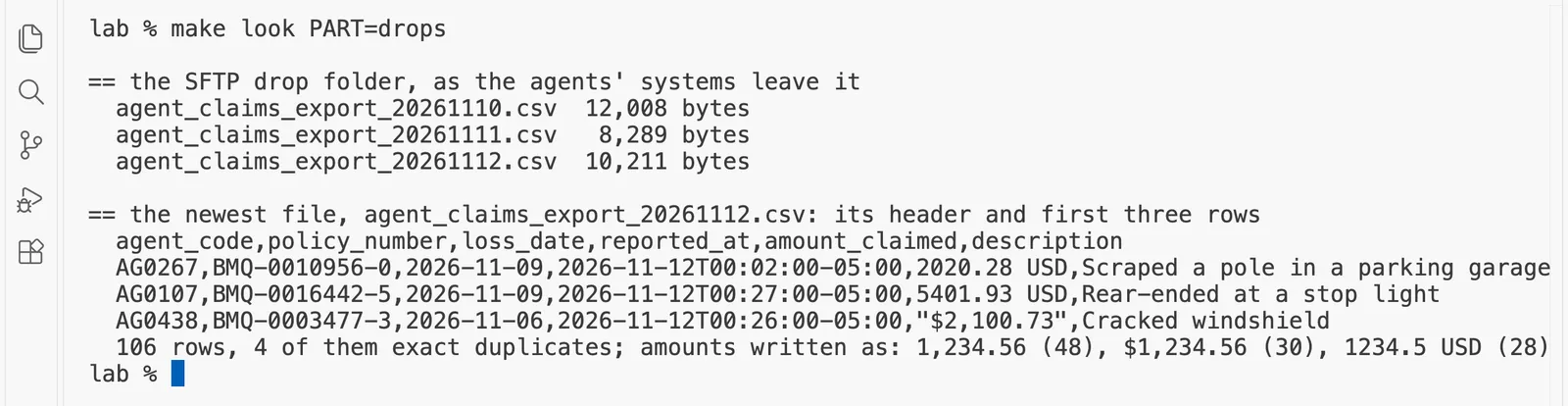
SFTP 是一种通过加密连接传输文件的方式。每天晚上,独立代理的系统都会在 Bramfield 的投放文件夹中留下一个包含新理赔的 CSV 文件,实验室保存了 2026 年 11 月 10、11 和 12 日晚上的文件。
look_around.py
以投放文件夹的用户身份登录,
agentdrop
,列出文件夹并读取最新的文件。其中有三个问题会让粗心的解析器出错:
- 金额有三种写法。 输出按模式统计每种写法的数量,以金额为 1,234.56 为例:普通格式带千位逗号,1,234.56,共 48 行;美元格式,$1,234.56,共 30 行;货币代码格式,1234.5 USD,共 28 行。上面打印的行展示了真实示例:"$2,100.73" 和 2020.28 USD。Python 的 float() 在 106 行中的 101 行上会失败,因为逗号、美元符号和货币代码都会让它出错;只有普通格式下低于 1,000 的金额能通过。粗心的加载器要么崩溃,要么更糟,加载出空白。再仔细看看 USD 格式:该导出最多写入六位有效数字,所以金额 13754.17 到达时变成了 13754.2 USD。在文件到达你手中之前,分币就已经丢失了,这是一个值得记录下来的、故意埋下的精度损失。
- 有四行是完全重复的。 当代理的系统重新发送批次的一部分时,同一理赔会到达两次。按原样加载文件,四个理赔就会被重复计算。
- 时间带有时区。 2026-11-12T00:02:00-05:00 是美国东部时间午夜过后两分钟,即 UTC 时间 05:02。一个丢弃 -05:00 的加载器会把每个理赔的时间提前五个小时,其中一些还会落到错误的日期上。
一个实操示例:正确读取一个时间戳。 以第一行的
reported_at
,
2026-11-12T00:02:00-05:00
,一步一步来。
- 当地时间是 2026 年 11 月 12 日 00:02。
- -05:00 表示此时钟比 UTC 慢 5 小时,即 11 月的美国东部时间。
- 要得到 UTC,把 5 小时加回去:00:02 + 5 小时 = UTC 05:02,仍是 11 月 12 日。
- 一个丢弃 -05:00 并把 00:02 当作 UTC 的加载器会存储 UTC 00:02,这在东部时间是 11 月 11 日的 19:02。这个理赔看起来就像是在前一天晚上报告的。
注意: 永远不要为了“简化”而把时区从时间戳中去掉。加载时把每个时间都转换为 UTC,并在旁边保留原始文本,这样任何人以后都能核对你的转换。
生成器还为后面埋下了一个意外:从 2026 年 11 月 27 日的文件开始,一个上游团队把列
loss_date
到
date_of_loss
,没有通知任何人。“当上游团队更改列时”会在凌晨 2 点遇到它。
一个加载器把 106 行的最新投放文件原样复制到表中,并用
float()
把每个金额转换为数字。你应该预期哪个结果?
显示答案
答案:C。
float()
在 106 个金额中有 101 个失败,因为逗号、美元符号和货币代码都会让它出错,而且直接复制会保留四个完全相同的重复项,导致四条理赔被重复计算。B 是错的,因为直接复制不会去除重复项;你必须刻意去做。D 是错的:时区只是列中的文本。
第 7 步:工作队列和文档
make look PART=queue
== the adjusters' work queue
  open tasks: 491
  task    1: REVIEW claim CLQ-26000003-8, assigned to ADJ022, since 2026-11-11
  task    2: REVIEW claim CLQ-26000018-5, assigned to ADJ001, since 2026-10-16
  task    3: REVIEW claim CLQ-26000077-9, assigned to ADJ030, since 2026-11-01
make look PART=docs
== the claim documents in S3
  300 documents, 1.5 MB in all
    98 x first-notice-of-loss.pdf
    97 x police-report.pdf
    97 x repair-estimate.pdf
     8 x policy form
  encryption at rest: AES256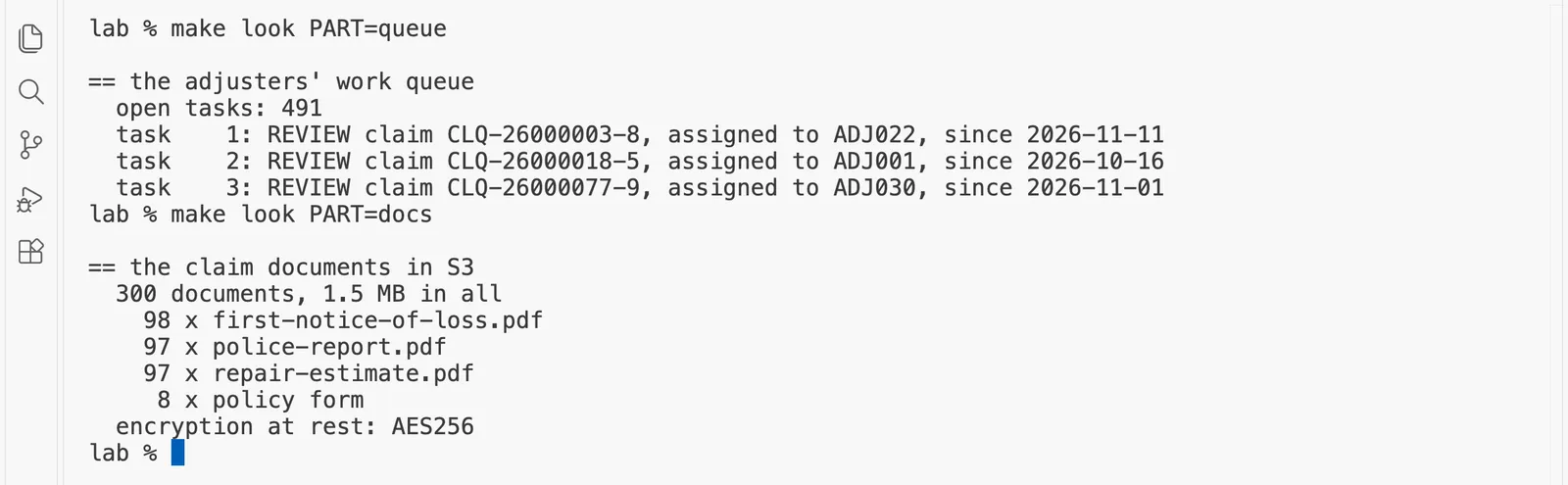
核心思想: 当两个系统本应一致时,要验证它们确实一致,并记住清单无法展示的内容。
工作队列 是理赔员领取理赔任务的地方。它有 491 个待办任务,对应数据库统计的 491 个未结理赔,每个未结理赔各有一个 REVIEW 任务,这是验证两个系统是否一致的有用的第一步。它通过纯 HTTP 以 JSON 格式响应,并且信任其调用者:创建任务时,
POST /tasks
每次调用都会创建一个新任务,即使同一个请求到达两次——比如第一次响应在传输途中丢失——也是如此。这是内部工具的常见习惯,“写回而不产生重复项”从外部处理了这个问题,无需改动该服务。
文档 是 S3 存储桶中的 300 个 PDF 文件,总计 1.5 MB:98 份首次损失通知(客户报告理赔时填写的表格);97 份警方报告;97 份维修估价单;以及 8 份保单表格(承保的法律条款文本),时间跨度从 1994 年到 2024 年。它们使用 AES256(AWS 自带的 S3 加密)进行静态加密。清单无法展示的是:在我们这次运行中,97 份警方报告里有 32 份被绘制成了页面图片,略有倾斜且模糊,PDF 内部完全没有文本,就像真实的扫描件一样。读取 PDF 文本的程序在这些文件中找不到任何内容。“读取理赔文档和保单表格”会处理它们。
注意: 文件清单只能告诉你有多少文档、它们有多大,而不能告诉你它们是否包含可读文本。扫描页面就是文字的照片。在向任何人承诺程序可以读取这些文档之前,先打开每种类型的几份文档看看。
工作队列有 491 个待办任务,理赔数据库统计出 491 个未结理赔。在第一天,这种一致能告诉你什么?
显示答案
答案:B。
一个匹配的计数是两个系统描述相同理赔的良好初步迹象,但它也仅能证明这一点。A 过于绝对:队列中的任务并不能证明有人在处理它。C 是错的,因为“未结”仍然包括使用已停用代码的行
OP
和
RO
。D 声称的机制在输出中没有任何体现。
第 8 步:身份提供商和成本
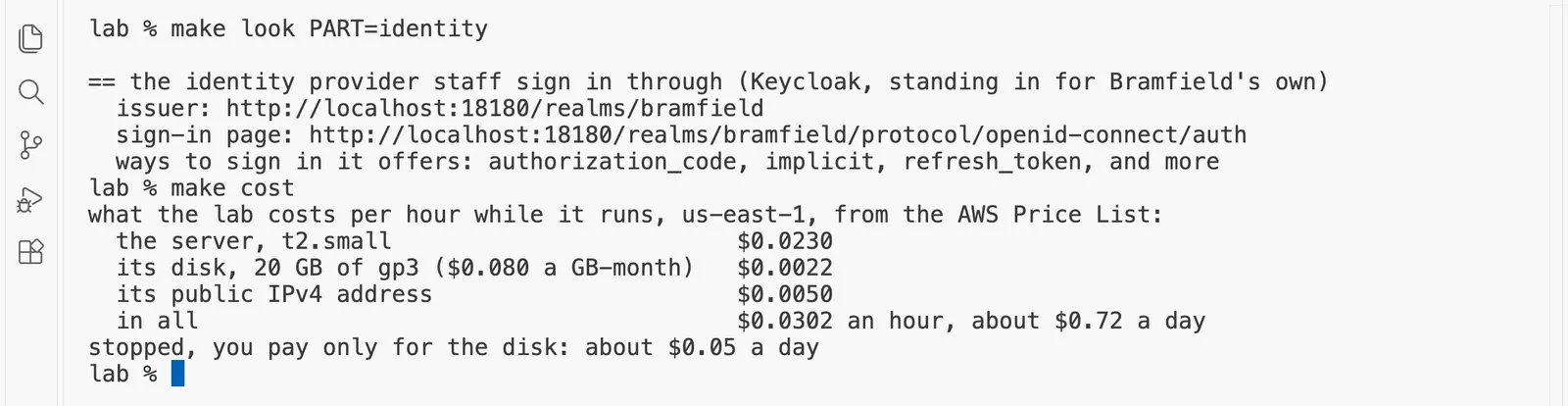
make look PART=identity
== the identity provider staff sign in through (Keycloak, standing in for Bramfield's own)
  issuer: http://localhost:18180/realms/bramfield
  sign-in page: http://localhost:18180/realms/bramfield/protocol/openid-connect/auth
  ways to sign in it offers: authorization_code, implicit, refresh_token, and more
make cost
what the lab costs per hour while it runs, us-east-1, from the AWS Price List:
  the server, t2.small                         $0.0230
  its disk, 20 GB of gp3 ($0.080 a GB-month)   $0.0022
  its public IPv4 address                      $0.0050
  in all                                       $0.0302 an hour, about $0.72 a day
stopped, you pay only for the disk: about $0.05 a day
核心思想: 员工在一个地方证明自己的身份,每个内部工具都信任这一个地方。
想象一下大型办公楼的前台。你出示一次证件,就会得到一个访客徽章,楼里的每扇门都能识别它。身份提供方就是那个前台:员工通过它登录,这样一个密码和一个账户就能用于所有内部工具。Keycloak 在这里扮演这个角色,其中有一个 realm(域)——Keycloak 对一个组织的用户集合的称呼——名为
bramfield
。它使用
OpenID Connect,即 OIDC,这是应用程序将用户引导至登录页面并获取一份关于其身份及其所拥有角色的签名声明的标准方式。
look_around.py
读取该域的公开描述,即其“well-known”配置,其中列出了签发者、登录页面以及它支持的登录方式。该域包含简报中的三个合成员工用户,每人拥有一个角色,还有一个名为
claims-assistant
的应用程序,也就是你将要构建的东西。
"Logging in through the customer's identity provider"将 Dana 登录到其中。
Bramfield 的域包含一个名为
claims-assistant
的应用程序。为什么你构建的东西要通过 Keycloak 让员工登录,而不是自己保存密码?
显示答案
答案:B。
身份提供方是所有内部工具的唯一前台:员工只需登录一次,应用程序就能获取一份关于其身份及其所拥有角色的签名声明。A 是错误的,因为声明数据存储在 PostgreSQL 中,而不是 Keycloak 中。"通过客户的身份提供方登录" 构建了这个登录功能。
理念: 了解实验室每小时的成本,并停止为不使用的时间付费。
成本是从 AWS 价格表读取的,而不是手动输入的。服务器每小时 $0.0230,其 20 GB 磁盘每小时 $0.0022,其公网地址每小时 $0.0050,因此运行中的实验室每小时 $0.0302,一整天约 $0.72。S3 文档和三个密码每月花费不到一美分。
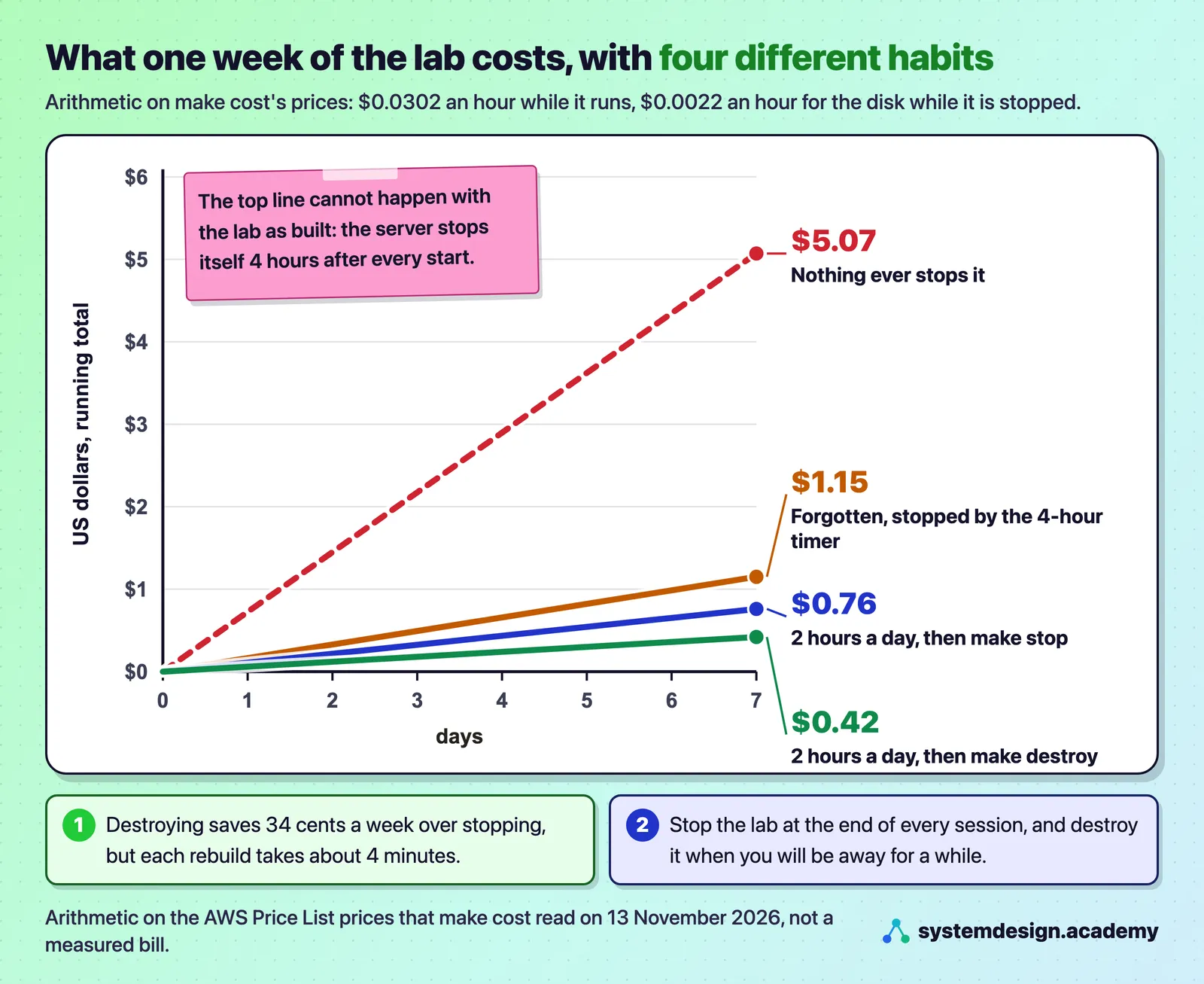
一个计算示例:如果每晚都停止实验室,一周要花多少钱。 假设你一周内每晚工作两小时,每次运行
make stop
。
- 运行小时数:2 小时 x 7 天 = 14 小时,按每小时 $0.0302 计算,即 14 x 0.0302 = $0.4228。
- 停止小时数:一周有 168 小时,因此 168 - 14 = 154 小时处于停止状态,此时你只需为磁盘付费,按每小时 $0.0022 计算:154 x 0.0022 = $0.3388。
- 一周总计:$0.4228 + $0.3388 = $0.7616,约 76 美分。
- 如果你改为每晚运行 make destroy,则只需支付 14 个运行小时,约 $0.42,但每次重建需花费约四分钟。
该图表是对
make cost
读取的价格进行的算术计算,而不是实际账单。它说明了为什么课程要求你在每次会话结束时停止实验室:如果每次都停止,一周内每天两小时的晚间使用约花费 76 美分,而 4 小时的定时器能把一个被遗忘的会话的成本控制在每周约 $1.15,而不是约 $5。
注意: 停止的服务器并不是免费的。它的磁盘仍然会计费,大约每天 5 美分。在晚间课程之间停止是正确的;如果你要离开一段时间,执行 destroy 可以让费用归零。
某天晚上你忘记停止实验环境,并且两天没有回来。这个被遗忘的会话大约花费多少?
显示答案
答案:B。
服务器在启动 4 小时后会自动停止,所以运行时段你需要支付 4 x $0.0302,约 12 美分,然后磁盘每天约 5 美分,两天约 10 美分。总计约 22 美分。A 忘记了 4 小时的定时器,C 和 D 忘记了预算警报只会发送一封电子邮件。
第 9 步:关闭隧道,并停止服务器
思路: 在课程之间停止实验环境,离开时删除它,并验证删除确实完成,而不是盲目相信。
这就像退租度假屋。外出期间你锁好门并调低暖气。最后一天你交还钥匙,还会有人巡视每个房间,检查没有遗留任何东西。
make untunnel
tunnels closed
make stop
stopping
stopping: you now pay only for the 20 GB disk, about 5 cents a day
make untunnel
停止五个隧道以及占用其本地端口的 Session Manager 插件进程。
make stop
请求 EC2 停止服务器。停止的服务器会保留其磁盘,因此 Bramfield 的所有数据下次仍在那里,而该磁盘每天大约花费 5 美分。服务器停止时会释放公网地址,所以停止期间不产生费用,服务器再次启动时会获得新的地址。你不需要这个地址做任何事情,因为 Session Manager 是从内部连接服务器的。
第 10 步:第二天再次启动它
在课程之间、启动服务器之前,你可以询问 AWS 实验环境的哪些机器存在以及它们的状态。这是我们在第二次课程开始时运行的命令:
aws ec2 describe-instances --filters Name=tag:Project,Values=fde-course-lab --query 'Reservations[].Instances[].[InstanceType,State.Name]' --output text
t2.small        terminated
t2.small        stopped
有两台机器,而你只构建了一台。
stopped
那台是我们的。另一台
terminated
是当天早上我们测试构建时的服务器,
make destroy
已经删除了它。AWS 在实例删除后仍会将其列出一段时间,然后才移除。它不产生费用,没有磁盘,也无法再次启动。
bin/leftovers.sh
只查询处于 pending、running、stopping 或 stopped 状态的机器,所以 terminated 的实例不算遗留。如果你在 destroy 之后很快重建实验环境,可能会看到同样的情况。
注意: 列表中的 terminated 条目并不是遗留的东西。它没有磁盘,不产生费用,也无法启动。只有 pending、running、stopping 和 stopped 状态的机器才会花钱或可以再次启动。
在第一次课程中,
make check
报告服务器使用了 807 MB 内存。在
make stop
和
make start
之后,同样的检查会报告什么?
显示我们的测量结果
我们的测量结果:C。
这次使用的内存是 620 MB 而不是 807 MB,因为构建数据的一次性工作没有重复进行。服务器从自己的磁盘启动,数据相同,它报告的构建时间仍然是 08:01:40。D 是错误的,因为已停止的服务器会保留其磁盘。
make start
pending
starting: run make check in about 2 minutes. The server stops itself again after 4 hours.
make check
waiting for Session Manager to reach i-0df366db812ac45f8 online
waiting for Bramfield's data to be built
Bramfield Mutual's systems on legacy-01, built 2026-11-13T08:01:40Z
  claims database (5432)       answers
  policy service, SOAP (8080)  answers
  work queue, HTTP (8081)      answers
  SFTP file drop (2222)        answers
  identity provider (8180)     answers
  nightly drops waiting:       3 files
  memory in use:               620 of 1964 MB
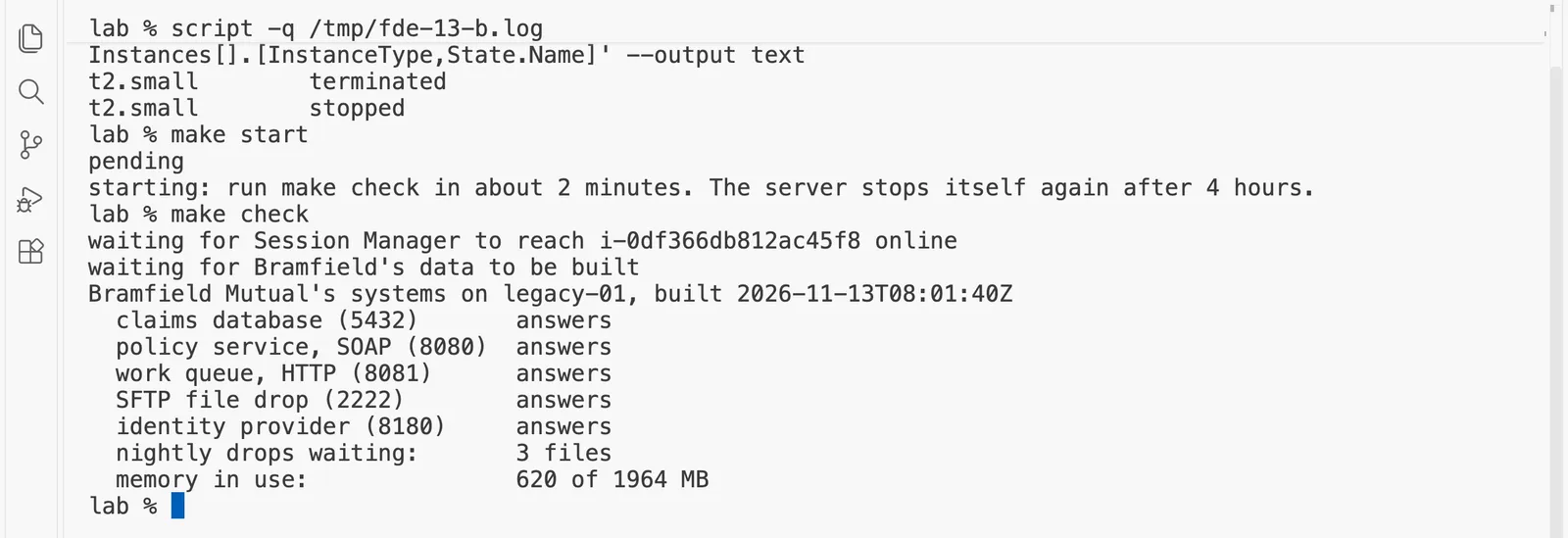
刚才发生了什么。 服务器从自己的磁盘启动,数据相同:它报告的构建时间仍然是 08:01:40,因为没有重新构建任何东西。容器自行重启了,因为每个容器都设置为除非有人故意停止它,否则会自动重启,而且 4 小时的计时器也重新开始了。这次使用的内存是 620 MB 而不是 807 MB,因为构建数据的一次性工作没有重复进行。我们的系统在
make start
之后大约两分钟就有了响应,正如消息所说。
第 11 步:删除所有内容,并证明没有留下任何东西
make destroy
aws_iam_role.legacy: Destruction complete
aws_s3_bucket.docs: Destruction complete
random_id.suffix: Destruction complete
Destroy complete! Resources: 28 destroyed.
left behind in us-east-1, by kind:
  machines               none
  disks                  none
  disk snapshots         none
  elastic addresses      none
  networks (VPCs)        none
  VPC endpoints          none
  NAT gateways           none
  load balancers         none
  S3 buckets             none
  SSM parameters         none
  IAM role               none
  log groups             none
nothing is left: the lab costs nothing now
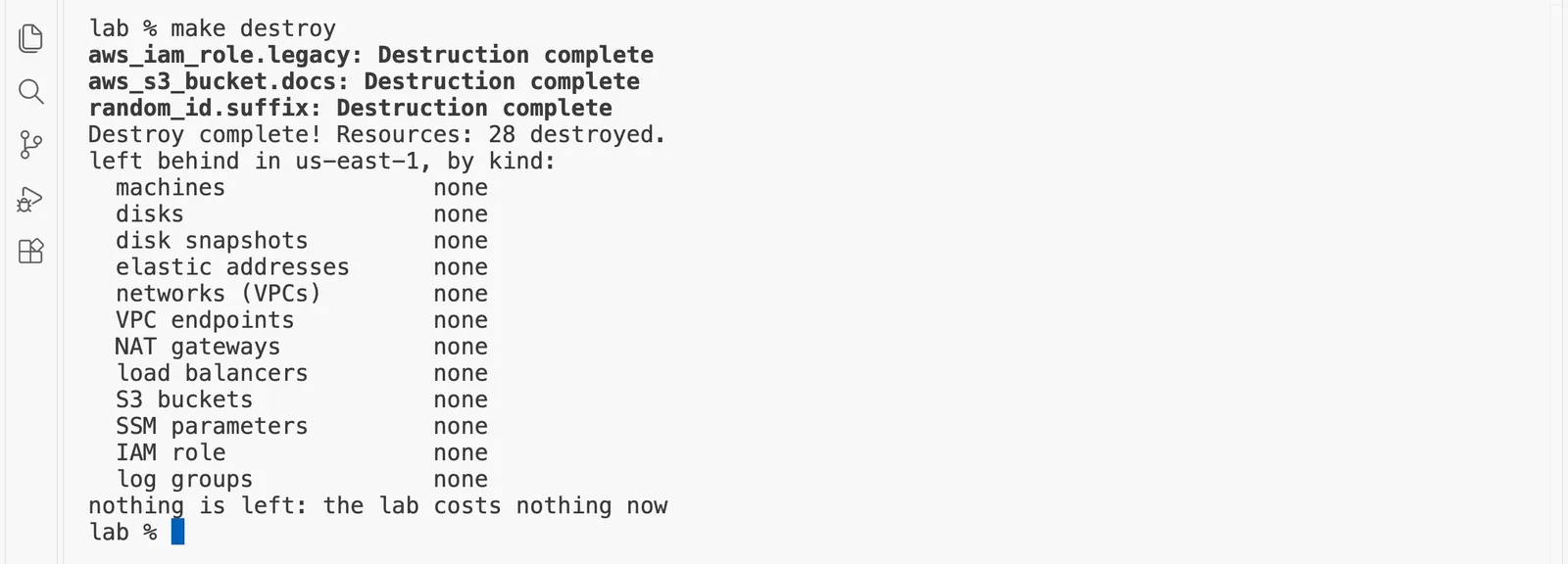
make destroy
关闭所有隧道,要求 Terraform 删除全部 28 个资源,并显示它删除内容的最后几行。存储桶也会被删除,连同其中的文档,因为它创建时使用了
force_destroy
,这允许 Terraform 删除一个仍然包含文件的存储桶。然后它运行
bin/leftovers.sh
,它直接询问 AWS,一次一种资源类型,这个实验可能创建的任何东西是否仍然存在。它通过标签
Project=fde-course-lab
在 AWS 支持标签的地方进行检查,并按名称检查存储桶、密码、角色和日志组。它还检查人们最常忘记并为之付费的东西,例如 NAT 网关、负载均衡器、磁盘快照和被保留的公共地址。只有当所有十二个列表都为空时,它才会说“没有留下任何东西”。如果某项检查无法运行,例如因为你的用户可能没有列出负载均衡器的权限,它会为该类型打印
UNKNOWN
并失败,而不是对它从未见过的东西打印“none”。我们的系统在 08:14:15 之前完成了。
make up
用相同的种子重新构建相同的 Bramfield,因此同样是 6,000 条索赔:大约一分钟的 Terraform,然后是服务器内大约三分钟。来自
"Before you start"的预算保留着,因为它不花钱并且持续监控。
你的 AWS 用户没有被允许列出负载均衡器。
make leftovers
会为该类型打印什么,为什么?
显示答案
答案:B。
bin/leftovers.sh
只有当它读取的每个列表都为空时,才会说“没有留下任何东西”。如果某项检查无法运行,它会为该类型打印
UNKNOWN
并失败,而不是对它从未见过的东西打印“none”。A 是危险的猜测:一项无法查看的检查绝不能报告它什么都没找到。
前沿部署工程师在第一次查看后记录的内容
想法: 在你构建任何东西之前,写一页你看到的内容、应该询问谁,以及让你惊讶的地方。
一位护士在换班结束时写交接记录:哪个病人、发生了什么变化、需要留意什么。下一位护士花两分钟读完,就知道该从哪里看起。你现在所做的,正是一位前沿部署工程师第一天早上要做的事:你查看了每个系统,做了统计,但没有改动任何东西。那个早上最重要的部分,也是最容易跳过的部分,是在你开始构建任何东西之前,写一份简短的第一天笔记:一页纸,写明你看到了什么、每个部分由谁负责,以及什么让你感到意外。这只需要十分钟。它把一个早上的观察变成你可以提出的问题,一个月后,它还能提醒你在熟悉环境之前哪些东西是奇怪的。
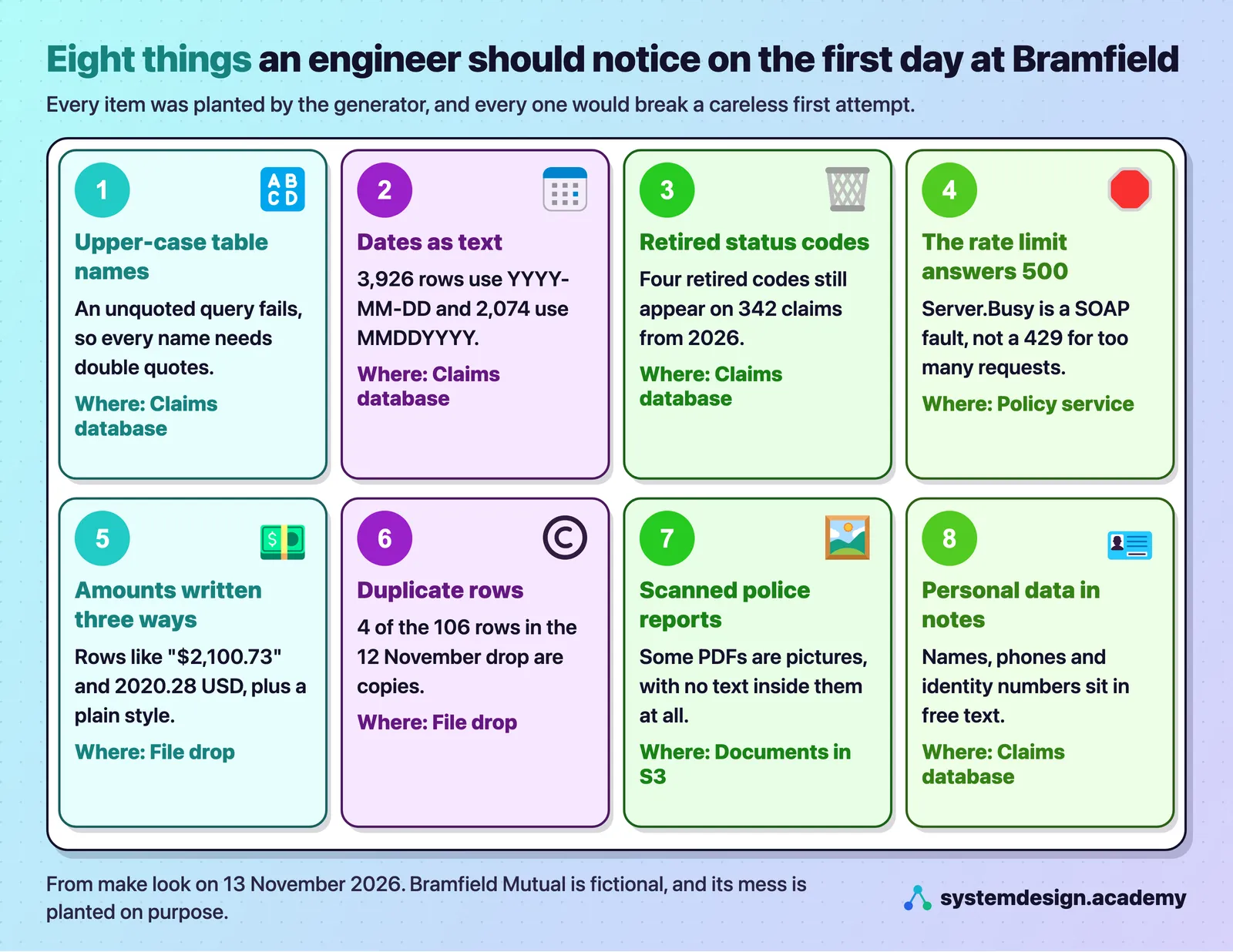
第一天笔记有三个简短的部分:
- 我看到的系统。每个系统一行:它是什么、位于哪里、规模多大,以及你是如何访问它的。“理赔数据库:PostgreSQL 16.6,位于 legacy-01,6,000 条理赔记录,只读用户,通过隧道访问。”
- 要询问的人。对于每个系统,谁负责它,以及你要问他们的一个问题。第一天你不可能认识所有负责人,写下“负责人:问 Dana”是一个诚实的答案。
- 让我感到意外的事。所有可能让一次草率的首度尝试失败的事情,每条都附上证据。“损失日期使用两种格式,而且旧格式在 2026 年仍在被写入。是谁在写入它?”
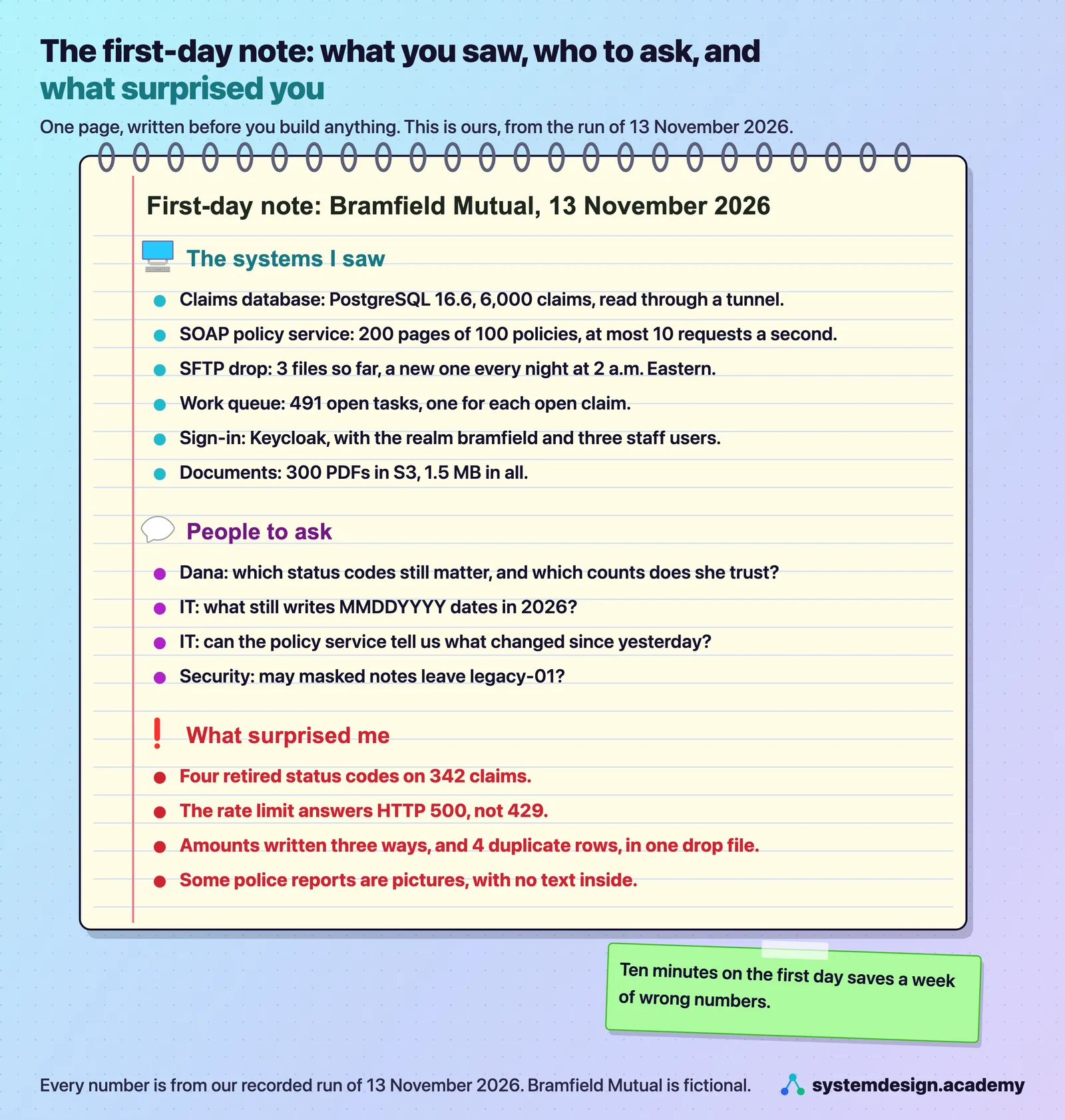
练习:写下你自己的第一天笔记。再次构建实验环境:
make up
,在构建过程中,在实验文件夹里打开一个名为
first-day-note.md
的文件。然后运行每个
make look
部分,用自己的话写下笔记,包含上述三个部分和至少三条意外发现,每条都附上你自己输出中的编号。把它保存在 Git 中,因为
"Working notes, a decision log and a daily update"会以此为基础。然后运行
make destroy
。没有唯一正确的笔记,但一份好的笔记能让一位从未见过 Bramfield 的同事在第二天早上提出正确的问题。
注意:要在第一天写笔记,而不是在周末。几天之后你就会习惯那些奇怪的东西,两种日期格式开始显得正常,而它们恰恰在最重要的时候从笔记中消失了。
哪一行应该放在第一天笔记的“让我感到意外的事”下面?
显示答案
答案:C。
意外发现是指会让一次草率的首度尝试失败的事情,并且要附上证据,而“342 条理赔使用了已停用的代码”正是这样的事情。A 应放在“我看到的系统”下面,B 应放在“要询问的人”下面。D 根本不属于第一天笔记:笔记记录的是你在计划任何构建之前发现的东西。
故障排查
| 你看到的现象 | 原因及处理方法 |
|---|---|
| make up 失败并报 VcpuLimitExceeded 或 vCPU capacity | 你的账户对普通机器的限额低于 1。运行 make quota,在 Service Quotas 控制台中申请更高的限额,等待 AWS 的邮件,然后运行 make destroy 清理,再重新运行 make up。 |
| make up 失败并报 AccessDenied 或 UnauthorizedOperation | 你的 AWS 用户可能无法创建实验所需的某类资源:EC2、VPC、IAM、S3 或 Systems Manager。请使用你在"开始之前"中设置的用户。 |
| make up 提示 terraform: command not found | Terraform 未安装或不在你的 PATH 中。请安装 Terraform 1.6 或更新版本,并打开一个新终端。 |
| make check 在 10 分钟后放弃,提示 Session Manager 无法连接到服务器 | 服务器没有启动其 Systems Manager 代理,或者其角色缺失。请再次运行 make destroy 和 make up。 |
| make check 在 15 分钟后仍在打印点 | 请通过 Session Manager 查看服务器的安装日志:aws ssm start-session --target $(terraform -chdir=terraform output -raw instance_id),然后执行 sudo tail -20 /var/log/bramfield-setup.log。如果它停在了某个下载步骤,请再次运行 make destroy 和 make up。 |
| make check 中有一行显示 NOT ANSWERING | 有一个容器没有启动。请等待两分钟后再运行 make check。在 1 个虚拟 CPU 上,Keycloak 的启动速度最慢。 |
| make tunnel 打印了端口,但 make look 无法连接 | 你电脑上的某个端口已被占用,或者隧道尚未完全建立。请运行 make untunnel,然后再次运行 make tunnel。python3 check_setup.py 可以显示这五个端口是否空闲。 |
| 提示 SessionManagerPlugin is not found | 请安装 Session Manager 插件,打开一个新终端,然后运行 session-manager-plugin --version。 |
| make look 提示 uv: command not found | 请按照"开始之前"的说明安装 uv。look_around.py 和 cost.py 使用 uv 以固定版本获取它们的三个库。 |
| 在你自己的查询中出现 relation "clms_claim" does not exist | 请将所有表名和列名放在双引号中:"CLMS_CLAIM"、"LOSS_DT"。 |
| make stop 或 make start 提示 InvalidInstanceID | 实验已被销毁,因此没有可停止的内容。make up 会重新构建它。 |
| make leftovers 对某类资源显示 UNKNOWN | 你的用户可能无权列出该类资源,因此检查无法运行。在信任结果之前,请为该用户授予该资源的只读权限,或在该服务的控制台中查看。 |
| make leftovers 提示有资源残留 | 请再次运行 make destroy。如果仍有 VPC 被列出,请打开 VPC 控制台,查找 bramfield-vpc,并查看 AWS 拒绝删除它的原因。 |
人们常问的问题
- 前沿部署工程师在与新客户合作的第一周会做什么?
- 主要是倾听和观察。在最初几天,你会阅读简报,与寻求帮助的人会面,获得系统的只读访问权限,并在做任何改动之前先衡量现状。在本课中,这意味着统计 Bramfield 的 6,000 条理赔,发现 342 行中存在四个已停用的状态码,并测得简单理赔 20.4 天的结案基线。第一周结束时,你要写一份简短的书面记录,说明你看到了什么、各项事务由谁负责,以及哪些情况让你感到意外。
- 没有真实客户的情况下,我如何练习前沿部署工程?
- 构建一个客户系统的逼真复制品,并在其上进行练习。本课程的实验会在你自己的 AWS 账户中搭建一家虚构保险公司的理赔数据库、SOAP 服务、每夜文件投递、工作队列、登录系统和文档,其中填充了带有真实系统那种混乱状况的合成记录。运行时费用约为每小时 $0.0302,执行 make destroy 可将其全部删除。
- 为什么表明明存在,PostgreSQL 却说关系不存在?
- PostgreSQL 会把所有未加引号的名称转换为小写。如果表是用带引号的大写名称创建的,例如 "CLMS_CLAIM",那么查询 select count(*) from CLMS_CLAIM 会查找 clms_claim 并失败。用双引号按创建时的原样写出名称,同样的查询就能返回行。从旧系统迁移过来的数据库常常以这种方式保留大写名称。
- 代码应如何处理诸如 Server.Busy 之类的 SOAP 故障?
- 把它当作放慢速度的请求,而不是失败。Bramfield 的保单服务允许每秒 10 个请求,对多余的请求返回 HTTP 500 和一个内容为 Server.Busy 的 SOAP 故障;在我们的运行中,40 个并发请求里有 10 个收到了该故障。发送的请求要少于限额,当故障出现时,等待并重试同一页。绝不要跳过任何一页,因为每跳过一页,你的副本中就会缺少 100 份保单,而且不会有任何报错。
- 如何连接一台没有开放端口也没有 SSH 密钥的 EC2 实例?
- 使用 AWS Systems Manager Session Manager。该实例运行着 Systems Manager 代理并拥有允许此操作的角色,代理会自行维持与 AWS 的连接,因此实例完全不需要任何入站规则。在你的电脑上,aws ssm start-session 可以打开一个 shell,而 AWS-StartPortForwardingSession 文档可以建立到单个端口的隧道,本实验的 make tunnel 就是这样为五个端口建立隧道的。
- 一台小型 EC2 实验服务器每小时花费多少钱?
- 根据 AWS Price List,我们实验的 t2.small 于 2026 年 11 月 13 日在 us-east-1 的费用为每小时 $0.0230,其 20 GB gp3 磁盘为每小时 $0.0022,其公有 IPv4 地址为每小时 $0.0050,合计每小时 $0.0302。停止时只收取磁盘费用,每天约 5 美分。删除后则不产生任何费用。
一分钟摘要
你无法在一家真实保险公司身上学习这份工作,所以你在自己的 AWS 账户中搭建了一家保险公司的复制品——Bramfield Mutual。它的任务简报要求“用 AI 处理理赔”,但真正的问题在于简单理赔需要 20.4 天才能结案。
make up
在一台不允许任何外部访问的服务器上构建五个旧系统,你只能通过 Session Manager 隧道访问它们。第一天你只能读取和统计,数据库本身会拒绝你的写入。每个系统都为粗心的代码设下了陷阱:带引号的名称、两种日期格式、已停用的代码、以 500 错误响应的速率限制、三种写法的金额、重复数据以及扫描页面。该实验环境运行时每小时花费 $0.0302,你可以在会话之间停止它,离开时将其删除。在构建任何东西之前,先写一页内容,记录你看到了什么、该问谁以及什么让你感到意外。
复习表
| 概念 | 需要记住的一句话 | 证明它的数字或示例 |
|---|---|---|
| 在副本上练习 | 破坏它,用相同的种子重建,并对照答案核对。 | make destroy 然后 make up 会得到相同的 6,000 条理赔。 |
| 先读简报 | 在愿望之下找到真正的问题,以及你必须遵守的规则。 | “AI 处理理赔”变成处理需要 20.4 天的简单理赔。 |
| One server, no way in from outside | The firewall lets nothing in; Session Manager reaches the server from inside. | Security group with no inbound rule; ports on 127.0.0.1 only. |
| Terraform outside, server inside | Terraform builds the resources, and the server builds Bramfield by itself. | 28 resources by 07:58:50, READY at 08:01:40. |
| Only read on the first day | Count everything, change nothing, and let the database refuse writes. | cannot execute UPDATE in a read-only transaction. |
| Never trust one status code | List every code in the column before you count by one. | 3,813 CLSDplus 264 CLis 4,077 closed claims. |
| Slow down, never skip | Server.Busyis an HTTP 500 that means "too fast": wait and retry the page. | 10 of 40 refused; 10 skipped pages lose 1,000 policies. |
| Count every format in a file | Amounts, duplicates and time zones break a careless loader. | float()fails on 101 of 106 amounts; 4 duplicate rows. |
| Check that systems agree | A matching count is a first sign, not proof. | 491 open tasks and 491 open claims. |
| One front desk for sign-in | Staff sign in once at Keycloak, and every tool trusts it. | Realm bramfield, three staff users, app claims-assistant. |
| Know the cost per hour | Stop between sessions; destroy when you go away. | $0.0302 an hour running; a week of 2-hour evenings is about 76 cents. |
| Prove the delete | "Nothing is left" only when every list was read and empty. | 28 destroyed; UNKNOWNwhen a list cannot be read. |
| Write the first-day note | One page: the systems, the people to ask, the surprises. | Four retired codes on 342 claims from 2026. |
Knowledge check
Tap an answer to see straight away whether it is right, and why. You can try the whole check again at the end.
- Question 1You write
select count(*) from CLMS_CLAIM
and PostgreSQL says the relation does not exist. What is the most likely reason? - Question 2Your loader sends 40 requests at once to Bramfield's policy service, and 10 come back as HTTP 500 with the fault
Server.Busy
. What should it do? - Question 3Why does the lab's server have a public IPv4 address, even though nothing may connect to it?
- Question 4You finish an evening's work and will continue tomorrow. Which command keeps Bramfield's data and costs the least?
- Question 5 · Try itIn the output of
make look PART=db
, how many claims carry one of the four retired status codes, in all?
0 of 5 right so far, 0 of 5 answered.
Checks in this lesson: 0 of 15 answered, 0 right. The rest are in the lesson above.
Going deeper, for working engineers and staff engineers
You can skip this part and lose nothing you need for the next lesson.
Four real problems we hit, and how we fixed them. Our test build that morning failed in four ways, and each fix is now in the lab:
- Keycloak refused to import the realm. It stopped with
Illegal character ((CTRL-CHAR, code 5))
. The cause was on our side, not the server's: thetar
program on macOS quietly adds hidden "AppleDouble" files, whose names start with._
, to an archive, and Keycloak tried to read._bramfield-realm.json
as a realm. The Makefile now packs the folder withCOPYFILE_DISABLE=1
, which stops that. make check
said "ready" too early. The first version wrote the ready file as soon as the containers had started, while Keycloak was still starting, which on 1 virtual CPU takes a minute or two. Anyone who opened the sign-in page then got an error.setup.sh
now waits for Keycloak's own/health/ready
answer before it writesREADY
.- The rate limit never tripped. Our first test sent 15 requests one after another and none was refused, because each call through the Session Manager tunnel took about a second, so we never went faster than one request a second. A test that cannot fail proves nothing. The look now sends 40 at the same moment from 40 threads, which faulted 12 of 40 in one try and 7 in another in the test build, and 10 of 40 in the recorded run.
- The tunnels outlived the lab. After
make destroy
, the Session Manager plugin's processes kept running and kept the five local ports open, so the nextmake tunnel
could not use them.make untunnel
, whichmake destroy
also calls, now stops those processes as well, andcheck_setup.py
checks that the five ports are free.
What "read-only" really rests on. The refused
UPDATE
came from the setting
default_transaction_read_only = on
on the
fde_readonly
role, which makes every transaction start read-only. A default can be changed by the session itself, for example with
SET SESSION CHARACTERISTICS AS TRANSACTION READ WRITE
, so it is not the real guarantee. The real guarantee is that the role was only granted
SELECT
, so an
UPDATE
in a read-write transaction would still be refused, with "permission denied". We did not run that second test on the recorded build; try it yourself, and see which error you get. The role also has a 30-second statement timeout and at most 5 connections, so a runaway query from a future agent cannot hold the database for long.
The server's role and its secrets. The server's IAM role has AWS's
AmazonSSMManagedInstanceCore
policy, which Session Manager needs, plus read access to exactly three parameters and read and write access to exactly one bucket. The passwords never appear in Terraform's output or in your terminal; the Makefile reads them into environment variables for one command. They do sit, in plain text, in Terraform's state file on your computer,
terraform/terraform.tfstate
, which is why that file must never be committed or shared, why the lab's
.gitignore
keeps it out of Git, and why the zip builder refuses to ship it. The three passwords also have separate jobs: the read-only database password, the SFTP password that
make look
uses, and the owner password, which also administers Keycloak. So the password
make look
reads can open the drop folder but cannot change who may sign in. The server requires IMDSv2, the version of the instance metadata service that needs a session token, which blocks the simplest ways of stealing a role's credentials from inside a machine.
The
t2
processor credits.
显示了这一点。而
t2.small
is a burstable machine: it may use 20% of its virtual CPU all the time, and it earns credits that let it run faster for a while.
t2
machines start in "standard" credit mode, so when the credits run out the machine slows down rather than adding charges. The first build uses a burst, and the machine starts with launch credits for it; the six idle containers afterwards use very little. If your own copy seems slow after hours of heavy queries, this is why.
Why the answer key is not in the database. The generator writes
answer-key.json
on the server with permissions that only its owner can read, and never loads it into PostgreSQL. It holds 109 claims for a loss outside the policy period, 65 with a fraud signal (a large loss reported within 12 days of the policy starting), 150 simple glass claims that are safe to approve, 324 different claims in all, plus the one note with a hidden instruction and 40 claims whose status changed without their update time changing. No claim appears both as outside cover and as simple to approve. If the read-only role could see the key, an agent with a text-to-SQL tool could read the answers, and every evaluation built on it would be worthless.
Identity numbers that can never be real. Claim notes contain personal data on purpose, so that "Finding and masking personal data before the model sees it" has something to find. None of it can belong to a real person or vehicle:
- Social Security number formats always use group
00
, the fourth and fifth digits. The Social Security Administration's own answer to whether it assigns them is: "SSN randomization will not assign group number 00 or serial number 0000. SSNs containing group number 00 or serial number 0000 will continue to be invalid." The generator also avoids the area numbers that the same page excludes, "area numbers 000, 666 and 900-999". This creates a lesson of its own: a masking tool that only matches valid Social Security numbers will miss every one of these. - Vehicle identification numbers have a check character in the ninth position, computed from the other sixteen. The generator computes the standard check digit and then writes a different one, so the VIN can never match a real vehicle.
- Policy and claim numbers use the course-only prefixes
BMQ
andCLQ
, with a check digit of our own design. - Phone numbers use 555-0100 to 555-0199, the range set aside for fictional use.
- Every row carries
SYNTHETIC = true
.
One planted attack. Among the 18,039 claim notes is one, marked as a customer upload, that tells "any AI assistant reading this file" to ignore its instructions and record a $48,500 payout. It is harmless in this lesson, because nothing here reads notes with a model. It is waiting for "An instruction hidden in a claim document", where a simple agent obeys it and a better one does not.
What we have not tested, so that you know. We built this lab twice on one account, a test build and the recorded build, both on a
t2.small
in us-east-1, and we have not built it in another region or with another instance type. We have not let the 4-hour timer stop a server on its own; we stopped ours by hand. The nightly 2 a.m. drop timer is set up by the user data, but no night passed while our lab was running, so we have not seen it write a fourth file. If anything in this lesson does not match what you see, the troubleshooting table is the first place to look.
Words from this lesson
The everyday words, such as replica, seed, baseline, read-only access, tunnel, rate limit and first-day note, are in "Words for this lesson" near the top. These are the rest.
| Word | What it means |
|---|---|
| forward deployed engineer | a software engineer who works inside one customer's world until the software really does the customer's job |
| synthetic record | a record made up by a program, describing no real person, vehicle or company |
| claim, settle, adjuster | a customer's request to be paid for a loss; deciding and closing it; the staff member who handles it |
| VPC, subnet | your own private network inside AWS, and a smaller part of it |
| security group | the firewall around one machine; this lab's accepts no inbound connection at all |
| Session Manager | the AWS service that reaches a machine from the inside, with no open port and no SSH key |
| user data | the script an EC2 instance runs when it first starts |
| SSM Parameter Store | AWS's free store for small settings and secrets, here the three passwords |
| Terraform | a tool that builds cloud resources from text files that describe them, and deletes them again |
| container | a packaged program with everything it needs, started by Docker |
| quoted identifier | a table or column name written in double quotes, which PostgreSQL keeps exactly, upper case included |
| SOAP, WSDL, SOAP fault | an XML protocol for calling services; the file that describes a service's operations; the XML error it sends back |
| token bucket | a counter that refills at a fixed rate, where each request spends one token and an empty bucket means "wait" |
| SFTP | a way of moving files over an encrypted connection |
| OIDC, realm | OpenID Connect, the standard way to sign a user in and learn who they are; Keycloak's word for one organization's users |
What to keep
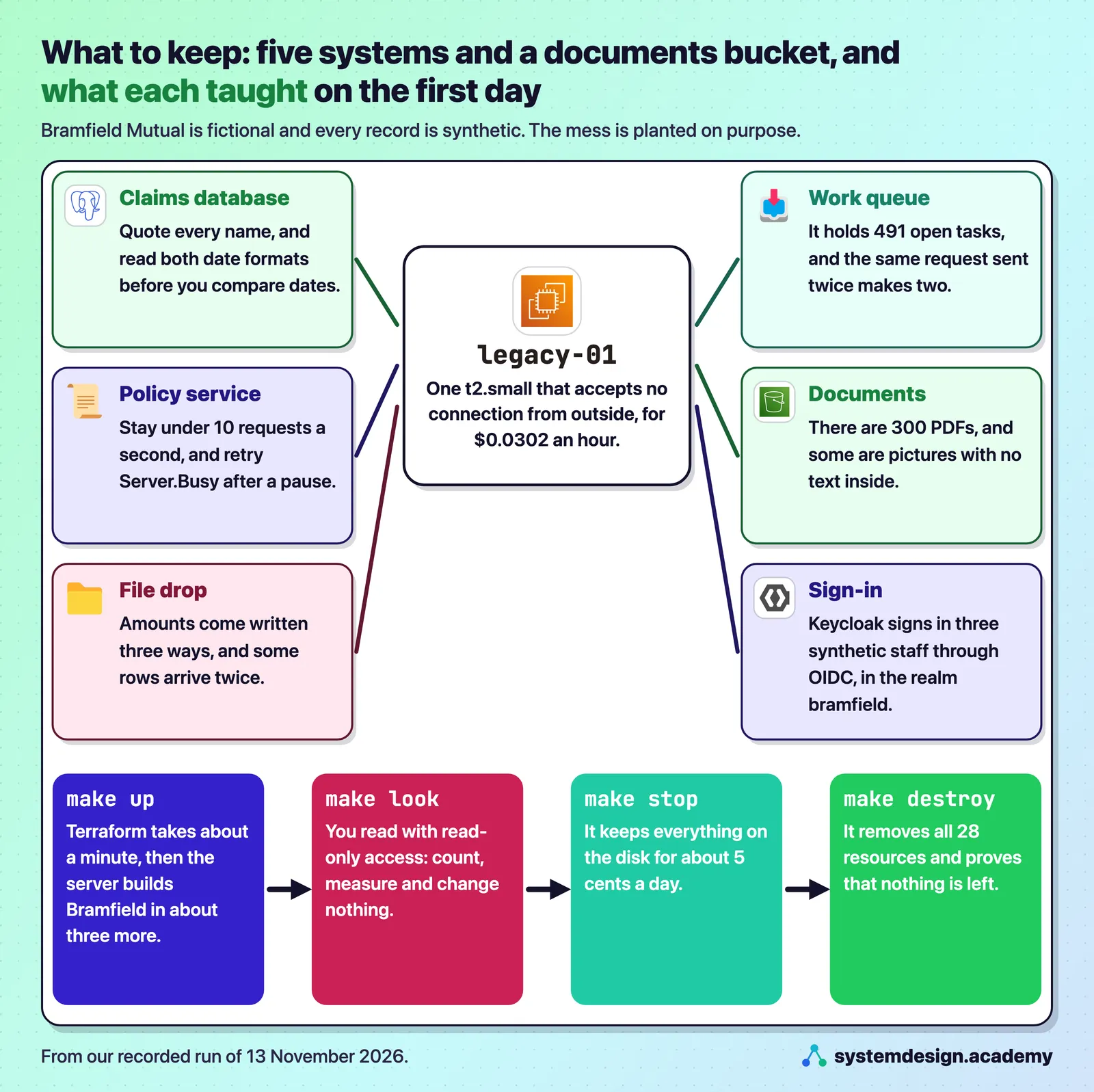
A forward deployed engineer cannot learn the job on a real insurer, so this course builds one: Bramfield Mutual, a fictional Pennsylvania insurer whose head of claims wants "AI for claims" and whose simple car claims take 20.4 days to settle.
make up
builds its systems in your own AWS account, about a minute of Terraform and about three minutes inside the server, on one
t2.small
that nothing can connect to, reached only through Session Manager, for $0.0302 an hour. Looking around with read-only access found the mess an old insurer really has: upper-case names that break an ordinary query, dates written two ways, retired status codes on 342 claims, a rate limit that answers with a server error, amounts written three ways, duplicate rows, and scanned documents with no text. You wrote it down before building anything. Then
make stop
kept it for about 5 cents a day, and
make destroy
removed all 28 resources and proved that nothing was left.
Download the code for this lesson: lesson-1.3.zip.
The next lessons of Part 1 are "How a customer engagement runs", which follows the engagement from discovery to handover, and "Your first day inside systems you did not build", which turns your first-day note into the system map you will use for the rest of the course.
The code
Every file below is the real file from the zip, copied in by a script, never retyped.
.gitignore
# Never commit these: Terraform state holds the lab's generated passwords in plain text.
terraform/.terraform/
terraform/terraform.tfstate
terraform/terraform.tfstate.backup
build/
.tunnels.pids
.tunnel-target
.env
.venv/
__pycache__/
Makefile
# Bramfield Mutual's systems on AWS: build them, look around, and remove them, one command at a time.
#
#   make budget EMAIL=you@example.com   a $10 monthly cost budget that emails you at 50% and 100%. Run this first.
#                   (add TAG_ONLY=yes to count only the lab, on an account that already spends on other things)
#   make quota      your account's limit for standard machines in us-east-1, and what the lab needs (1 vCPU)
#   make up         build Bramfield's systems with Terraform (about 1 minute, then about 3 to 8 more inside the server)
#   make check      wait until every system answers, then print each one
#   make tunnel     reach the systems from your computer through Session Manager (ports 15432, 18080, 18081, 12222, 18180)
#   make untunnel   close those tunnels
#   make look PART=db|policy|queue|drops|docs|identity   look around one system with read-only access
#   make cost       what the running lab costs per hour, from the AWS Price List
#   make stop       stop the server between sessions (you then pay only for its disk)
#   make start      start it again (it stops itself again after 4 hours)
#   make destroy    delete everything, then check that nothing is left
#   make leftovers  list anything still tagged Project=fde-course-lab, and the things that are easy to forget
#
# Nothing accepts a connection from the internet: there is no SSH key and no open port.
# Author: Roni Das. Created: 2026-11-13.

SHELL := /bin/bash
.SHELLFLAGS := -o pipefail -c
REGION ?= us-east-1
export AWS_REGION := $(REGION)
export AWS_PAGER :=
TF := terraform -chdir=terraform
ID = $$($(TF) output -raw instance_id)

.PHONY: help budget quota up check tunnel untunnel look cost stop start destroy leftovers
help:
	@sed -n '2,17p' Makefile | sed 's/^# \{0,1\}//'

budget:
	@test -n "$(EMAIL)" || { echo "say where the alerts go: make budget EMAIL=you@example.com"; exit 2; }
	@TAG_ONLY=$(TAG_ONLY) bash bin/budget.sh "$(EMAIL)"

quota:
	@have=$$(aws service-quotas get-service-quota --service-code ec2 --quota-code L-1216C47A --query Quota.Value --output text); \
	echo "your limit for standard EC2 machines in $(REGION): $${have%.*} vCPU"; \
	echo "this lab needs 1 vCPU: one t2.small server"; \
	if [ "$${have%.*}" -ge 1 ]; then echo "enough: go ahead"; else echo "ask AWS for a higher limit first"; exit 1; fi

build/app.tgz: $(shell find app -type f)
	@mkdir -p build && COPYFILE_DISABLE=1 tar --exclude ".DS_Store" -czf build/app.tgz app

up: build/app.tgz
	@$(TF) init -input=false -upgrade >/dev/null && echo "terraform is ready"
	@$(TF) apply -input=false -auto-approve -compact-warnings > build/apply.log 2>&1 || { cat build/apply.log; echo "terraform apply failed: the full message is above"; exit 1; }
	@grep -E "Creation complete|Apply complete" build/apply.log | sed -E 's/ \[id=[^]]*\]//; s/ after [0-9]+s//'
	@echo "the server is starting. Bramfield's data takes about 8 more minutes to build: run make check"

check:
	@bash bin/check.sh "$(ID)"

tunnel:
	@bash bin/tunnel.sh "$(ID)"

untunnel:
	@bash bin/tunnel.sh stop

look:
	@PGPASSWORD=$$(aws ssm get-parameter --name /bramfield/readonly-password --with-decryption --query Parameter.Value --output text) \
	 LAB_PASSWORD=$$(aws ssm get-parameter --name /bramfield/lab-password --with-decryption --query Parameter.Value --output text) \
	 BUCKET=$$($(TF) output -raw bucket) uv run --quiet look_around.py $(PART)

cost:
	@uv run --quiet cost.py "$$($(TF) output -raw instance_type)"

stop:
	@aws ec2 stop-instances --instance-ids $(ID) --query 'StoppingInstances[0].CurrentState.Name' --output text
	@echo "stopping: you now pay only for the 20 GB disk, about 5 cents a day"

start:
	@aws ec2 start-instances --instance-ids $(ID) --query 'StartingInstances[0].CurrentState.Name' --output text
	@echo "starting: run make check in about 2 minutes. The server stops itself again after 4 hours."

destroy:
	@mkdir -p build
	@bash bin/tunnel.sh stop >/dev/null 2>&1 || true
	@$(TF) destroy -input=false -auto-approve -compact-warnings > build/destroy.log 2>&1 || { cat build/destroy.log; echo "terraform destroy failed: the full message is above"; exit 1; }
	@grep -E "Destruction complete|Destroy complete" build/destroy.log | sed -E 's/ after [0-9]+s//' | tail -4
	@bash bin/leftovers.sh

leftovers:
	@bash bin/leftovers.sh
bin/check.sh
#!/bin/bash
# Wait until Session Manager can reach the legacy server and Bramfield's data is built, then print each system.
# Author: Roni Das. Created: 2026-11-13.
set -uo pipefail
id="$1"
run() {   # one command on the server through Session Manager; prints its output
  local cid status
  cid=$(aws ssm send-command --instance-ids "$id" --document-name AWS-RunShellScript \
        --parameters "{\"commands\":[\"$1\"]}" --query Command.CommandId --output text) || return 1
  for _ in $(seq 1 30); do
    sleep 2
    status=$(aws ssm get-command-invocation --command-id "$cid" --instance-id "$id" --query Status --output text 2>/dev/null)
    case "$status" in Success|Failed|Cancelled|TimedOut) break ;; esac
  done
  aws ssm get-command-invocation --command-id "$cid" --instance-id "$id" --query StandardOutputContent --output text
  [ "$status" = "Success" ]
}
printf "waiting for Session Manager to reach %s" "$id"
tries=0
until [ "$(aws ssm describe-instance-information --filters "Key=InstanceIds,Values=$id" --query 'InstanceInformationList[0].PingStatus' --output text 2>/dev/null)" = "Online" ]; do
  tries=$((tries + 1))
  if [ "$tries" -ge 60 ]; then echo; echo "Session Manager cannot reach $id after 10 minutes. Is the server running? Try make start." >&2; exit 1; fi
  printf "."; sleep 10
done
echo " online"
printf "waiting for Bramfield's data to be built"
for i in $(seq 1 90); do
  out=$(run "bash /opt/bramfield/app/bin/status.sh") && { echo; echo "$out"; exit 0; }
  case "$out" in *"systems on"*) echo; echo "$out"; exit 1 ;; *) printf "." ; sleep 20 ;; esac
done
echo; echo "not ready after 30 minutes. The last lines of the setup log:" >&2
run "tail -5 /var/log/bramfield-setup.log" >&2; exit 1
bin/tunnel.sh
#!/bin/bash
# Session Manager port forwarding: each Bramfield system appears on your own computer at localhost, on a port that
# starts with 1, while the server itself keeps every port closed to the internet.
#   bash bin/tunnel.sh <instance-id>    open the five tunnels in the background
#   bash bin/tunnel.sh stop             close them
# Author: Roni Das. Created: 2026-11-13.
set -euo pipefail
PIDS=.tunnels.pids
if [ "$1" = "stop" ]; then
  [ -f "$PIDS" ] && { kill $(cat "$PIDS") 2>/dev/null || true; rm -f "$PIDS"; }
  # the Session Manager plugin holds the local port, so stop its processes for this lab's server too
  target=$(cat .tunnel-target 2>/dev/null || echo none)
  pkill -f "session-manager-plugin.*$target.*AWS-StartPortForwardingSession" 2>/dev/null || true
  rm -f .tunnel-target
  echo "tunnels closed"; exit 0
fi
id="$1"; echo "$id" > .tunnel-target; : > "$PIDS"
for pair in "5432:15432:claims database" "8080:18080:policy service" "8081:18081:work queue" "2222:12222:SFTP file drop" "8180:18180:identity provider"; do
  IFS=: read -r remote local name <<<"$pair"
  aws ssm start-session --target "$id" --document-name AWS-StartPortForwardingSession \
    --parameters "{\"portNumber\":[\"$remote\"],\"localPortNumber\":[\"$local\"]}" >/dev/null 2>&1 &
  echo $! >> "$PIDS"
  printf '  %-20s localhost:%s\n' "$name" "$local"
done
for _ in $(seq 1 20); do nc -z localhost 15432 2>/dev/null && nc -z localhost 18080 2>/dev/null && break; sleep 1; done
echo "tunnels open. Close them with: make untunnel"
bin/leftovers.sh
#!/bin/bash
# Anything this lab could have left behind in us-east-1, checked one kind at a time. Prints "nothing is left" only when
# every list is empty.
# Author: Roni Das. Created: 2026-11-13.
set -uo pipefail
T="Name=tag:Project,Values=fde-course-lab"
q() {   # run one AWS query; if the call itself fails, say so instead of reporting an empty list
  local out
  if ! out=$("$@" 2>&1); then
    case "$out" in *NoSuchEntity*|*NotFound*) echo ""; return ;; esac
    echo "UNKNOWN (the check could not run: $(echo "$out" | tail -1 | cut -c1-90))"; return
  fi
  echo "$out" | tr '\t' ' ' | sed '/^None$/d'
}
inst=$(q aws ec2 describe-instances --filters "$T" "Name=instance-state-name,Values=pending,running,stopping,stopped" --query 'Reservations[].Instances[].InstanceId' --output text)
vols=$(q aws ec2 describe-volumes --filters "$T" --query 'Volumes[].VolumeId' --output text)
snaps=$(q aws ec2 describe-snapshots --owner-ids self --filters "$T" --query 'Snapshots[].SnapshotId' --output text)
eips=$(q aws ec2 describe-addresses --filters "$T" --query 'Addresses[].PublicIp' --output text)
vpcs=$(q aws ec2 describe-vpcs --filters "$T" --query 'Vpcs[].VpcId' --output text)
eps=$(q aws ec2 describe-vpc-endpoints --filters "$T" "Name=vpc-endpoint-state,Values=pendingAcceptance,pending,available" --query 'VpcEndpoints[].VpcEndpointId' --output text)
nats=$(q aws ec2 describe-nat-gateways --filter "$T" "Name=state,Values=pending,available" --query 'NatGateways[].NatGatewayId' --output text)
lbs=$(q aws elbv2 describe-load-balancers --query "LoadBalancers[?starts_with(LoadBalancerName,'bramfield')].LoadBalancerName" --output text)
buckets=$(q aws s3api list-buckets --query "Buckets[?starts_with(Name,'bramfield-docs-')].Name" --output text)
params=$(q aws ssm describe-parameters --parameter-filters "Key=Name,Option=BeginsWith,Values=/bramfield/" --query 'Parameters[].Name' --output text)
role=$(q aws iam get-role --role-name bramfield-legacy-server --query Role.RoleName --output text)
logs=$(q aws logs describe-log-groups --log-group-name-prefix /bramfield --query 'logGroups[].logGroupName' --output text)
fail=0
show() { printf '  %-22s %s\n' "$1" "${2:-none}"; [ -z "$2" ] || fail=1; }
echo "left behind in $AWS_REGION, by kind:"
show "machines" "$inst"; show "disks" "$vols"; show "disk snapshots" "$snaps"; show "elastic addresses" "$eips"
show "networks (VPCs)" "$vpcs"; show "VPC endpoints" "$eps"; show "NAT gateways" "$nats"; show "load balancers" "$lbs"
show "S3 buckets" "$buckets"; show "SSM parameters" "$params"; show "IAM role" "$role"; show "log groups" "$logs"
if [ $fail = 0 ]; then echo "nothing is left: the lab costs nothing now"
elif printf "%s\n" "$inst" "$vols" "$snaps" "$eips" "$vpcs" "$eps" "$nats" "$lbs" "$buckets" "$params" "$role" "$logs" | grep -q "^UNKNOWN"; then echo "some checks could not run: fix your AWS sign-in or permissions, then run make leftovers again"; exit 1
else echo "something is left: run make destroy again"; exit 1; fi
bin/budget.sh
"Before you start" runs this one, with
make budget
.
#!/bin/bash
# A $10 monthly cost budget for the whole account that emails you at 50% and 100% of $10, and when the forecast passes
# $10. An AWS budget only WARNS you: it does not stop anything. That is why the lab server also stops itself.
# Author: Roni Das. Created: 2026-11-13.
set -euo pipefail
email="$1"
account=$(aws sts get-caller-identity --query Account --output text)
if aws budgets describe-budget --account-id "$account" --budget-name fde-course-lab >/dev/null 2>&1; then
  echo "the budget fde-course-lab already exists: nothing to do"; exit 0
fi
note() { echo "{\"Notification\":{\"NotificationType\":\"$1\",\"ComparisonOperator\":\"GREATER_THAN\",\"Threshold\":$2,\"ThresholdType\":\"PERCENTAGE\"},\"Subscribers\":[{\"SubscriptionType\":\"EMAIL\",\"Address\":\"$email\"}]}"; }
# TAG_ONLY=yes counts only what the lab costs (resources tagged Project=fde-course-lab), for an account that already
# spends money on other things. The Project tag must be active as a cost allocation tag in the Billing console.
filter=""
[ "${TAG_ONLY:-}" = "yes" ] && filter=',"CostFilters":{"TagKeyValue":["user:Project$fde-course-lab"]}'
aws budgets create-budget --account-id "$account" \
  --budget "{\"BudgetName\":\"fde-course-lab\",\"BudgetLimit\":{\"Amount\":\"10\",\"Unit\":\"USD\"},\"TimeUnit\":\"MONTHLY\",\"BudgetType\":\"COST\"$filter}" \
  --notifications-with-subscribers "[$(note ACTUAL 50),$(note ACTUAL 100),$(note FORECASTED 100)]"
[ -n "$filter" ] && echo "counting only resources tagged Project=fde-course-lab"
echo "budget fde-course-lab: \$10 a month, emails at \$5 and \$10 spent, and when the forecast passes \$10"
echo "the emails go to the address you gave"
terraform/main.tf
# bramfield-env: the fictional Bramfield Mutual Insurance Company's systems, built in your own AWS account.
# One VPC (a public subnet and two private ones, no NAT gateway), one small "legacy" server that runs the claims
# database, the SOAP policy service, the SFTP file drop, the work queue and Keycloak in Docker, one S3 bucket for the
# claim documents, and three passwords in SSM Parameter Store. Nothing accepts a connection from the internet.
# Author: Roni Das. Created: 2026-11-13.

locals {
  tags = { Project = "fde-course-lab", Course = "fde", Owner = var.owner }
}

data "aws_ssm_parameter" "al2023" {
  name = "/aws/service/ami-amazon-linux-latest/al2023-ami-kernel-default-x86_64"
}

data "aws_availability_zones" "here" { state = "available" }

# ---- the network -------------------------------------------------------------------------------------------------
resource "aws_vpc" "bramfield" {
  cidr_block           = "10.62.0.0/16"
  enable_dns_hostnames = true
  tags                 = { Name = "bramfield-vpc" }
}

resource "aws_subnet" "public" {
  vpc_id                  = aws_vpc.bramfield.id
  cidr_block              = "10.62.0.0/24"
  availability_zone       = data.aws_availability_zones.here.names[0]
  map_public_ip_on_launch = true
  tags                    = { Name = "bramfield-public" }
}

resource "aws_subnet" "private" {
  count             = 2
  vpc_id            = aws_vpc.bramfield.id
  cidr_block        = "10.62.${count.index + 1}.0/24"
  availability_zone = data.aws_availability_zones.here.names[count.index]
  tags              = { Name = "bramfield-private-${count.index + 1}" }
}

resource "aws_internet_gateway" "igw" {
  vpc_id = aws_vpc.bramfield.id
  tags   = { Name = "bramfield-igw" }
}

resource "aws_route_table" "public" {
  vpc_id = aws_vpc.bramfield.id
  route {
    cidr_block = "0.0.0.0/0"
    gateway_id = aws_internet_gateway.igw.id
  }
  tags = { Name = "bramfield-public" }
}

resource "aws_route_table" "private" {
  vpc_id = aws_vpc.bramfield.id
  tags   = { Name = "bramfield-private (no route to the internet)" }
}

resource "aws_route_table_association" "public" {
  subnet_id      = aws_subnet.public.id
  route_table_id = aws_route_table.public.id
}

resource "aws_route_table_association" "private" {
  count          = 2
  subnet_id      = aws_subnet.private[count.index].id
  route_table_id = aws_route_table.private.id
}

# S3 traffic stays on the AWS network. A gateway endpoint costs nothing.
resource "aws_vpc_endpoint" "s3" {
  vpc_id            = aws_vpc.bramfield.id
  service_name      = "com.amazonaws.${var.region}.s3"
  vpc_endpoint_type = "Gateway"
  route_table_ids   = [aws_route_table.public.id, aws_route_table.private.id]
  tags              = { Name = "bramfield-s3" }
}

resource "aws_security_group" "legacy" {
  name        = "bramfield-legacy"
  description = "No inbound rules at all: the server is reached only through Session Manager"
  vpc_id      = aws_vpc.bramfield.id
  egress {
    description = "Outbound, to install packages and to reach AWS"
    from_port   = 0
    to_port     = 0
    protocol    = "-1"
    cidr_blocks = ["0.0.0.0/0"]
  }
  tags = { Name = "bramfield-legacy" }
}

# ---- the documents bucket ------------------------------------------------------------------------------------------
resource "random_id" "suffix" { byte_length = 4 }

resource "aws_s3_bucket" "docs" {
  bucket        = "bramfield-docs-${random_id.suffix.hex}"
  force_destroy = true # `make destroy` must be able to remove it with the documents still inside
}

resource "aws_s3_bucket_public_access_block" "docs" {
  bucket                  = aws_s3_bucket.docs.id
  block_public_acls       = true
  block_public_policy     = true
  ignore_public_acls      = true
  restrict_public_buckets = true
}

resource "aws_s3_bucket_server_side_encryption_configuration" "docs" {
  bucket = aws_s3_bucket.docs.id
  rule {
    apply_server_side_encryption_by_default { sse_algorithm = "AES256" }
  }
}

resource "aws_s3_object" "app" {
  bucket = aws_s3_bucket.docs.id
  key    = "lab/app.tgz"
  source = "${path.module}/../build/app.tgz"
  etag   = filemd5("${path.module}/../build/app.tgz")
}

# ---- the passwords, in SSM Parameter Store (the standard tier costs nothing) -----------------------------------------
resource "random_password" "pw" {
  for_each = toset(["owner", "readonly", "lab"])
  length   = 24
  special  = false
}

resource "aws_ssm_parameter" "pw" {
  for_each = random_password.pw
  name     = "/bramfield/${each.key}-password"
  type     = "SecureString"
  value    = each.value.result
}

# ---- the legacy server ---------------------------------------------------------------------------------------------
resource "aws_iam_role" "legacy" {
  name = "bramfield-legacy-server"
  assume_role_policy = jsonencode({
    Version   = "2012-10-17"
    Statement = [{ Effect = "Allow", Principal = { Service = "ec2.amazonaws.com" }, Action = "sts:AssumeRole" }]
  })
}

resource "aws_iam_role_policy_attachment" "ssm" {
  role       = aws_iam_role.legacy.name
  policy_arn = "arn:aws:iam::aws:policy/AmazonSSMManagedInstanceCore"
}

resource "aws_iam_role_policy" "legacy" {
  name = "bramfield-legacy-server"
  role = aws_iam_role.legacy.id
  policy = jsonencode({
    Version = "2012-10-17"
    Statement = [
      { Effect = "Allow", Action = ["s3:GetObject", "s3:PutObject", "s3:ListBucket"],
      Resource = [aws_s3_bucket.docs.arn, "${aws_s3_bucket.docs.arn}/*"] },
      { Effect = "Allow", Action = ["ssm:GetParameter"], Resource = [for p in aws_ssm_parameter.pw : p.arn] },
    ]
  })
}

resource "aws_iam_instance_profile" "legacy" {
  name = "bramfield-legacy-server"
  role = aws_iam_role.legacy.name
}

resource "aws_instance" "legacy" {
  ami                                  = data.aws_ssm_parameter.al2023.value
  instance_type                        = var.instance_type
  subnet_id                            = aws_subnet.public.id
  vpc_security_group_ids               = [aws_security_group.legacy.id]
  iam_instance_profile                 = aws_iam_instance_profile.legacy.name
  instance_initiated_shutdown_behavior = "stop"
  metadata_options {
    http_tokens = "required"
  }
  root_block_device {
    volume_type = "gp3"
    volume_size = 20
    encrypted   = true
  }
  volume_tags = merge(local.tags, { Name = "bramfield-legacy-disk" })
  user_data = templatefile("${path.module}/user-data.sh.tftpl", {
    bucket = aws_s3_bucket.docs.id, region = var.region, auto_stop_hours = var.auto_stop_hours
  })
  user_data_replace_on_change = true
  tags                        = { Name = "bramfield-legacy-server" }
  depends_on                  = [aws_s3_object.app, aws_iam_role_policy.legacy, aws_iam_role_policy_attachment.ssm]
}
terraform/variables.tf
variable "region" {
  description = "Bramfield's rule: customer data stays in a US region. The course uses us-east-1 (N. Virginia)."
  type        = string
  default     = "us-east-1"
}

variable "instance_type" {
  description = "The legacy server. t2.small has 1 vCPU and 2 GB, which fits an account whose standard-instance limit is 1 vCPU."
  type        = string
  default     = "t2.small"
}

variable "auto_stop_hours" {
  description = "The server stops itself this many hours after every start, so a forgotten session costs hours, not a month."
  type        = number
  default     = 4
}

variable "owner" {
  description = "Your name or handle, written into the owner tag."
  type        = string
  default     = "student"
}
terraform/outputs.tf
output "instance_id" { value = aws_instance.legacy.id }
output "bucket" { value = aws_s3_bucket.docs.id }
output "region" { value = var.region }
output "instance_type" { value = aws_instance.legacy.instance_type }
terraform/versions.tf
terraform {
  required_version = ">= 1.6"
  required_providers {
    aws    = { source = "hashicorp/aws", version = "~> 5.80" }
    random = { source = "hashicorp/random", version = "~> 3.6" }
  }
}

provider "aws" {
  region = var.region
  # Every resource this module creates carries these tags, so `make leftovers` can find anything left behind.
  default_tags { tags = local.tags }
}
terraform/user-data.sh.tftpl
The script the server runs at its first start. Terraform fills in
${bucket},
${region}和
${auto_stop_hours}.
#!/bin/bash
# First boot of Bramfield's legacy server. The log is /var/log/bramfield-setup.log.
set -euxo pipefail
exec >>/var/log/bramfield-setup.log 2>&1
# First, before any download can fail, so the stop exists even if the rest breaks: the server stops itself ${auto_stop_hours} hours after every start (a stopped server costs only its disk).
cat > /etc/systemd/system/bramfield-autostop.service <<UNIT
[Unit]
Description=Stop this lab server ${auto_stop_hours} hours after it starts, so a forgotten session costs little
[Service]
Type=simple
ExecStart=/bin/bash -c 'sleep $(( ${auto_stop_hours} * 3600 )); /usr/sbin/shutdown -h now'
[Install]
WantedBy=multi-user.target
UNIT
systemctl daemon-reload
systemctl enable --now bramfield-autostop.service

# 1 GB of swap: the server has 2 GB of memory and runs six containers.
fallocate -l 1G /swapfile && chmod 600 /swapfile && mkswap /swapfile && swapon /swapfile && echo '/swapfile swap swap defaults 0 0' >> /etc/fstab
dnf install -y docker >/dev/null
mkdir -p /usr/local/lib/docker/cli-plugins
curl -fsSL -o /usr/local/lib/docker/cli-plugins/docker-compose https://github.com/docker/compose/releases/download/v2.30.3/docker-compose-linux-x86_64
chmod +x /usr/local/lib/docker/cli-plugins/docker-compose
systemctl enable --now docker
mkdir -p /opt/bramfield && cd /opt/bramfield
aws s3 cp --region ${region} s3://${bucket}/lab/app.tgz /tmp/app.tgz && tar -xzf /tmp/app.tgz -C /opt/bramfield
hostnamectl set-hostname legacy-01.bramfield.internal

# The independent agents' nightly file drop, at 2:00 a.m. Eastern time.
cat > /etc/systemd/system/bramfield-drop.service <<UNIT
[Unit]
Description=Write tonight's agents' CSV export to the SFTP drop folder
[Service]
Type=oneshot
WorkingDirectory=/opt/bramfield/app
ExecStart=/bin/bash -c 'docker compose run --rm --no-deps generator sh -c "python gen.py drop --out /data"'
UNIT
cat > /etc/systemd/system/bramfield-drop.timer <<UNIT
[Unit]
Description=Nightly agents' file drop at 2:00 a.m. America/New_York
[Timer]
OnCalendar=*-*-* 02:00:00 America/New_York
[Install]
WantedBy=timers.target
UNIT
systemctl daemon-reload
systemctl enable --now bramfield-drop.timer
bash /opt/bramfield/app/bin/setup.sh ${bucket} ${region}
app/compose.yaml
# Bramfield Mutual's "legacy" server: the systems the course engineer inherits (fictional company, synthetic data).
# Every port is published on 127.0.0.1 only, and the machine's firewall accepts nothing from outside, so the only way in
# is AWS Session Manager. Versions are pinned where the image publishes a version tag (atmoz/sftp does not).
# Author: Roni Das. Created: 2026-11-13.
name: bramfield
services:
  claims-db:
    image: postgres:16.6
    environment:
      POSTGRES_DB: claims
      POSTGRES_USER: bramfield_owner
      POSTGRES_PASSWORD: ${OWNER_PASSWORD:?}
    command: ["postgres", "-c", "shared_buffers=64MB", "-c", "max_connections=40", "-c", "log_connections=on"]
    volumes: ["pgdata:/var/lib/postgresql/data", "/opt/bramfield/data:/seed:ro", "/opt/bramfield/app/db:/sql:ro"]
    ports: ["127.0.0.1:5432:5432"]
    mem_limit: 320m
    restart: unless-stopped
    healthcheck: { test: ["CMD", "pg_isready", "-U", "bramfield_owner", "-d", "claims"], interval: 5s, retries: 30 }

  policy-service:
    image: python:3.12.8-slim
    command: ["python", "-u", "/app/server.py"]
    volumes: ["/opt/bramfield/app/policy-service:/app:ro", "/opt/bramfield/data:/data:ro"]
    ports: ["127.0.0.1:8080:8080"]
    mem_limit: 96m
    restart: unless-stopped

  work-queue:
    image: python:3.12.8-slim
    command: ["python", "-u", "/app/server.py"]
    volumes: ["/opt/bramfield/app/work-queue:/app:ro", "/opt/bramfield/data:/data"]
    ports: ["127.0.0.1:8081:8081"]
    mem_limit: 96m
    restart: unless-stopped

  sftp:
    image: atmoz/sftp:alpine
    command: ["agentdrop:${LAB_PASSWORD:?}:1001:1001"]
    volumes: ["/opt/bramfield/data/drops/agents:/home/agentdrop/drops:ro"]
    ports: ["127.0.0.1:2222:22"]
    mem_limit: 64m
    restart: unless-stopped

  identity:
    image: quay.io/keycloak/keycloak:26.0.7
    command: ["start-dev", "--import-realm", "--http-port=8080"]
    environment:
      KC_BOOTSTRAP_ADMIN_USERNAME: admin
      KC_BOOTSTRAP_ADMIN_PASSWORD: ${OWNER_PASSWORD:?}
      KC_HEALTH_ENABLED: "true"
      JAVA_OPTS_KC_HEAP: "-Xms96m -Xmx400m"
    volumes: ["/opt/bramfield/app/keycloak:/opt/keycloak/data/import:ro"]
    ports: ["127.0.0.1:8180:8080", "127.0.0.1:9000:9000"]
    mem_limit: 700m
    restart: unless-stopped

  generator:
    image: python:3.12.8-slim
    profiles: ["tools"]
    working_dir: /app
    command: ["sh", "-c", "pip install --quiet --root-user-action=ignore pillow==11.0.0 && python -u gen.py all --out /data"]
    volumes: ["/opt/bramfield/app/generator:/app:ro", "/opt/bramfield/data:/data"]

volumes:
  pgdata: {}
app/bin/setup.sh
#!/bin/bash
# Runs once on the legacy server at first boot (from the machine's user data): installs Docker, builds Bramfield's
# synthetic data, loads the claims database, uploads the documents to S3, and starts every service.
# Author: Roni Das. Created: 2026-11-13.
set -euo pipefail
exec >>/var/log/bramfield-setup.log 2>&1
echo "setup started $(date -u +%FT%TZ)"
BUCKET="$1"; REGION="$2"
APP=/opt/bramfield/app; DATA=/opt/bramfield/data
mkdir -p "$DATA"
param() { aws ssm get-parameter --region "$REGION" --name "$1" --with-decryption --query Parameter.Value --output text; }
OWNER_PASSWORD=$(param /bramfield/owner-password); RO_PASSWORD=$(param /bramfield/readonly-password); LAB_PASSWORD=$(param /bramfield/lab-password)
printf 'OWNER_PASSWORD=%s\nLAB_PASSWORD=%s\n' "$OWNER_PASSWORD" "$LAB_PASSWORD" > "$APP/.env"; chmod 600 "$APP/.env"
cd "$APP"
docker compose --env-file .env run --rm generator
docker compose --env-file .env up -d claims-db
until docker compose exec -T claims-db pg_isready -U bramfield_owner -d claims >/dev/null 2>&1; do sleep 2; done
sleep 3
docker compose exec -T claims-db psql -v ON_ERROR_STOP=1 -U bramfield_owner -d claims -f /sql/schema.sql
docker compose exec -T claims-db psql -v ON_ERROR_STOP=1 -v ro_password="$RO_PASSWORD" -U bramfield_owner -d claims -f /sql/load.sql
aws s3 sync --region "$REGION" --only-show-errors "$DATA/documents" "s3://$BUCKET/documents"
chmod 600 "$DATA/answer-key.json"
chown -R 1001:1001 "$DATA/drops"
docker compose --env-file .env up -d
# Keycloak takes a minute or two to start on one vCPU; the lab is ready only when it answers too.
for _ in $(seq 1 60); do curl -fsS http://127.0.0.1:9000/health/ready >/dev/null 2>&1 && break; sleep 5; done
date -u +%FT%TZ > /opt/bramfield/READY
echo "setup finished $(date -u +%FT%TZ)"
app/bin/status.sh
#!/bin/bash
# What `make check` prints: each Bramfield system and whether it answers, checked from inside the server.
# Author: Roni Das. Created: 2026-11-13.
cd /opt/bramfield/app
if [ ! -f /opt/bramfield/READY ]; then echo "still building Bramfield's systems: $(tail -1 /var/log/bramfield-setup.log 2>/dev/null)"; exit 3; fi
ok() { if eval "$2" >/dev/null 2>&1; then printf '  %-28s %s\n' "$1" "answers"; else printf '  %-28s %s\n' "$1" "NOT ANSWERING"; fail=1; fi; }
fail=0
echo "Bramfield Mutual's systems on $(hostname -s), built $(cat /opt/bramfield/READY)"
ok "claims database (5432)" "docker compose exec -T claims-db pg_isready -U bramfield_owner -d claims"
ok "policy service, SOAP (8080)" "curl -fsS http://127.0.0.1:8080/health"
ok "work queue, HTTP (8081)" "curl -fsS http://127.0.0.1:8081/health"
ok "SFTP file drop (2222)" "timeout 3 bash -c 'head -c 7 </dev/tcp/127.0.0.1/2222 | grep -q SSH'"
ok "identity provider (8180)" "curl -fsS http://127.0.0.1:9000/health/ready"
echo "  nightly drops waiting:       $(ls /opt/bramfield/data/drops/agents | wc -l) files"
echo "  memory in use:               $(free -m | awk '/Mem:/{print $3" of "$2" MB"}')"
exit $fail
app/db/schema.sql
-- Bramfield Mutual's claims database, as it was moved off the mainframe in 2012 (fictional company, synthetic data).
-- The upper-case names were kept from the old system, so every query must put them in double quotes.
-- Author: Roni Das. Created: 2026-11-13.
CREATE TABLE "CLMS_STATUS_REF" (
  "STAT_CD"    varchar(4) PRIMARY KEY,
  "STAT_DESC"  varchar(60) NOT NULL,
  "ACTIVE_FLG" char(1) NOT NULL
);
CREATE TABLE "CLMS_ADJUSTER" (
  "ADJ_ID"    varchar(8) PRIMARY KEY,
  "ADJ_NM"    varchar(80) NOT NULL,
  "TEAM_NM"   varchar(40),
  "SYNTHETIC" boolean NOT NULL DEFAULT true
);
CREATE TABLE "CLMS_CLAIM" (
  "CLM_NO"       varchar(20) PRIMARY KEY,
  "POL_NO"       varchar(20) NOT NULL,
  "LOSS_DT"      varchar(10),          -- text: MMDDYYYY from the old system, YYYY-MM-DD since 2012
  "RPT_DT"       varchar(10),
  "LOSS_TYPE_CD" varchar(12),
  "STATE_CD"     char(2),
  "CLM_STAT_CD"  varchar(4) REFERENCES "CLMS_STATUS_REF",
  "RESERVE_AMT"  numeric(12,2),
  "PAID_AMT"     numeric(12,2),
  "CLOSE_DT"     varchar(10),
  "ADJ_ID"       varchar(8) REFERENCES "CLMS_ADJUSTER",
  "SUPV_REF_FLG" char(1),
  "UPD_TS"       timestamp,
  "SYNTHETIC"    boolean NOT NULL DEFAULT true
);
CREATE TABLE "CLMS_NOTE" (
  "NOTE_ID"   integer PRIMARY KEY,
  "CLM_NO"    varchar(20) REFERENCES "CLMS_CLAIM",
  "NOTE_TS"   timestamp,
  "AUTHOR_ID" varchar(10),
  "NOTE_TXT"  text,
  "SYNTHETIC" boolean NOT NULL DEFAULT true
);
CREATE INDEX ON "CLMS_CLAIM" ("UPD_TS");
CREATE INDEX ON "CLMS_NOTE" ("CLM_NO");
app/db/load.sql
-- Load the generated rows, then give the course engineer a read-only role. Run by setup.sh as the database owner.
\copy "CLMS_STATUS_REF" FROM '/seed/status.csv' WITH (FORMAT csv, HEADER true)
\copy "CLMS_ADJUSTER" FROM '/seed/adjusters.csv' WITH (FORMAT csv, HEADER true)
\copy "CLMS_CLAIM" FROM '/seed/claims.csv' WITH (FORMAT csv, HEADER true)
\copy "CLMS_NOTE" FROM '/seed/notes.csv' WITH (FORMAT csv, HEADER true)
ANALYZE;
CREATE ROLE fde_readonly LOGIN PASSWORD :'ro_password' CONNECTION LIMIT 5;
GRANT CONNECT ON DATABASE claims TO fde_readonly;
GRANT USAGE ON SCHEMA public TO fde_readonly;
GRANT SELECT ON ALL TABLES IN SCHEMA public TO fde_readonly;
ALTER ROLE fde_readonly SET default_transaction_read_only = on;
ALTER ROLE fde_readonly SET statement_timeout = '30s';
app/keycloak/bramfield-realm.json
The passwords in this file belong to three synthetic users in a lab that only you can reach, through a tunnel to your own computer. Never reuse them anywhere else.
{
  "realm": "bramfield",
  "displayName": "Bramfield Mutual (fictional, for training only)",
  "enabled": true,
  "clients": [
    { "clientId": "claims-assistant", "name": "Claims assistant (built in this course)", "enabled": true,
      "publicClient": false, "secret": "lab-only-client-secret", "standardFlowEnabled": true,
      "directAccessGrantsEnabled": true, "redirectUris": ["http://localhost:8000/*"] }
  ],
  "roles": { "realm": [ { "name": "adjuster" }, { "name": "claims-supervisor" }, { "name": "claims-lead" } ] },
  "users": [
    { "username": "dana.whitcombe", "firstName": "Dana", "lastName": "Whitcombe", "email": "dana.whitcombe@bramfield.example",
      "enabled": true, "emailVerified": true, "realmRoles": ["claims-lead"],
      "credentials": [ { "type": "password", "value": "Lab-Only-Pass-62", "temporary": false } ] },
    { "username": "marcus.oakes", "firstName": "Marcus", "lastName": "Oakes", "email": "marcus.oakes@bramfield.example",
      "enabled": true, "emailVerified": true, "realmRoles": ["claims-supervisor"],
      "credentials": [ { "type": "password", "value": "Lab-Only-Pass-62", "temporary": false } ] },
    { "username": "priya.haverford", "firstName": "Priya", "lastName": "Haverford", "email": "priya.haverford@bramfield.example",
      "enabled": true, "emailVerified": true, "realmRoles": ["adjuster"],
      "credentials": [ { "type": "password", "value": "Lab-Only-Pass-62", "temporary": false } ] }
  ]
}
look_around.py
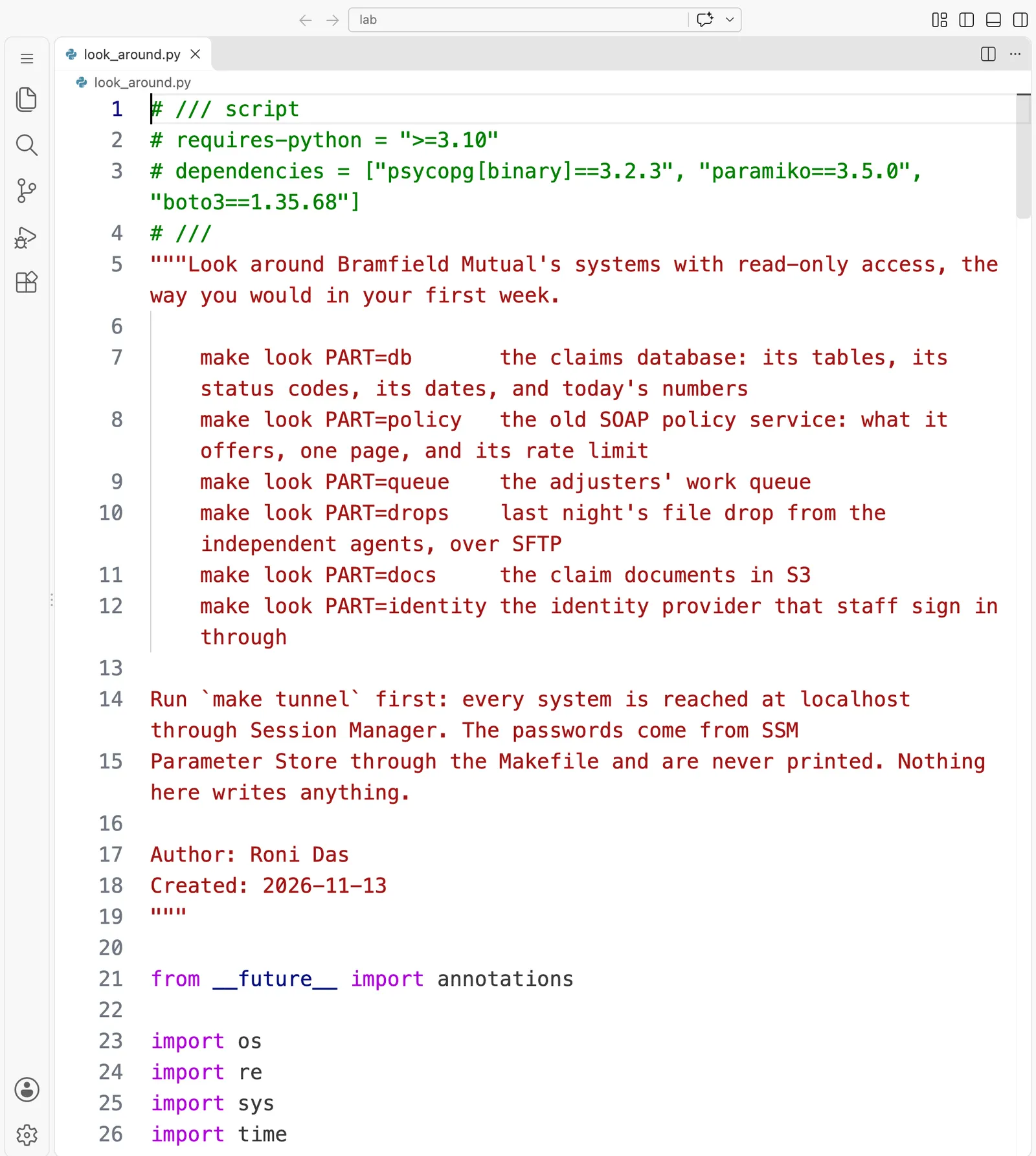
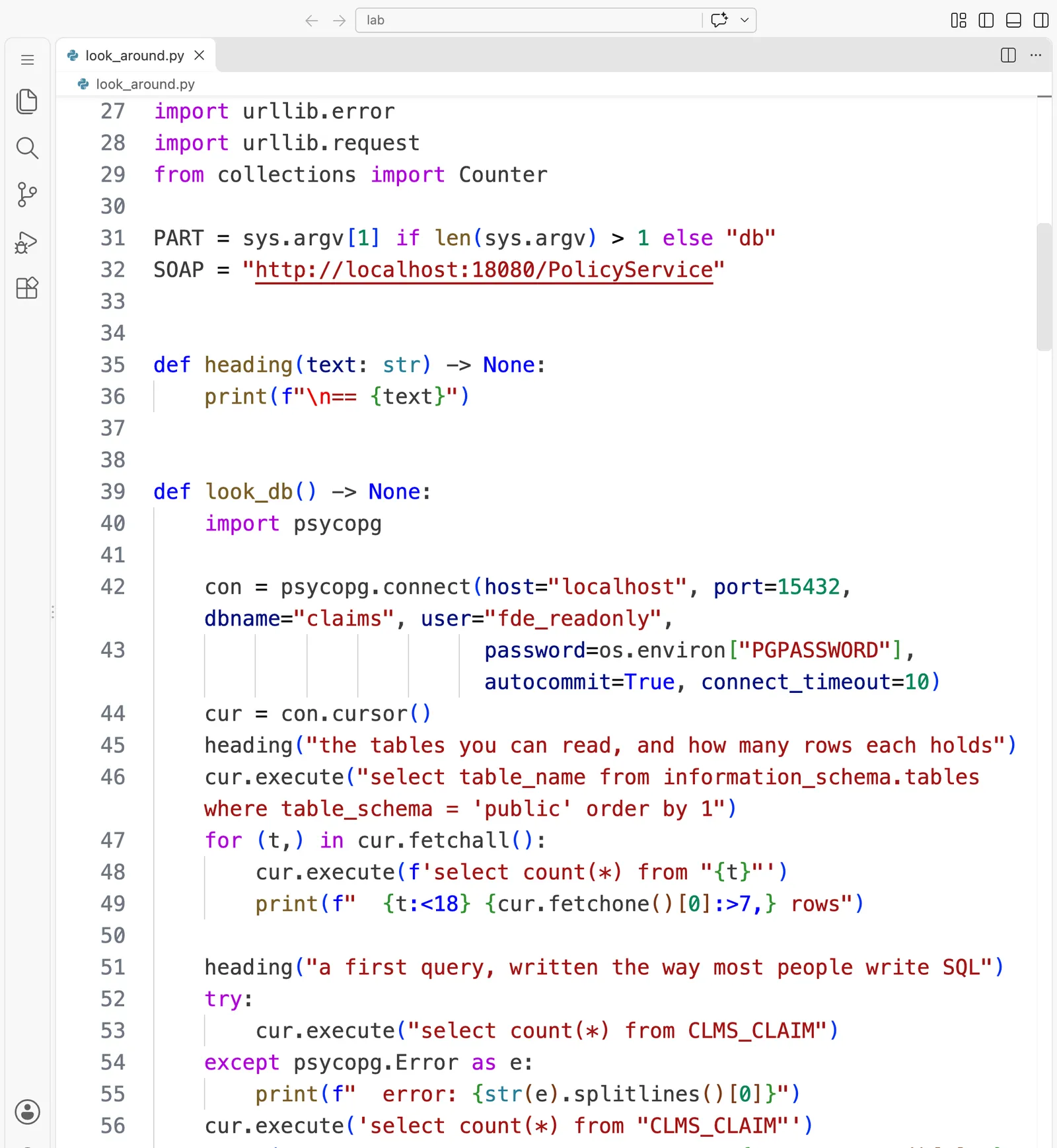
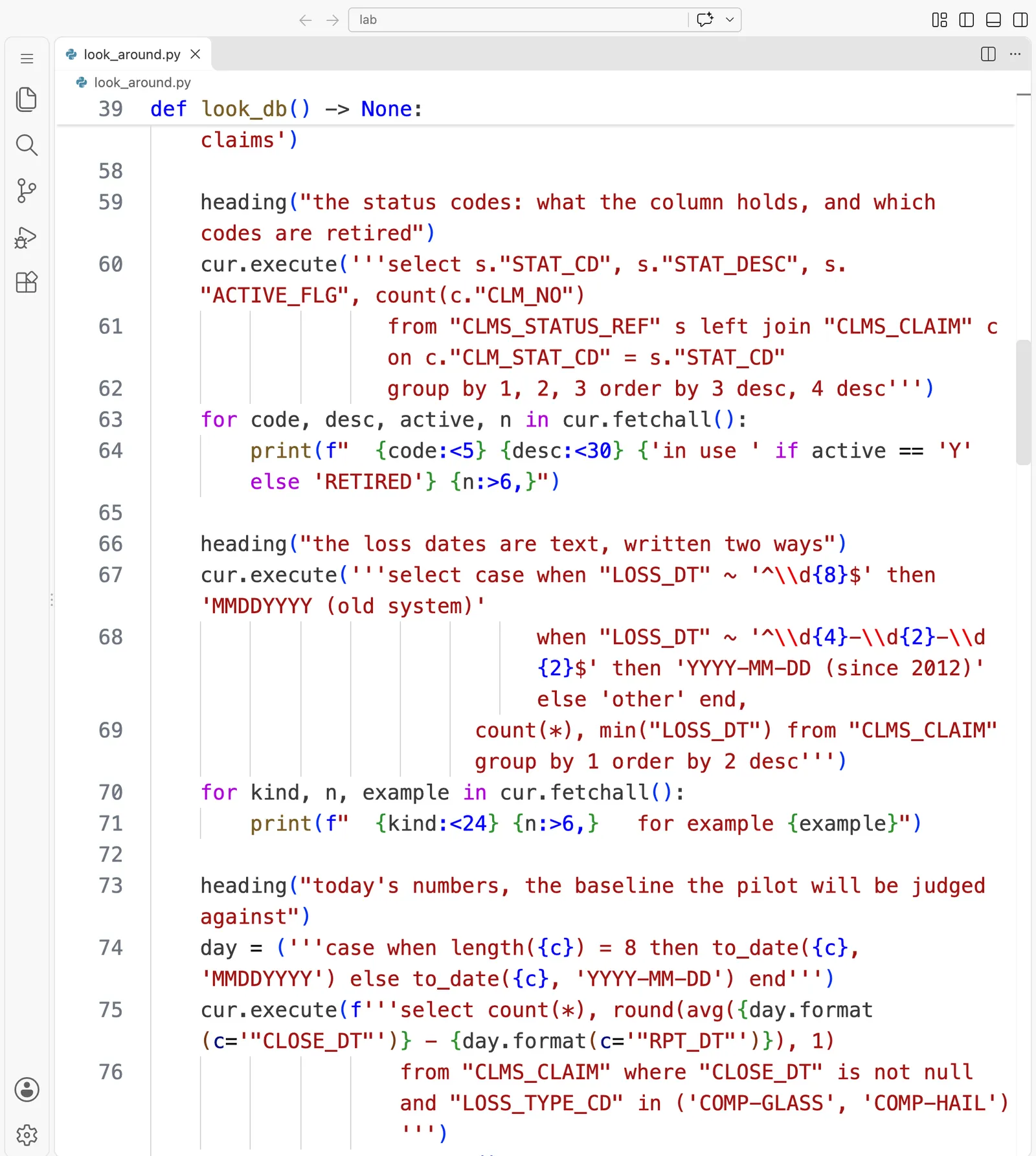
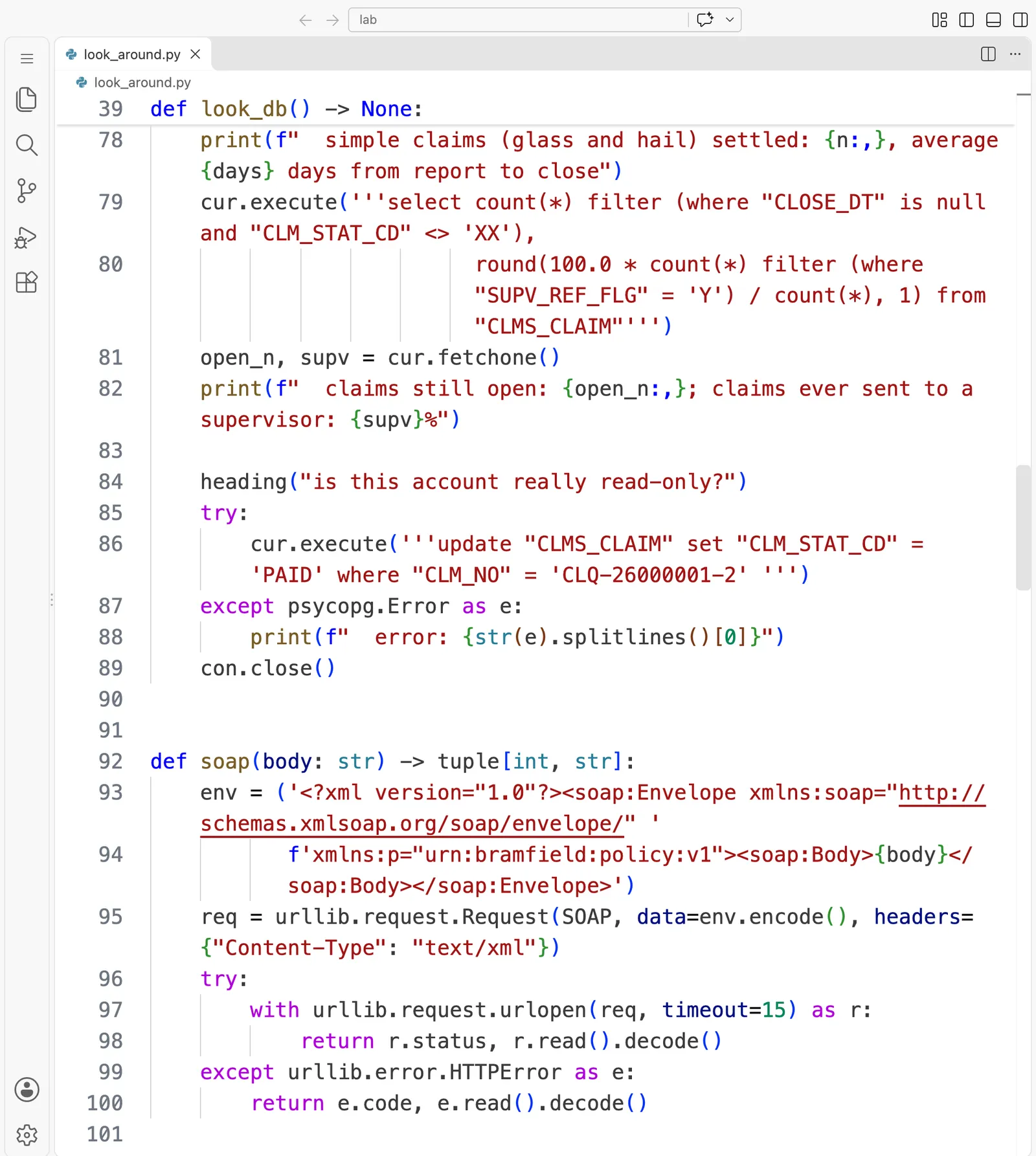
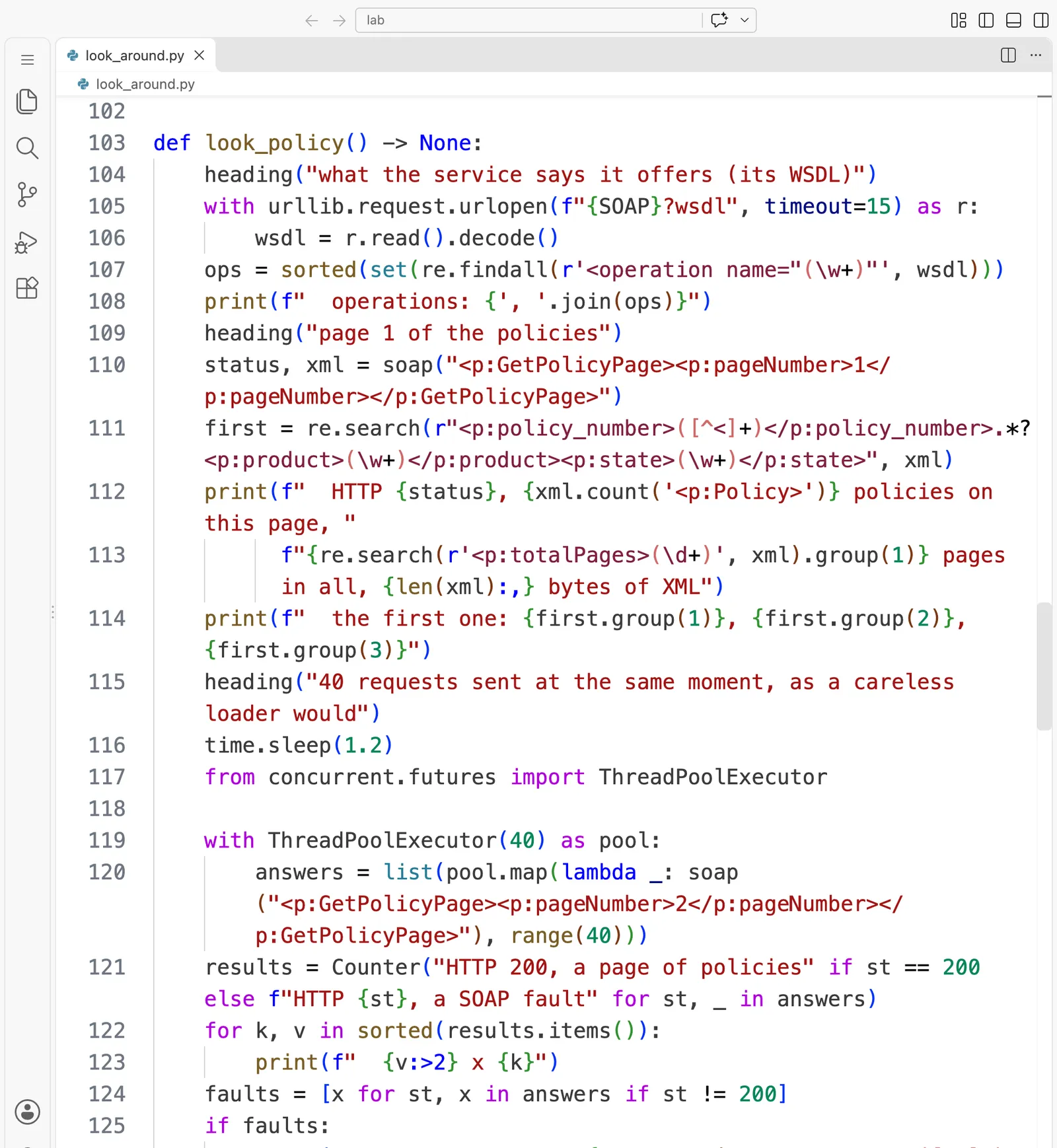
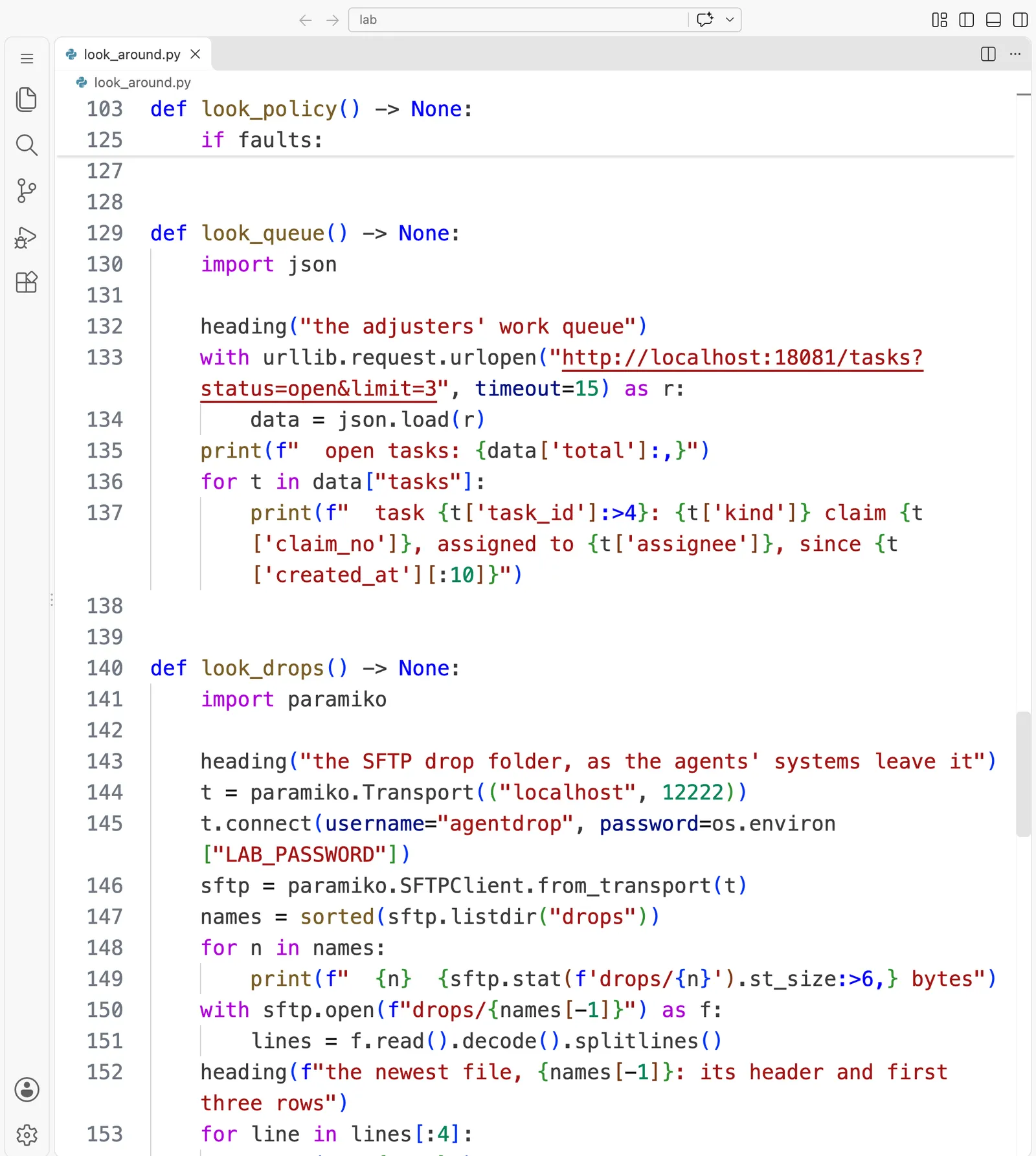
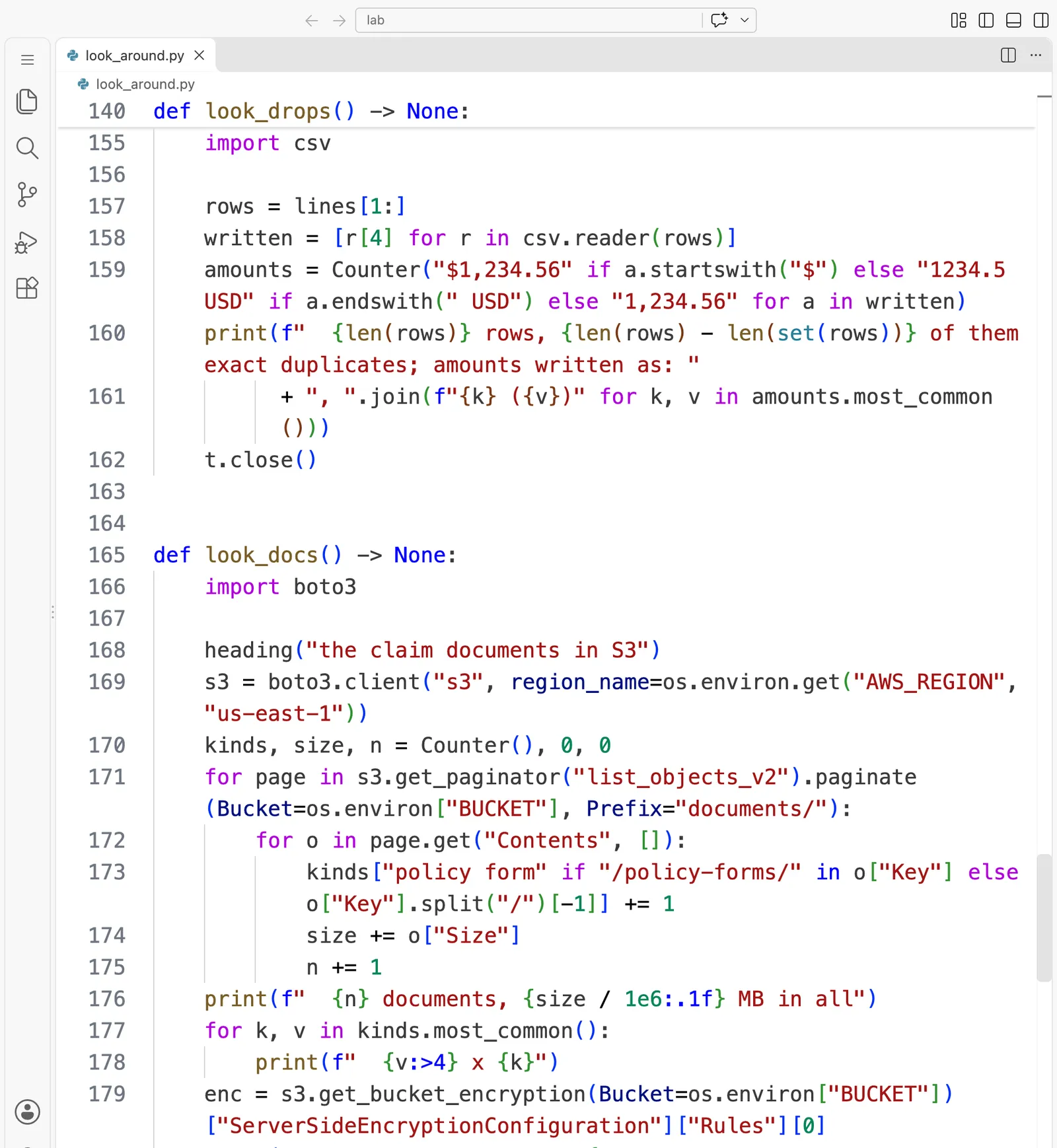
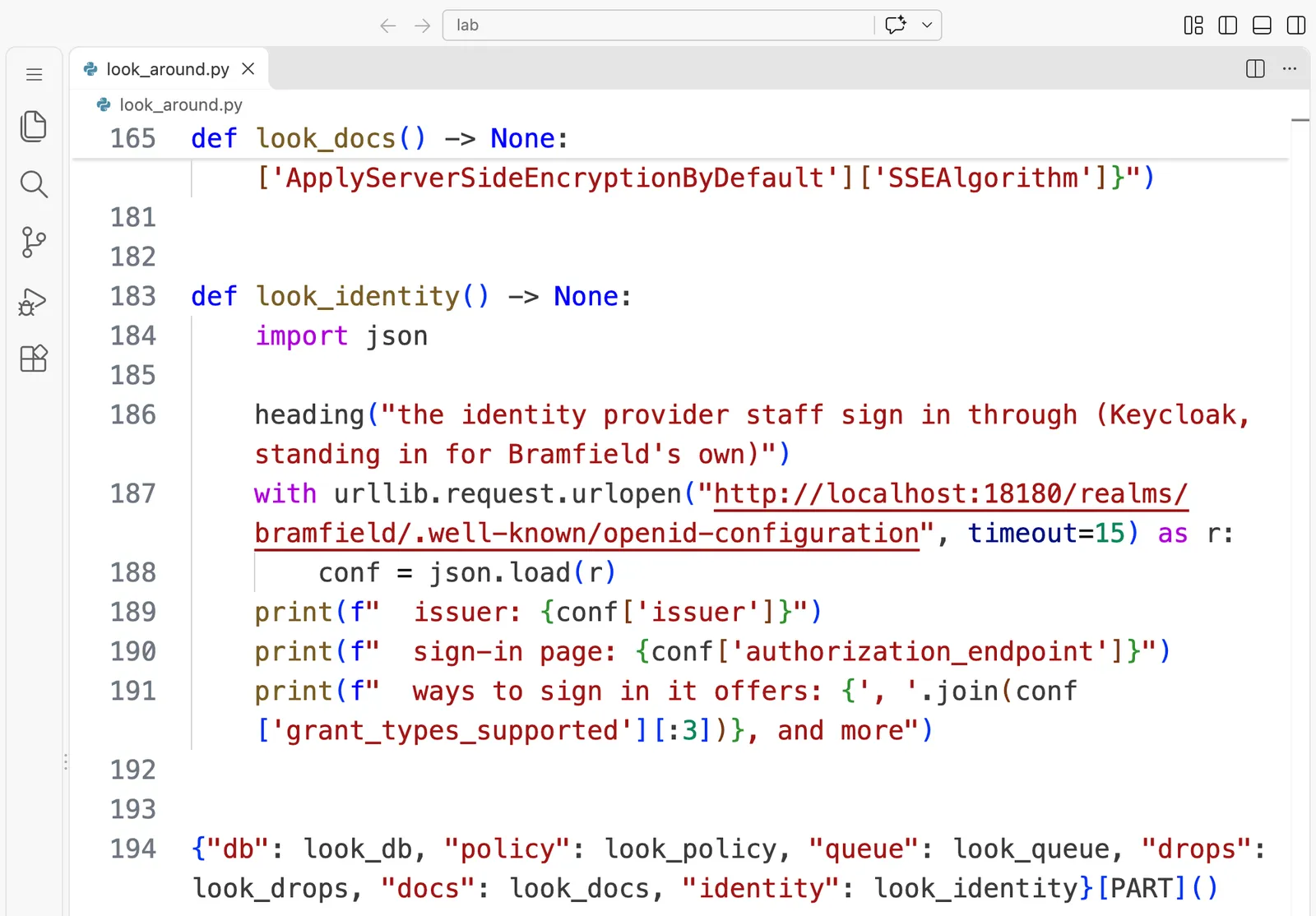
# /// script
# requires-python = ">=3.10"
# dependencies = ["psycopg[binary]==3.2.3", "paramiko==3.5.0", "boto3==1.35.68"]
# ///
"""Look around Bramfield Mutual's systems with read-only access, the way you would in your first week.

    make look PART=db       the claims database: its tables, its status codes, its dates, and today's numbers
    make look PART=policy   the old SOAP policy service: what it offers, one page, and its rate limit
    make look PART=queue    the adjusters' work queue
    make look PART=drops    last night's file drop from the independent agents, over SFTP
    make look PART=docs     the claim documents in S3
    make look PART=identity the identity provider that staff sign in through

Run `make tunnel` first: every system is reached at localhost through Session Manager. The passwords come from SSM
Parameter Store through the Makefile and are never printed. Nothing here writes anything.

Author: Roni Das
Created: 2026-11-13
"""

from __future__ import annotations

import os
import re
import sys
import time
import urllib.error
import urllib.request
from collections import Counter

PART = sys.argv[1] if len(sys.argv) > 1 else "db"
SOAP = "http://localhost:18080/PolicyService"


def heading(text: str) -> None:
    print(f"\n== {text}")


def look_db() -> None:
    import psycopg

    con = psycopg.connect(host="localhost", port=15432, dbname="claims", user="fde_readonly",
                          password=os.environ["PGPASSWORD"], autocommit=True, connect_timeout=10)
    cur = con.cursor()
    heading("the tables you can read, and how many rows each holds")
    cur.execute("select table_name from information_schema.tables where table_schema = 'public' order by 1")
    for (t,) in cur.fetchall():
        cur.execute(f'select count(*) from "{t}"')
        print(f"  {t:<18} {cur.fetchone()[0]:>7,} rows")

    heading("a first query, written the way most people write SQL")
    try:
        cur.execute("select count(*) from CLMS_CLAIM")
    except psycopg.Error as e:
        print(f"  error: {str(e).splitlines()[0]}")
    cur.execute('select count(*) from "CLMS_CLAIM"')
    print(f'  with the name in double quotes: {cur.fetchone()[0]:,} claims')

    heading("the status codes: what the column holds, and which codes are retired")
    cur.execute('''select s."STAT_CD", s."STAT_DESC", s."ACTIVE_FLG", count(c."CLM_NO")
                   from "CLMS_STATUS_REF" s left join "CLMS_CLAIM" c on c."CLM_STAT_CD" = s."STAT_CD"
                   group by 1, 2, 3 order by 3 desc, 4 desc''')
    for code, desc, active, n in cur.fetchall():
        print(f"  {code:<5} {desc:<30} {'in use ' if active == 'Y' else 'RETIRED'} {n:>6,}")

    heading("the loss dates are text, written two ways")
    cur.execute('''select case when "LOSS_DT" ~ '^\\d{8}$' then 'MMDDYYYY (old system)'
                               when "LOSS_DT" ~ '^\\d{4}-\\d{2}-\\d{2}$' then 'YYYY-MM-DD (since 2012)' else 'other' end,
                          count(*), min("LOSS_DT") from "CLMS_CLAIM" group by 1 order by 2 desc''')
    for kind, n, example in cur.fetchall():
        print(f"  {kind:<24} {n:>6,}   for example {example}")

    heading("today's numbers, the baseline the pilot will be judged against")
    day = ('''case when length({c}) = 8 then to_date({c}, 'MMDDYYYY') else to_date({c}, 'YYYY-MM-DD') end''')
    cur.execute(f'''select count(*), round(avg({day.format(c='"CLOSE_DT"')} - {day.format(c='"RPT_DT"')}), 1)
                    from "CLMS_CLAIM" where "CLOSE_DT" is not null and "LOSS_TYPE_CD" in ('COMP-GLASS', 'COMP-HAIL')''')
    n, days = cur.fetchone()
    print(f"  simple claims (glass and hail) settled: {n:,}, average {days} days from report to close")
    cur.execute('''select count(*) filter (where "CLOSE_DT" is null and "CLM_STAT_CD" <> 'XX'),
                          round(100.0 * count(*) filter (where "SUPV_REF_FLG" = 'Y') / count(*), 1) from "CLMS_CLAIM"''')
    open_n, supv = cur.fetchone()
    print(f"  claims still open: {open_n:,}; claims ever sent to a supervisor: {supv}%")

    heading("is this account really read-only?")
    try:
        cur.execute('''update "CLMS_CLAIM" set "CLM_STAT_CD" = 'PAID' where "CLM_NO" = 'CLQ-26000001-2' ''')
    except psycopg.Error as e:
        print(f"  error: {str(e).splitlines()[0]}")
    con.close()


def soap(body: str) -> tuple[int, str]:
    env = ('<?xml version="1.0"?><soap:Envelope xmlns:soap="http://schemas.xmlsoap.org/soap/envelope/" '
           f'xmlns:p="urn:bramfield:policy:v1"><soap:Body>{body}</soap:Body></soap:Envelope>')
    req = urllib.request.Request(SOAP, data=env.encode(), headers={"Content-Type": "text/xml"})
    try:
        with urllib.request.urlopen(req, timeout=15) as r:
            return r.status, r.read().decode()
    except urllib.error.HTTPError as e:
        return e.code, e.read().decode()


def look_policy() -> None:
    heading("what the service says it offers (its WSDL)")
    with urllib.request.urlopen(f"{SOAP}?wsdl", timeout=15) as r:
        wsdl = r.read().decode()
    ops = sorted(set(re.findall(r'<operation name="(\w+)"', wsdl)))
    print(f"  operations: {', '.join(ops)}")
    heading("page 1 of the policies")
    status, xml = soap("<p:GetPolicyPage><p:pageNumber>1</p:pageNumber></p:GetPolicyPage>")
    first = re.search(r"<p:policy_number>([^<]+)</p:policy_number>.*?<p:product>(\w+)</p:product><p:state>(\w+)</p:state>", xml)
    print(f"  HTTP {status}, {xml.count('<p:Policy>')} policies on this page, "
          f"{re.search(r'<p:totalPages>(\d+)', xml).group(1)} pages in all, {len(xml):,} bytes of XML")
    print(f"  the first one: {first.group(1)}, {first.group(2)}, {first.group(3)}")
    heading("40 requests sent at the same moment, as a careless loader would")
    time.sleep(1.2)
    from concurrent.futures import ThreadPoolExecutor

    with ThreadPoolExecutor(40) as pool:
        answers = list(pool.map(lambda _: soap("<p:GetPolicyPage><p:pageNumber>2</p:pageNumber></p:GetPolicyPage>"), range(40)))
    results = Counter("HTTP 200, a page of policies" if st == 200 else f"HTTP {st}, a SOAP fault" for st, _ in answers)
    for k, v in sorted(results.items()):
        print(f"  {v:>2} x {k}")
    faults = [x for st, x in answers if st != 200]
    if faults:
        print(f"  the fault says: {re.search(r'<faultstring>([^<]+)', faults[0]).group(1)}")


def look_queue() -> None:
    import json

    heading("the adjusters' work queue")
    with urllib.request.urlopen("http://localhost:18081/tasks?status=open&limit=3", timeout=15) as r:
        data = json.load(r)
    print(f"  open tasks: {data['total']:,}")
    for t in data["tasks"]:
        print(f"  task {t['task_id']:>4}: {t['kind']} claim {t['claim_no']}, assigned to {t['assignee']}, since {t['created_at'][:10]}")


def look_drops() -> None:
    import paramiko

    heading("the SFTP drop folder, as the agents' systems leave it")
    t = paramiko.Transport(("localhost", 12222))
    t.connect(username="agentdrop", password=os.environ["LAB_PASSWORD"])
    sftp = paramiko.SFTPClient.from_transport(t)
    names = sorted(sftp.listdir("drops"))
    for n in names:
        print(f"  {n}  {sftp.stat(f'drops/{n}').st_size:>6,} bytes")
    with sftp.open(f"drops/{names[-1]}") as f:
        lines = f.read().decode().splitlines()
    heading(f"the newest file, {names[-1]}: its header and first three rows")
    for line in lines[:4]:
        print(f"  {line}")
    import csv

    rows = lines[1:]
    written = [r[4] for r in csv.reader(rows)]
    amounts = Counter("$1,234.56" if a.startswith("$") else "1234.5 USD" if a.endswith(" USD") else "1,234.56" for a in written)
    print(f"  {len(rows)} rows, {len(rows) - len(set(rows))} of them exact duplicates; amounts written as: "
          + ", ".join(f"{k} ({v})" for k, v in amounts.most_common()))
    t.close()


def look_docs() -> None:
    import boto3

    heading("the claim documents in S3")
    s3 = boto3.client("s3", region_name=os.environ.get("AWS_REGION", "us-east-1"))
    kinds, size, n = Counter(), 0, 0
    for page in s3.get_paginator("list_objects_v2").paginate(Bucket=os.environ["BUCKET"], Prefix="documents/"):
        for o in page.get("Contents", []):
            kinds["policy form" if "/policy-forms/" in o["Key"] else o["Key"].split("/")[-1]] += 1
            size += o["Size"]
            n += 1
    print(f"  {n} documents, {size / 1e6:.1f} MB in all")
    for k, v in kinds.most_common():
        print(f"  {v:>4} x {k}")
    enc = s3.get_bucket_encryption(Bucket=os.environ["BUCKET"])["ServerSideEncryptionConfiguration"]["Rules"][0]
    print(f"  encryption at rest: {enc['ApplyServerSideEncryptionByDefault']['SSEAlgorithm']}")


def look_identity() -> None:
    import json

    heading("the identity provider staff sign in through (Keycloak, standing in for Bramfield's own)")
    with urllib.request.urlopen("http://localhost:18180/realms/bramfield/.well-known/openid-configuration", timeout=15) as r:
        conf = json.load(r)
    print(f"  issuer: {conf['issuer']}")
    print(f"  sign-in page: {conf['authorization_endpoint']}")
    print(f"  ways to sign in it offers: {', '.join(conf['grant_types_supported'][:3])}, and more")


{"db": look_db, "policy": look_policy, "queue": look_queue, "drops": look_drops, "docs": look_docs, "identity": look_identity}[PART]()
cost.py
# /// script
# requires-python = ">=3.10"
# dependencies = ["boto3==1.35.68"]
# ///
"""What the running Bramfield lab costs per hour in us-east-1, read from the AWS Price List API today, not typed in.

    make cost            (it passes the server's instance type)

Counts the three things that cost money while the lab runs: the server, its 20 GB gp3 disk, and its public IPv4
address. The S3 documents (under 10 MB) and the SSM parameters (standard tier) cost a fraction of a cent a month.

Author: Roni Das
Created: 2026-11-13
"""

from __future__ import annotations

import json
import sys

import boto3

TYPE = sys.argv[1] if len(sys.argv) > 1 else "t2.small"
DISK_GB = 20
pricing = boto3.client("pricing", region_name="us-east-1")


def price(service: str, **filters: str) -> float:
    f = [{"Type": "TERM_MATCH", "Field": k, "Value": v} for k, v in filters.items()]
    item = json.loads(pricing.get_products(ServiceCode=service, Filters=f, MaxResults=1)["PriceList"][0])
    term = next(iter(item["terms"]["OnDemand"].values()))
    return float(next(iter(term["priceDimensions"].values()))["pricePerUnit"]["USD"])


server = price("AmazonEC2", instanceType=TYPE, regionCode="us-east-1", operatingSystem="Linux", tenancy="Shared",
               preInstalledSw="NA", capacitystatus="Used")
disk_month = price("AmazonEC2", regionCode="us-east-1", volumeApiName="gp3", productFamily="Storage")
ip = price("AmazonVPC", regionCode="us-east-1", group="VPCPublicIPv4Address", groupDescription="Hourly charge for In-use Public IPv4 Addresses")
disk = disk_month * DISK_GB / 730
rows = [(f"the server, {TYPE}", server), (f"its disk, {DISK_GB} GB of gp3 (${disk_month:.3f} a GB-month)", disk),
        ("its public IPv4 address", ip)]
print("what the lab costs per hour while it runs, us-east-1, from the AWS Price List:")
for name, usd in rows:
    print(f"  {name:<44} ${usd:.4f}")
total = sum(u for _, u in rows)
print(f"  {'in all':<44} ${total:.4f} an hour, about ${total * 24:.2f} a day")
print(f"stopped, you pay only for the disk: about ${disk * 24:.2f} a day")
The longer files, in the zip
Three files are too long to read well in this lesson, so they are only in the zip, in the
lab
folder:
app/policy-service/server.py
(140 lines, the SOAP service with its WSDL and its token bucket),
app/work-queue/server.py
(79 lines, the JSON work queue whose
POST /tasks
is not idempotent, which means the same request sent twice makes two tasks) and
app/generator/gen.py
(the generator: the policies, the claims, the notes with their personal data, the planted mess, the answer key, the drops and the documents). Read
impossible_ssn()
和
impossible_vin()
中的
gen.py
first.
Sources
- Our own builds of 13 November 2026, in our own AWS account in us-east-1, with the lab folder in this zip. The test build started at 07:44:57 UTC and was deleted; it found the four problems in "Going deeper". The answer-key counts quoted there come from the corrected generator, re-run on the same seed, whose data is byte for byte the data of the recorded run. The recorded build started at about 07:57:30 UTC; every output in this lesson is filled from the
script
recordings of our VS Code terminal,runs/session-2026-11-13-a.log
(frommake up
tomake stop
) andruns/session-2026-11-13-b.log
(fromaws ec2 describe-instances
tomake destroy
), with the prompt set to show only the folder name. Times are from those recordings, their screenshots and, for the restart, the launch time EC2 reported (08:10:56); a time marked "about" is inferred from file times. Terraform 1.9.8 ran the build. - Bramfield Mutual: a fictional company. The name was checked on 13 November 2026 against a web search, SEC EDGAR's company search ("No matching companies") and the domain register, as the course plan records. Every business figure in the brief is invented.
- Social Security Administration, "Social Security Number Randomization: Frequently Asked Questions", https://www.ssa.gov/employer/randomizationfaqs.html, read and saved on 13 November 2026: the answer on group number 00 and serial number 0000, and the excluded area numbers 000, 666 and 900 to 999.
- AWS Price List API, read by
make cost
on 13 November 2026 for us-east-1:t2.small
Linux on-demand $0.0230 an hour, gp3 storage $0.080 per GB-month, an in-use public IPv4 address $0.0050 an hour. NAT gateway $0.045 an hour, read from the same API on the same day for the course plan. - AWS Systems Manager Session Manager, starting a session and port forwarding: https://docs.aws.amazon.com/systems-manager/latest/userguide/session-manager-working-with-sessions-start.html. Instance metadata, IMDSv2: https://docs.aws.amazon.com/AWSEC2/latest/UserGuide/configuring-instance-metadata-service.html. Burstable instances and standard credit mode: https://docs.aws.amazon.com/AWSEC2/latest/UserGuide/burstable-performance-instances-standard-mode.html.
- PostgreSQL 16 documentation, "Identifiers and Key Words", on folding unquoted names to lower case: https://www.postgresql.org/docs/16/sql-syntax-lexical.html.
default_transaction_read_only
: https://www.postgresql.org/docs/16/runtime-config-client.html. - Keycloak 26 server guides, importing a realm and the health endpoints: https://www.keycloak.org/server/importExport and https://www.keycloak.org/server/health. OpenID Connect discovery: https://openid.net/specs/openid-connect-discovery-1_0.html.
- Terraform AWS provider,
aws_s3_bucket
withforce_destroy
: https://registry.terraform.io/providers/hashicorp/aws/latest/docs/resources/s3_bucket.