This is for information systems departments and DX promotion staff who have rolled out Microsoft 365 Copilot company-wide but are stuck, unable to expand usage beyond creating meeting minutes. The next step is to train employees who know the business into "in-house FDEs" who can build agents for their own departments using Copilot. The process is: first confirm the scope of licenses and sharing, then pair business department employees with information systems department employees for training, and finally get approval through internal review based on work-time measurements taken in the first department.
This article covers the procedures and personnel selection for rolling this out company-wide across industries, and what to include in the internal approval request for in-house FDE training. It is based on our support case studies and aggregated data from implementation consultations. AIworker Inc. provides training and hands-on support to develop employees who know the business into people who can build AI systems using the AI tools your company already uses, such as Copilot.
What does it mean to develop in-house FDEs with Copilot?
At our company, we call employees who look at their own department's work, find areas that AI can improve, build systems, and refine them while colleagues use them "in-house FDEs." FDE stands for Forward Deployed Engineer, a term originally referring to engineers who go into customers' sites and solve problems with technology (see the article What is an FDE for details). Being able to write code is not a requirement.
When developing them with Copilot, employees mainly build agents. An agent is an AI that has instructions and reference materials set up in advance so that it can be entrusted with specific tasks. Instead of crafting how you ask Copilot every time, the idea is that the person in charge of a task builds an agent that answers based on their own department's regulations and procedures.
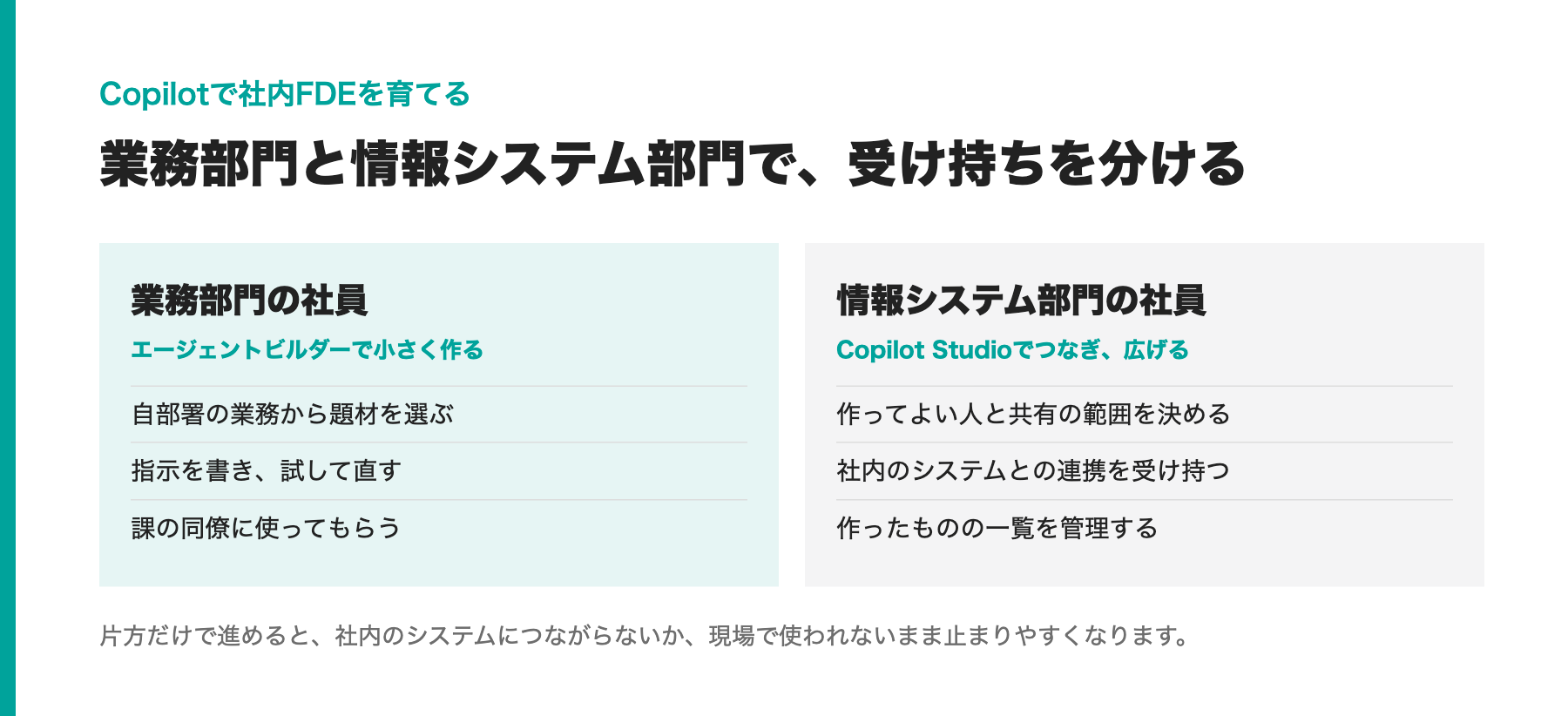
Microsoft's official documentation explains that the Agent Builder feature lets you create agents that reference materials on SharePoint, and that you can test them before use or sharing. Processes that operate external services cannot be built with Agent Builder; in that case, you copy the agent into Copilot Studio and build it out there (Agent Builder overview, as of November 2026). Therefore, we recommend a division of labor where business department employees build small agents with Agent Builder, and information systems department employees take over with Copilot Studio when connecting to systems.
Why doesn't work change even after rolling out Copilot company-wide?
There is still a big gap between distributing a tool and having it actually used in daily work. In our aggregation of new AI implementation consultations, the share of consultations mentioning Copilot as an AI in use or under consideration rose from 13% in 2025 to 35% in 2026. On the other hand, consultations at the stage of "rolled out company-wide but adoption isn't progressing" also increased from 9% in 2025 to 19% in 2026 (the aggregation methodology is described in the article Aggregating AI implementation consultations).
The same thing was happening at a government-affiliated IT company (about 400 employees) where we provided hands-on support. The initial internal survey showed high numbers: 73% usage rate, 86% intent to use, and 92.5% rule compliance. Even so, the paid Copilot was only being used for things like meeting minutes.
What this example shows is that even with high usage rates and rules in place, the work procedures themselves may not change. The people who know their department's rules and exceptions best are the ones handling that work. That is exactly why the next stage is enabling those people to build their own department's systems with Copilot.
In what order should you develop in-house FDEs with Copilot?
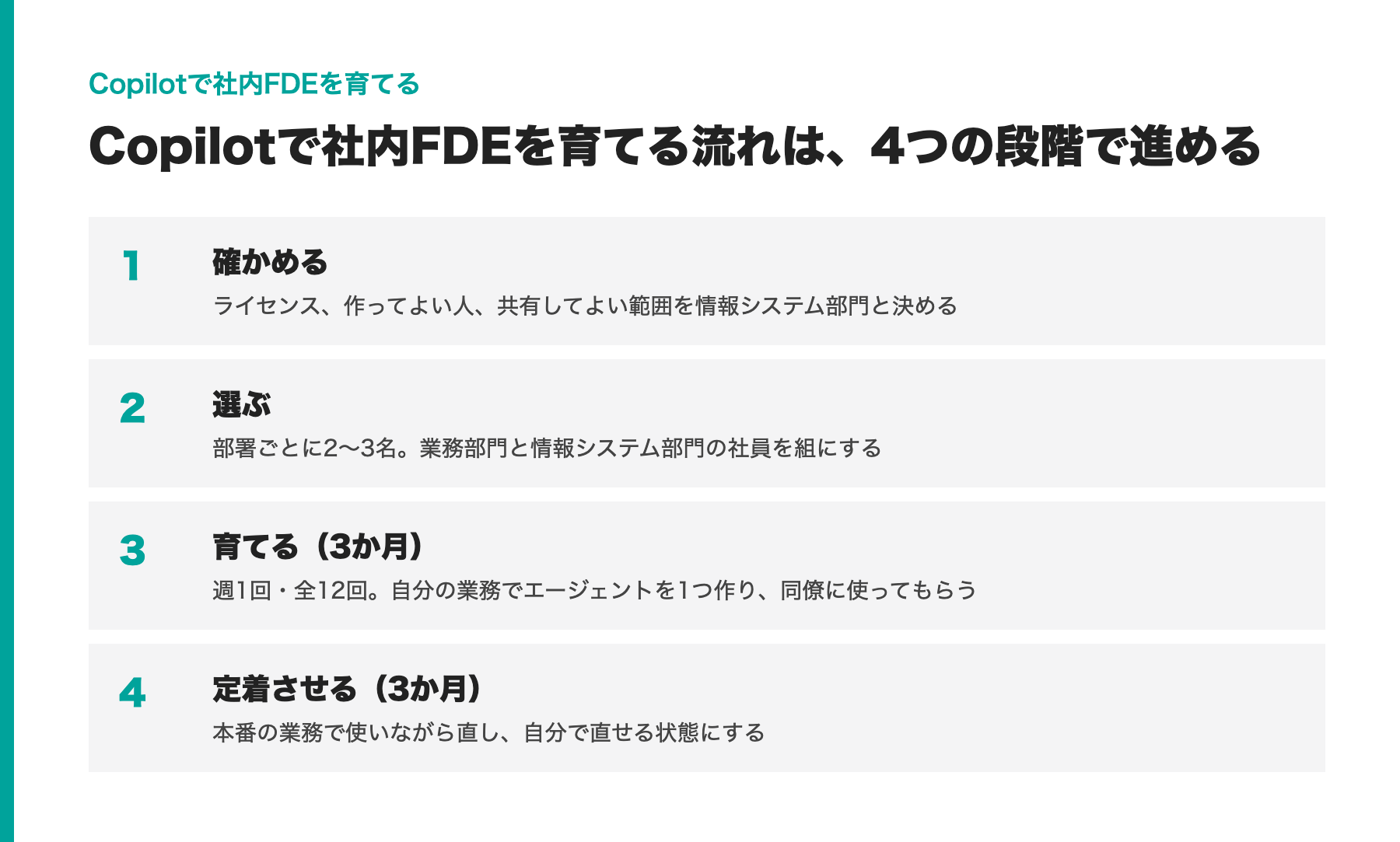
Our standard approach consists of the following four stages.
- Verify: Confirm with the information systems department in advance the trainees' licenses, who is allowed to create agents, and the scope of what can be shared.
- Select: Choose 2-3 people per department and pair business department employees with information systems department employees.
- Train: Over 12 weekly training sessions, each trainee builds one agent based on their own work and has colleagues use it.
- Embed: Over the following three months, they refine it while using it in real work, until the creator can make fixes themselves.
Do not target everyone in the company from the start. Measure work time in one or two departments, produce before-and-after comparison figures, and then expand to the next department. Having these initial figures also makes it easier to write the approval request for company-wide rollout.
In our in-house FDE training, we cap each class at 20 people. That is the upper limit at which the instructor can review each person's deliverables. Since the training uses the AI tools your company already uses, companies that have Copilot generally do not need to contract for new tools.
Who should you select, and how should you pair them?
When selecting trainees, we look at the following five points.
- They can explain the exceptions in their work and why the procedures are the way they are
- They can state their pain points in terms of time, e.g., "this aggregation takes several hours every week"
- They don't mind testing and iterating
- Their manager has committed in advance to allowing 20% of work time for lectures and assignments
- There are colleagues in the same section who will try out what they build
When developing with Copilot, the key is pairing business department employees with information systems department employees. If you proceed with business department employees alone, the agents they build may fail to connect to internal systems. Conversely, if the information systems department builds everything, it may connect to systems but go unused in the field.
It is also important not to fill the group only with volunteers. Selecting based on both manager recommendations and the individuals' own preferences keeps the work aligned with the department's priority issues. Our thinking on personnel selection and the overall training stages is also summarized in the article How to develop in-house FDEs.
What makes a good first agent to build?
The first project should be work that answers internal inquiries based on regulations and procedure documents. That is because it recurs every week, the supporting materials are in place, and any mistakes can be caught internally. Candidates include general affairs regulations, accounting expense rules, and routine questions directed to the information systems department.
At a major payment services company we accompanied, employees from non-IT departments who had barely used Power Platform (Microsoft's tool for building business apps) built systems for their own departments. Our consultants ran two cohorts of accompaniment—six one-hour weekly sessions each—on the principle that the accompanying side produces no deliverables; the employees themselves build everything. The first session was spent not building anything, but on taking inventory of the work, first separating which steps to delegate to AI and which steps should keep human judgment.
As a result, we worked with 11 departments in total (6 in the first cohort, 5 in the second), and every department completed a working deliverable within the support period. What they built includes a Copilot Studio agent that answers inquiries and an automatic reminder for unfinished tasks (case study article). This is an example showing that even in environments with strict license limits and security rules, business department employees can progress to building things themselves once the setup is translated into a buildable configuration.
What should you check with the IT department first?
Whether you can build agents with Copilot depends on licenses and company settings. According to Microsoft's official documentation, using an agent that answers based on SharePoint documents requires a Microsoft 365 Copilot license or a pay-as-you-go billing setup (Copilot credits). Users without a Copilot license and without that billing setup cannot create agents (agent capabilities and licensing model, as of November 2026).
Also check the scope of sharing. Agents built with the agent builder are usable only by the creator immediately after creation. When sharing, you choose per recipient whether they can "chat" or "edit." In addition, administrators can restrict sharing to the whole organization to specific people, or block it entirely (sharing and managing agents, as of November 2026).
For this reason, before starting training, decide the following three points with the IT department.
- Who is allowed to build agents (including the license status of all trainees)
- The scope of permitted sharing, and where source materials may be placed
- The procedure for expanding across departments, and management of a list of what has been built
In our training, the IT department joins from the pre-start meeting as a rule. The scope of information that may be entered into AI, who develops and who approves, and how changes are recorded are also decided together at that meeting.
How do you get internal FDE training approved through the internal approval process?
Reasons for stalling in internal approvals mostly come down to two things: lack of internal understanding and lack of a cost rationale. In our tally of implementation consultations, 30% cited "unable to gain internal understanding, procedures not progressing" and 29% cited "no budget, cannot build a cost rationale" as reasons implementation was stalled (one company may cite multiple reasons).
For companies that already have Copilot, writing the purpose of the approval request as "converting the Copilot licenses we are already paying for into mechanisms that reduce work hours" makes it easier to explain the connection to company strategy. On that basis, the approval request should include the following five items.
- Purpose: the Copilot rollout policy and how this training connects to it
- Target work and current work hours: who spends how many hours per week on which tasks
- Scope: initially 2–3 people in one department, plus the paired IT department contact
- What will be reported after 3 months: work hours before and after implementation, and input for deciding whether to expand
- Cost and duration: fees and months for training and retention accompaniment, and trainees' work hours
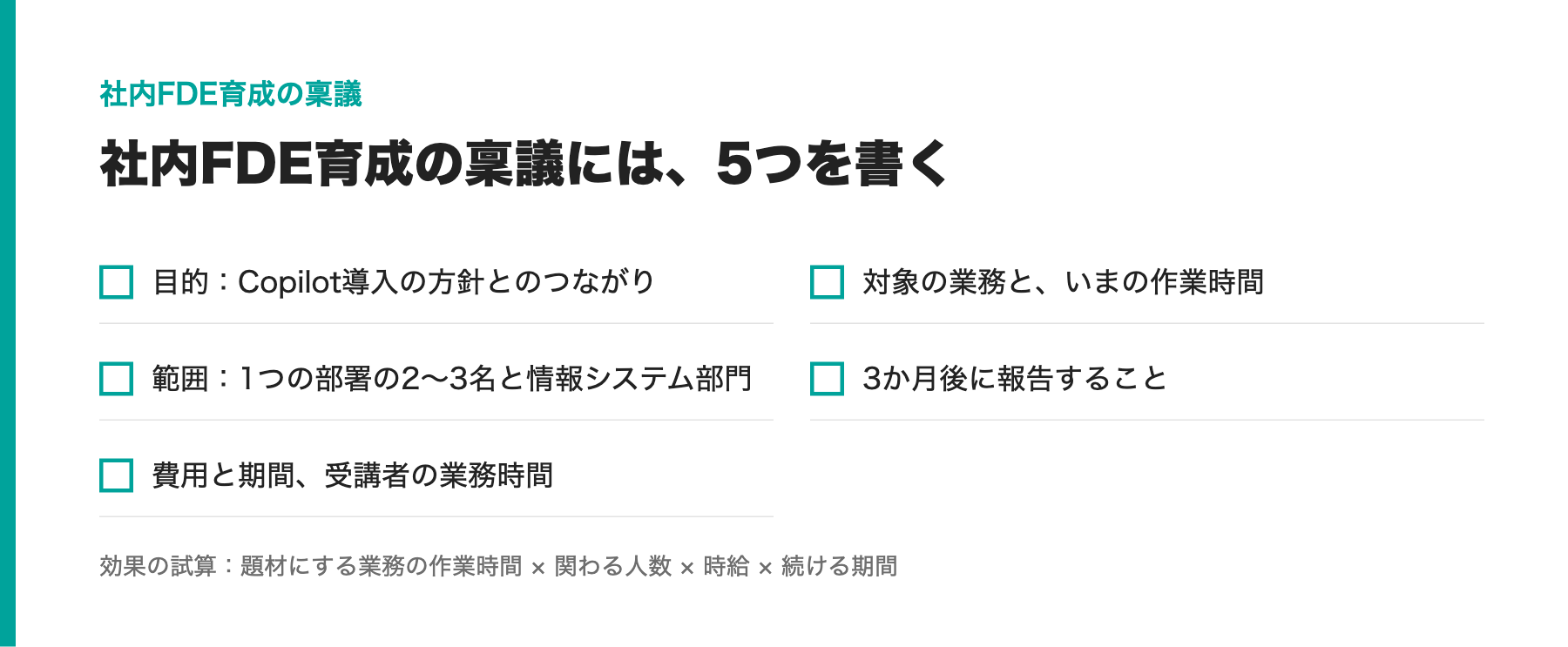
Estimate the effect in advance as "work hours of the target task × number of people involved × hourly rate × duration," and compare it against the cost. Because work hours before and after implementation are actually measured during the training, the estimate and the results can be verified with the same yardstick.
During the approval process, you will surely face different questions depending on the stakeholder's role. Here are examples of how to answer.
| Who asks | What they tend to ask | Example answer |
|---|---|---|
| Manager | Won't this take time away from frontline work? | We will use 20% of work hours for 3 months, but we start with just 2–3 people in one department |
| Executives | Can't we just stay with Copilot as is? | By loading each department's own documents and procedures, the same answers can be given even when the person in charge changes |
| IT department | Won't things built without oversight multiply? | We first decide together the scope of what may be built, and register the builders and the materials used in a list |
| Legal and audit | Who guarantees the correctness of the answers? | Answers include the names of source documents, and items requiring judgment are verified by the person in charge |
How do you expand from the first department to the whole company?
In the first department's presentation, show work hours before and after implementation and the number of people using it. Use those figures as the basis for choosing the next department, and repeat the same process—that is the basic approach.
At the expansion stage, you will want internal rules in place as well. Register built agents in a list with their name, builder, using department, and referenced materials, and when someone transfers, hand over the manual together with the agent to their successor. Once internal FDEs exceed 10, appoint one mentor and assign them rule-compliance checks and consultations. Evaluate based on reduced work hours. If you evaluate by the number of things built, unused artifacts will multiply.
For agents used company-wide across departments, there is a method of registering them in the organization's catalog. Microsoft's official documentation describes a flow where, after an administrator reviews and approves the content, the agent appears in the internal agent store (sharing and managing agents, as of November 2026). It is reassuring to decide this approval procedure with the IT department in advance.
How much should you budget?
Our internal FDE training fees, for 3 trainees, are as follows (as of November 2026, excluding tax).
| Plan | Total for 3 people | Post-training retention accompaniment (monthly) |
|---|---|---|
| Minimum | 1.95 million yen | 250,000 yen |
| Standard | 2.55 million yen | 450,000 yen |
| Intensive | 3.6 million yen | 800,000 yen |
The total combines the 3-month training program and the subsequent 3 months of retention accompaniment. Because the amount varies with the number of trainees and the duration, we provide the figures for your approval request after learning the headcount and target work.
Frequently asked questions
Q. Can employees who do not have a Copilot license also take the training?
A. You can take the course, but if there is no pay-as-you-go billing setup for Copilot licenses either, you cannot create agents. Therefore, before starting the training, we confirm the license status of all participants with the IT department. We can also restructure the content of the creation sessions to fit the scope of the licenses.
Q. Can employees without programming experience become in-house FDEs?
A. Yes. We do not require the ability to write programs. In the case of the major payment services company, most participants were non-IT department employees who had never used tools for building business applications before.
Q. Is it acceptable to start with business departments only and have the IT department join later?
A. We do not recommend it. This is because things tend to stall at the stage of sharing the created agents or connecting them to internal systems. If they participate from the initial meeting, you can decide in advance the scope of what may be built and the approval procedures.
Q. How should I create the effect figures to write in the approval request?
A. First, make a preliminary estimate by multiplying the work time of the target task, the number of people involved, the hourly wage, and the duration. Then measure the actual work time in the first month of training, measure again in the third month, and report the estimate and results using the same yardstick.
Organize the first step toward training in-house FDEs with Copilot in 30 minutes
For details on the training process and curriculum, please see the In-house FDE Training page.
AIworker Inc. offers a free 30-minute consultation. We will listen to your current workflow and where time is being spent, and provide you with an organized view of where to start. We also welcome consultations on Copilot license status and how to create figures for approval requests.